PowerFlex Manager - 기능 update_clc_node_agent에서 SO 노드 업데이트 실패
Summary: PFxM이 'update_clc_node_agent' 기능 중에 SO(Storage Only) 노드를 업그레이드하지 못하여 SDS를 PMM에 넣으려고 할 때 업그레이드 작업이 중단됩니다.
This article applies to
This article does not apply to
This article is not tied to any specific product.
Not all product versions are identified in this article.
Symptoms
시나리오
- 환경: HA(High-Available) CloudLink Center 어플라이언스
- 문제: SO 리소스 그룹은 두 개의 예상 CLC VM 중 하나만 나열합니다.
- 증상: 노드가 PMM에 없기 때문에 SO 노드 업그레이드가 실패합니다.
이 시나리오는 업그레이드 실패의 트리거 지점을 나타냅니다. 다음은 정상 스택이 실행 시 어떻게 나타나야 하는지에 대한 예입니다. update_clc_node_agent 기능:
정상 스택 예:
로그 위치: job-afe400aa-d7fe-4897-9a04-fe08b924c4ae-0-1/deployment.logs
DEBUG [2024-12-16T11:20:36.199529] 13742: service_deployment.rb:5348:in `process_firmware_update': Processing firmware update after selecting resources
DEBUG [2024-12-16T11:20:36.200310] 13742: service_deployment.rb:5353:in `block in process_firmware_update': Processing firmware update on rackserver-xxxxxxx
INFO  [2024-12-16T11:20:36.201536] 13742: service_deployment.rb:5363:in `block in process_firmware_update': Updating CLC Agent update on vmcl01-esxi08.dell.lab
DEBUG [2024-12-16T11:20:36.201933] 13742: service_deployment.rb:5365:in `block in process_firmware_update': Updating CLC Agent version on node svm-vmcl01-esxi08
DEBUG [2024-12-16T11:20:36.202379] 13742: type/base.rb:412:in `delegate': service_deployment.rb:5366:in `block in process_firmware_update' calling delegated method update_clc_node_agent on #
DEBUG [2024-12-16T11:20:36.204979] 13742: type/base.rb:412:in `delegate': cloudlinkcenter.rb:205:in `clc_agent_info' calling delegated method os_connect_ip on #
DEBUG [2024-12-16T11:20:38.054169] 13742: type/base.rb:412:in `delegate': cloudlinkcenter.rb:742:in `update_clc_node_agent' calling delegated method os_connect_ip on #
DEBUG [2024-12-16T11:20:38.760221] 13742: provider/cloudlink/cloudlinkcenter.rb:747:in `update_clc_node_agent': clc-10.10.30.20: CLC Server and agent are running on same version 7.1 (build 140)
INFO  [2024-12-16T11:20:38.760840] 13742: service_deployment.rb:5367:in `block in process_firmware_update': Competed CLC agent update on vmcl01-esxi08.dell.lab
반면, 비정상 스택에는 다음 오류가 표시됩니다.NoMethodError: undefined method '[]' for nil:NilClass
로그 위치: job-afe400aa-d7fe-4897-9a04-fe08b924c4ae-0-1/deployment.logs
DEBUG [2024-12-19T13:35:48.462150] 19552: service_deployment.rb:5348:in `process_firmware_update': Processing firmware update after selecting resources
DEBUG [2024-12-19T13:35:48.462349] 19552: service_deployment.rb:5353:in `block in process_firmware_update': Processing firmware update on rackserver-xxxxxxx
INFO  [2024-12-19T13:35:48.463044] 19552: service_deployment.rb:5363:in `block in process_firmware_update': Updating CLC Agent update on PFSON04
DEBUG [2024-12-19T13:35:48.463276] 19552: service_deployment.rb:5365:in `block in process_firmware_update': Updating CLC Agent version on node PFSON04
DEBUG [2024-12-19T13:35:48.463622] 19552: type/base.rb:412:in `delegate': service_deployment.rb:5366:in `block in process_firmware_update' calling delegated method update_clc_node_agent on #
DEBUG [2024-12-19T13:35:48.466045] 19552: type/base.rb:412:in `delegate': cloudlinkcenter.rb:205:in `clc_agent_info' calling delegated method os_connect_ip on #
DEBUG [2024-12-19T13:35:51.089302] 19552: type/base.rb:412:in `delegate': cloudlinkcenter.rb:742:in `update_clc_node_agent' calling delegated method os_connect_ip on #
ERROR [2024-12-19T13:35:51.093230] 19552: service_deployment.rb:5535:in `process_firmware_update': Encountered an error during firmware update: NoMethodError: undefined method `[]' for nil:NilClass
또한 업그레이드 작업 로그는 작업이 실패하는 정확한 순간을 캡처합니다.
로그 위치: job-afe400aa-d7fe-4897-9a04-fe08b924c4ae-0-1/deployment.logs
DEBUG [2024-12-19T13:37:23.210005] 19552: service_deployment.rb:6485:in `finalize_firmware_update': Update complete: false, in protected maintenance mode false
ERROR [2024-12-19T13:37:23.210184] 19552: service_deployment.rb:6491:in `finalize_firmware_update': Failed to update the server!
INFO  [2024-12-19T13:37:23.210321] 19552: service_deployment.rb:6496:in `finalize_firmware_update': Firmware update status: Error
ERROR [2024-12-19T13:37:23.216294] 19552: service_deployment.rb:622:in `process': Firmware update failed for Job-afe400aa-d7fe-4897-9a04-fe08b924c4ae-0-2
ERROR [2024-12-19T13:37:23.216535] 19552: service_deployment.rb:623:in `process': ["/opt/asm-deployer/lib/asm/service_deployment.rb:6500:in `finalize_firmware_update'", "/opt/asm-deployer/lib/asm/service_deployment.rb:5549:in `process_firmware_update'", "/opt/asm-deployer/lib/asm/service_deployment.rb:479:in `process'", "/opt/asm-deployer/lib/asm.rb:228:in `block in process_deployment'"]
INFO  [2024-12-19T13:37:23.216961] 19552: service_deployment.rb:625:in `process': Status: Error
영향
SO 노드를 업그레이드할 수 없습니다.
Cause
로그는 PowerFlex Manager가 두 CLC 어플라이언스 간에 올바른 '기본'을 식별하지 못하여 update_clc_node_agent 작업을 진행할 수 없음을 나타냅니다. 오류 줄의 deployment.logs에 표시됩니다.
ERROR [2024-12-19T13:35:51.093230] 19552: service_deployment.rb:5535:in `process_firmware_update': Encountered an error during firmware update: NoMethodError: undefined method `[]' for nil:NilClass
Resolution
-
서비스 세부 정보 업데이트 작업 시도
-
영향을 받는 서비스에 대한 Update Service Details 작업을 시작합니다.
-
-
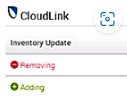
마법사에서 인벤토리 요약 확인
- 프로세스 중에 마법사는 CLC 어플라이언스 중 하나가 제거되고 다른 어플라이언스가 추가되고 있음을 나타내는 인벤토리 요약을 표시해야 합니다.
- 이렇게 하면 현재 CLC가 기본 CLC가 아니며 추가되는 어플라이언스가 올바른 기본 어플라이언스임을 확인할 수 있습니다
-
Update Service Details 프로세스 완료
- 마법사의 안내에 따라 Update Service Details 작업을 완료합니다.
-
업그레이드 진행
- 업그레이드를 다시 시도합니다. 이제 문제없이 진행됩니다.
영향을 받는 버전
PowerFlex Manager 3.x
Affected Products
PowerFlex appliance connectivityProducts
PowerFlex rack, VxFlex Ready Nodes, PowerFlex custom node, PowerFlex appliance R650, PowerFlex appliance R6525, PowerFlex appliance R660, PowerFlex appliance R6625, Powerflex appliance R750, PowerFlex appliance R760, PowerFlex appliance R7625
, PowerFlex appliance R640, PowerFlex appliance R740XD, PowerFlex appliance R7525, PowerFlex appliance R840
...
Article Properties
Article Number: 000275691
Article Type: Solution
Last Modified: 22 Jan 2025
Version: 1
Find answers to your questions from other Dell users
Support Services
Check if your device is covered by Support Services.