Avamar: SQL Backup completed with error or exceptions.
Summary: Avamar Backup using SQL Plug-in completed with exceptions or errors. 995 the I/O operation has been aborted because of either a thread exit or an application request or operating system error 0x8007000e. (Not enough storage is available to complete this operation.) ...
This article applies to
This article does not apply to
This article is not tied to any specific product.
Not all product versions are identified in this article.
Symptoms
Avamar Backup using SQL Plug-in completed with exceptions that can be seen in Avamar Log and Windows Application Log.
- Windows application logs for SQL Server.
10/9/2013 10:33:24 PM MSSQLSERVER Error Backup 3041 NT AUTHORITY\SYSTEM RFSQL03 BACKUP failed to complete the command BACKUP DATABASE ASAP. Check the backup application log for detailed messages. 10/9/2013 10:33:24 PM MSSQLSERVER Error Server 18210 NT AUTHORITY\SYSTEM RFSQL03 BackupVirtualDeviceSet::SetBufferParms: Request large buffers failure on backup device '(local)_ASAP_db_sched-sql_backup-1381372200061#12-3006-SQL'. Operating system error 0x8007000e(Not enough storage is available to complete this operation.).- Avamar SQL logs
2013-12-17 22:08:23 avsql Error <9072>: sqlconnectimpl_smo::execute Microsoft.SqlServer.Management.Common.ExecutionFailureException: An exception occurred while executing a Transact-SQL statement or batch. ---> System.Data.SqlClient.SqlException: Write on "(local)_TMEngine_8PM-BACKUP-SQL-1387332000116#1-3006-SQL" failed: 112 (There is not enough space on the disk.)- A nonrecoverable I/O error occurred on the file listed below.
"(local)_TMEngine_8PM-DATACAPAPP01-SQL-1387332000116#1-3006-SQL:" 995(The I/O operation has been aborted because of either a thread exit or an application request.). BACKUP DATABASE is terminating abnormally.
Cause
High memory and CPU usage have been observed during the backup process. The above failure occurs because avsql is attempting to use the SQLVDI interface API (a library, either shared or static) to read data from the SQL server. Under normal conditions, this process assumes that memory allocation for segment sharing during the transfer is successful. The data transfer on the SQLVDI interface fails, avsql logs a message and breaks the pipe to avtar during the plug-in’s shutdown process. The first step is to validate SQL available memory by running the following Transact-SQL (TSQL) queries:
Following TSQL query to check Total OS memory and available memory:
SELECT

(total_physical_memory_kb/1024) AS Total_OS_Memory_MB,

(available_physical_memory_kb/1024)  AS Available_OS_Memory_MB

FROM sys.dm_os_sys_memory;
Here is the query to check Memory consumed by SQL Server during Avamar backup run:
SELECT

(physical_memory_in_use_kb/1024) AS Memory_used_by_Sqlserver_MB,

(locked_page_allocations_kb/1024) AS Locked_pages_used_by_Sqlserver_MB,

(total_virtual_address_space_kb/1024) AS Total_VAS_in_MB,

process_physical_memory_low,

process_virtual_memory_low

FROM sys.dm_os_process_memory;
There should be at least 20% or more of free memory for Avamar backups to run properly. By default, SQL Server consumes most available memory resources. It must be configured to limit the amount of memory allocated for SQL operations to ensure optimal performance.
The other known reasons for these failures are:
- MAXTRANSFERSIZE was changed to 4 MB in Avamar 7.0, and we see this failure even where maxtransfer was 64 KB:
- This error often indicates insufficient disk space, particularly during restore operations. For instance, a logged failure might show:
 2024/05/01-18:25:39.60800 [avsql_t0]  ===> avsql_avtarpipe_ctl::wait
2024/05/01-18:25:39.60899 [sqlcommand restore(FxCentral)] Caught Exception : Microsoft.SqlServer.Management.Common.ExecutionFailureException: An exception occurred while executing a Transact-SQL statement or batch. ---> System.Data.SqlClient.SqlException: There is insufficient free space on disk volume 'H:\' to create the database. The database requires 870622363648 additional free bytes, while only 140103278592 bytes are available- According to Pinal Dave (https://blog.sqlauthority.com/2016/04/14/sql-server-backup-randomly-failing-error-112-not-enough-space-disk/) (External Site)
- SQL backup size of a compressed Database would be different in the beginning and at the end and this discrepancy can lead to this failure
- When changing the MAXTRANSFERSIZE by setting the below avsql flag as shown, especially for large Database backups
avsql flag : —max-transfer-size=65536- Failure seen after avsql reported connectivity glitch as seen in the snip below:
2020-11-03 15:32:36 avsql Info <10684>: Setting ctl message version to 3 (from 1)
2020-11-03 15:32:36 avsql Info <16136>: Setting ctl max message size to 268435456
2020-11-03 15:32:38 avsql Info <6688>: Process 9540 (C:\Program Files\avs\bin\avtar) finished (code 536870920: cannot establish connection with server (possible network or DNS failure))
2020-11-03 15:32:38 avsql Warning <6690>: CTL workorder "NAH-1604435554526#1" non-zero exit status 'code 536870920: cannot establish connection with server (possible network or DNS failure)'
2020-11-03 15:32:38 avsql Info <7732>: Waiting for avtar to finish
2020-11-03 15:32:38 avsql Info <6444>: Plugin exited with 'code 536870920: cannot establish connection with server (possible network or DNS failure)'
2020-11-03 15:32:38 avsql Error <18491>: SQL plug-in will now terminate due to the following avtar error: 'code 536870920: cannot establish connection with server (possible network or DNS failure)'
2020-11-03 15:32:38 avsql Info <6446>: SQL VDI transfer of 'sql_111\spd/SPMonitoring/f-0.SPMonitoring' to 'sql_111_spd_SPMonitoring_NAH-1604435554526-3006-SQL' successful
2020-11-03 15:32:38 avsql Error <40258>: sqlconnectimpl_smo::execute Microsoft.SqlServer.Management.Common.ExecutionFailureException: An exception occurred while executing a Transact-SQL statement or batch. ---> System.Data.SqlClient.SqlException: Write on "lfosat993_csotspd_SPMonitoring_NAH-1604435554526-3006-SQL" failed: 112(There is not enough space on the disk.)-
- In addition to mitigate these symptoms setting the "vditransfertimeoutsecs" to a large value would avoid avtar pipe connection timing out
Resolution
Workaround:
Use one of the following methods to add flags in the MCGUI Dataset or in the avsql.cmd file:
- Method #1 - Adding to Dataset
- Add the following flags in a Dataset for SQL Plug-in.
-
NOTE: Both flags must have leading "[avsql]"
[avsql]max-transfer-size=65536
[avsql]vditransfertimeoutsecs=10800- Method #2 - Added to the avsql.cmd file
- Add the following flags to the C:\Program Files\avs\var\avsql.cmd file
--max-transfer-size=65536
--vditransfertimeoutsecs=10800-
-
NOTE: In some circumstances large Virtual Machines may require a larger value for timeout flag:
-
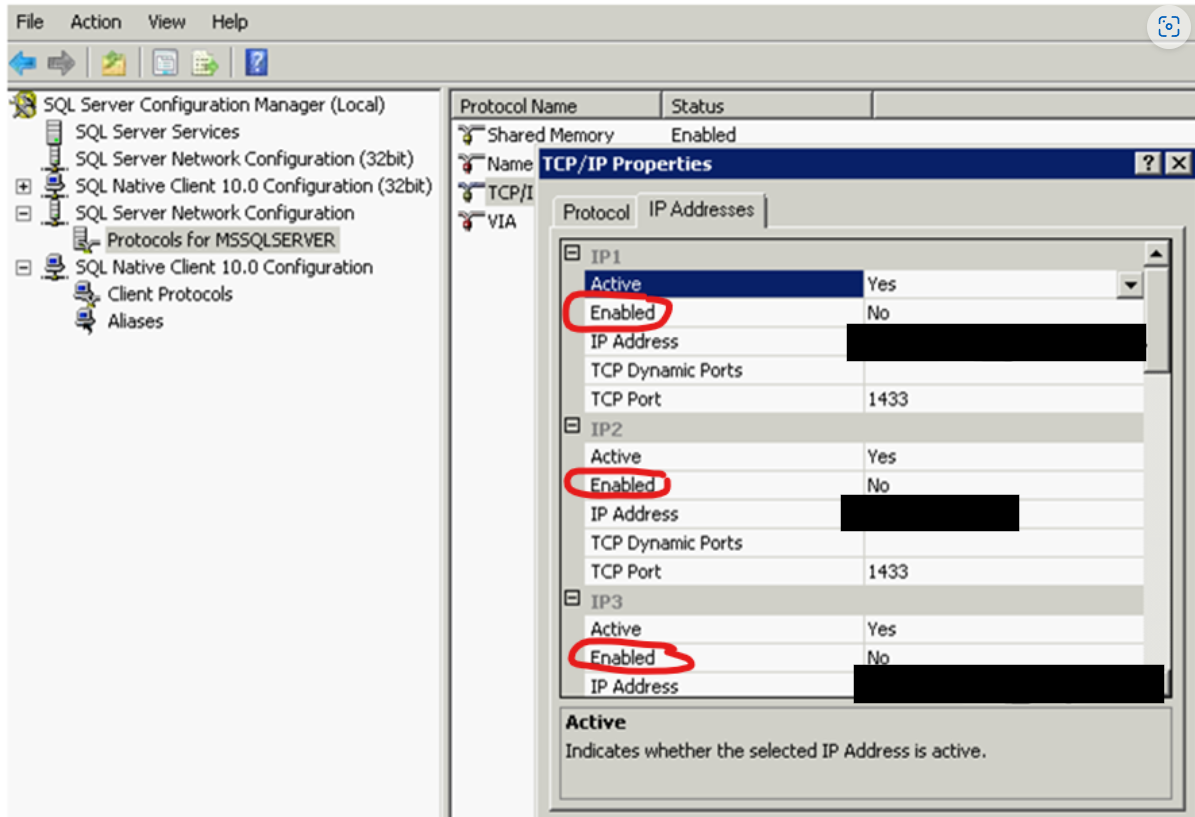
- Method #3 - Disable and re-enable protocols "Shared Memory," "Named Pipes" and "TCP/IP" from Config Manager (Enabled option). This would require a restart of SQL server:
Affected Products
Avamar Plug-in for SQLProducts
Avamar, Avamar Plug-inArticle Properties
Article Number: 000078628
Article Type: Solution
Last Modified: 25 Feb 2025
Version: 3
Find answers to your questions from other Dell users
Support Services
Check if your device is covered by Support Services.