Windows 11 또는 Windows 10으로 부팅되지 않는 Dell 컴퓨터 문제 해결
Summary: 전원이 켜지지만 Windows로 부팅되지 않는 개인 컴퓨터에 대한 기본 문제 해결 단계 BIOS 화면을 통과했지만 OS를 로드하지 못한 컴퓨터에 부팅 안 됨 상태가 발생합니다.
This article applies to
This article does not apply to
This article is not tied to any specific product.
Not all product versions are identified in this article.
Instructions
참고: Microsoft의 Windows 10에 대한 지원이 2025년 10월 14일에 종료됩니다. 자세한 내용은 Microsoft Windows 10 지원 종료 공지를 참조하십시오.
시작하기 전에:
Dell 컴퓨터가 Windows로 부팅할 수 없음 라이브러리 페이지에 설명된 기본 문제 해결 단계를 완료했는지 확인합니다. 이 문서에서는 이러한 단계가 중단된 부분을 선택합니다. 부팅 문제를 해결하는 데 도움이 되는 고급 솔루션을 안내합니다. 이러한 방법은 Windows가 제대로 로드되지 못하게 하는 심층적인 시스템 문제를 해결합니다.
다음 비디오는 컴퓨터에 부팅 문제가 있는지 식별하는 데 도움이 됩니다.
부팅되지 않는 Dell 컴퓨터의 증상
시간: 0:39
선택 자막: 이 비디오는 여러 언어로 제공됩니다. 선택 자막 아이콘을 클릭하고 원하는 언어를 선택합니다.
빠른 참조:
| 문제 | 이 솔루션 시도 |
|---|---|
|
최근 업데이트 또는 소프트웨어로 인해 문제가 발생했습니다. |
|
|
무엇이 잘못되었는지 모른다 |
|
|
로그인 실패, 사용자 프로필 서비스 오류 또는 특정 사용자 계정 내의 불안정. |
|
|
"운영 체제 누락" 오류 |
|
|
"부팅 구성 데이터 파일이 없습니다.", "Windows를 시작하지 못했습니다.", "BOOTMGR 누락" 유형의 메시지가 있습니다. |
|
|
아무것도 작동하지 않습니다 |
시스템 복원 지점 사용
시스템 복원 지점은 정상적인 부팅을 방해할 수 있는 최근 변경 사항을 실행 취소할 수 있습니다. 시스템 복원 지점 애플리케이션에 액세스하려면 다음 단계를 수행하십시오.
- WinRE(Windows Recovery Environment)에 액세스합니다(지침은 문서 하단에 있음).
- Troubleshoot>Advanced>Options System Restore를 선택합니다(그림 1)
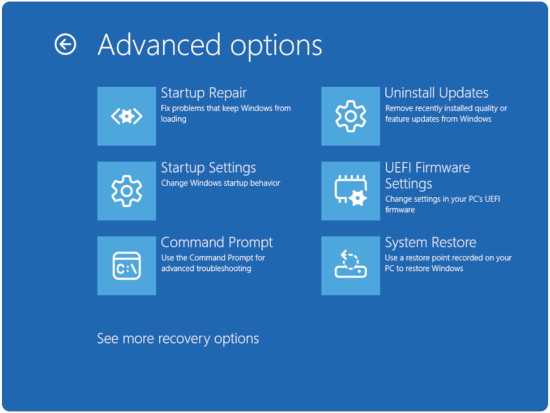
그림 1: 고급 옵션 - Next를 클릭합니다.
- 부팅 문제가 시작되기 전의 복원 지점을 선택합니다(사용할 수 있는 복원 지점이 없는 경우 파일을 유지하면서 Windows 재설정으로 이동) 섹션.
- 마법사를 따라 복원을 완료합니다.
참고: 시스템 복원은 개인 파일에 영향을 주지 않지만 최근에 설치한 프로그램 및 드라이버를 제거합니다.
파일을 보관하는 동안 Windows 재설정
이 옵션은 개인 데이터를 보존하면서 Windows를 다시 설치합니다.
- 재설정 옵션에 액세스합니다.
- WinRE(Windows Recovery Environment)에 액세스합니다(지침은 문서 하단에 있음).
- Troubleshoot>Reset this PC를 선택합니다(그림 2).
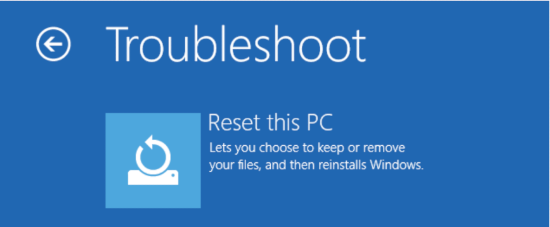
그림 2 : 이 PC 초기화 - Keep my files(내 파일 유지)를 선택합니다.
- 컴퓨터가 BitLocker로 암호화된 경우 메시지가 표시되면 복구 키를 입력합니다. account.microsoft.com 에서 계정에 로그인하고 장치 섹션을 확인하면 키를 찾을 수 있습니다.
- 추가 옵션을 선택합니다.
- 로컬 재설치(더 빠름) 또는 클라우드 다운로드(최신 Windows 버전 다운로드)를 선택합니다.
- 재설정을 완료합니다.
- 화면의 지시를 따릅니다.
- 이 프로세스는 시스템에 따라 1-3시간이 소요됩니다.
참고: 이 프로세스는 개인 파일을 유지하지만 설치된 프로그램을 제거하고 설정을 기본값으로 재설정합니다.
Profile 솔루션
손상된 사용자 프로파일을 수정합니다.
사용자 프로필이 손상되면 Windows가 완전히 로드되지 않을 수 있습니다.
- WinRE(Windows Recovery Environment)에 액세스합니다(지침은 문서 하단에 있음).
- Troubleshoot>Advanced OptionsStartup> Settings를 선택합니다.
- Restart를 클릭합니다.
- 컴퓨터가 BitLocker로 암호화된 경우 메시지가 표시되면 복구 키를 입력합니다. account.microsoft.com 에서 계정에 로그인하고 장치 섹션을 확인하면 키를 찾을 수 있습니다.
- 선택:
- 안전 모드의 경우 4 또는 F4를 누릅니다(그림 3).
- Safe Mode with Networking의 경우 5 또는 F5 키를 누릅니다(그림 3).
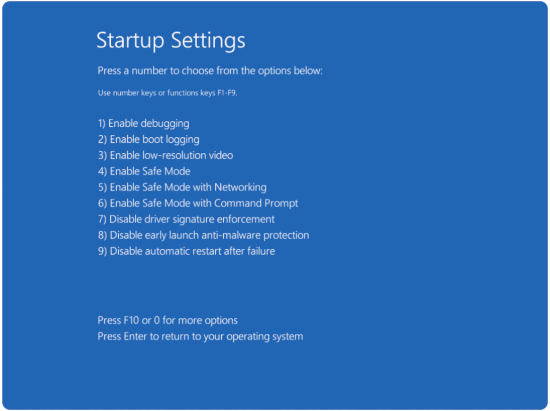
그림 3 : 시작 설정 옵션
- 안전 모드에서 프로필 오류를 확인합니다.
- C:\Users\로 이동합니다.
- 확장자가 .bak 폴더를 찾습니다.
- 필요한 경우 새 사용자 프로파일을 만듭니다.
- 안전 모드에서 설정>계정>가족 및 기타 사용자로 이동합니다.
- 이 PC에 다른 사용자 추가를 클릭합니다.
- 프롬프트에 따라 새 로컬 계정을 생성합니다.
시스템 파일 복구 방법
Windows 부팅 관리자 문제 해결
시작 파일이 손상되면 Windows를 제대로 시작할 수 없습니다. 재구축하는 방법은 다음과 같습니다.
- WinRE(Windows Recovery Environment)에 액세스합니다(지침은 문서 하단에 있음).
- Troubleshoot>Advanced Options>Command Prompt를 선택합니다(그림 4)
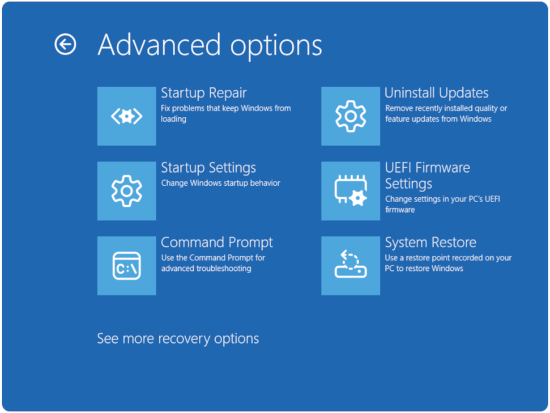
그림 4: 고급 옵션 - 컴퓨터가 BitLocker로 암호화된 경우 메시지가 표시되면 복구 키를 입력합니다. account.microsoft.com 에서 계정에 로그인하고 장치 섹션을 확인하면 키를 찾을 수 있습니다.
참고: 메시지가 나타나면 Y 를 입력하여 Windows 설치를 부팅 목록에 추가합니다.
- BCD(Boot Configuration Data) 재구축
- 명령 프롬프트에서 bootrec /fixmbr을 입력한 다음 Enter 키를 누릅니다.
- 명령 프롬프트에서 bootrec /fixboot를 입력한 다음 Enter 키를 누릅니다.
참고: 액세스 거부 메시지가 표시될 수 있습니다. 이 경우 다음 명령으로 이동합니다.
- 명령 프롬프트에 다음 명령을 입력한 후 Enter 키를 누릅니다.
- 명령 프롬프트에 다음 명령을 입력한 후 Enter 키를 누릅니다.
- 수리 확인
- exit를 입력하고 컴퓨터를 다시 시작합니다.
- Windows가 올바르게 부팅되는지 확인합니다.
고급 명령으로 시스템 파일 복구
시스템 파일 검사기가 일부 문제를 놓칠 수 있습니다. 다음과 같은 포괄적인 복구 방법을 사용하십시오.
- 복구 환경의 명령 프롬프트 액세스
- WinRE(Windows Recovery Environment)에 액세스합니다(지침은 문서 하단에 있음).
- 고급 옵션>명령 프롬프트문제 해결> 을 선택합니다(그림 5)

그림 5: 고급 옵션 - 컴퓨터가 BitLocker로 암호화된 경우 메시지가 표시되면 복구 키를 입력합니다. account.microsoft.com 에서 계정에 로그인하고 장치 섹션을 확인하면 키를 찾을 수 있습니다.
- 오프라인 복구와 함께 SFC 사용
- sfc /scannow /offbootdir=C:\를 입력합니다. /offwindir=C:\Windows 를 입력하고 Enter 키를 누릅니다.
- 특정 파일 손상 확인
- 명령 프롬프트에 findstr /c:"[SR]" %windir%\logs\cbs\cbs.log >입력 sfcdetails.txt를 입력한 후 Enter 키를 누릅니다.
참고: "Windows 리소스 보호에서 손상된 파일을 찾았지만 일부 파일을 수정할 수 없습니다"라는 메시지가 표시되는 경우 이러한 명령은 표준 SFC가 해결할 수 없는 문제를 해결하는 경우가 많습니다.
부팅 구성 수정 사항
- WinRE(Windows Recovery Environment)에 액세스합니다(지침은 문서 하단에 있음).
- 고급 옵션>명령 프롬프트문제 해결> 을 선택합니다(그림 6)
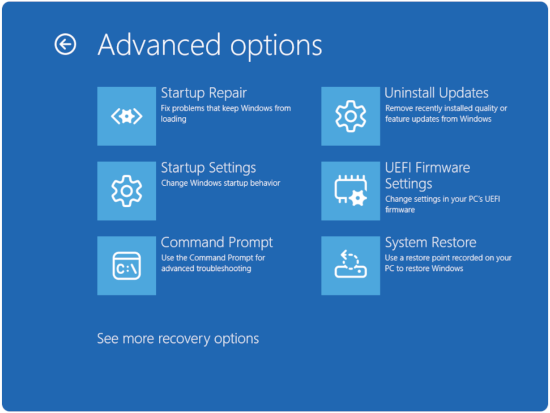
그림 6: 고급 옵션 - 컴퓨터가 BitLocker로 암호화된 경우 메시지가 표시되면 복구 키를 입력합니다. account.microsoft.com 에서 계정에 로그인하고 장치 섹션을 확인하면 키를 찾을 수 있습니다.
UEFI 부팅 문제를 해결합니다.
최신 시스템은 레거시 BIOS 대신 UEFI를 사용합니다. UEFI 부팅 문제를 복구하는 방법은 다음과 같습니다.
- EFI 부팅 파티션을 다시 만듭니다.
- 명령 프롬프트에서 diskpart를 입력하고 Enter 키를 누릅니다.
- 명령 프롬프트에서 select disk 0을 입력한 다음 Enter 키를 누릅니다.
- 명령 프롬프트에서 list partition을 입력하고 Enter 키를 누릅니다.
- 명령 프롬프트에서 select partition [EFI partition number]를 입력하고 Enter 키를 누릅니다.
- 명령 프롬프트에서 assign letter=S를 입력하고 Enter 키를 누릅니다.
- 명령 프롬프트에서 exit를 입력하고 Enter 키를 누릅니다.
- EFI 부트로더 재구축
- 명령 프롬프트에서 bcdboot C:\Windows /s S를 입력합니다. /f UEFI를 입력한 후 Enter 키를 누릅니다.
- 임시 드라이브 문자를 제거합니다.
- 명령 프롬프트에서 diskpart를 입력하고 Enter 키를 누릅니다.
- 명령 프롬프트에서 select disk 0을 입력한 다음 Enter 키를 누릅니다.
- 명령 프롬프트에서 select partition [EFI partition number]를 입력하고 Enter 키를 누릅니다.
- 명령 프롬프트에서 remove letter=S를 입력하고 Enter 키를 누릅니다.
- 명령 프롬프트에서 exit를 입력하고 Enter 키를 누릅니다.
새로 설치를 고려해야 하는 경우
새로 설치가 필요하다는 신호:
- 여러 번의 복구 시도가 실패했습니다.
- 시스템 파일이 광범위하게 손상되었습니다.
- 하드웨어 확인 후에도 부팅 문제가 지속됨
- 부팅에 성공한 후에도 성능이 계속 저하됩니다.
새로 설치 전 백업 고려 사항
- 중요한 데이터를 복구합니다.
- 데이터를 백업하는 가장 신뢰할 수 있는 방법은 부팅 가능한 외장 미디어를 사용하거나 하드 드라이브를 물리적으로 제거하는 것입니다. 이렇게 하면 컴퓨터가 부팅되지 않는 경우에도 다른 운영 체제에서 내부 파일에 액세스할 수 있습니다.
- 소프트웨어를 문서화합니다.
- 설치된 프로그램 나열
- 라이선스 키와 활성화 정보를 기록합니다.
자세한 내용은 Dell 기술 자료 문서 SupportAssist OS Recovery를 사용하여 컴퓨터 복구 및 복원을 참조하십시오.
다음 비디오는 컴퓨터에서 운영 체제 복원을 수행하는 방법에 대한 두 가지 옵션을 제공합니다.
OS 시스템 복원을 수행하는 방법(데이터 백업 사용)
시간: 4:20
선택 자막: 이 비디오는 여러 언어로 제공됩니다. 선택 자막 아이콘을 클릭하고 원하는 언어를 선택합니다.
WinRE(Windows Recovery Environment)에 액세스하는 방법
- 컴퓨터를 끈 상태에서 시작합니다. 컴퓨터의 전원 버튼을 누르고 즉시 F12 키를 1초에 한 번씩 눌러 시스템 부팅 메뉴에 액세스합니다.
- SupportAssist OS Recovery를 선택하여 SupportAssist OS Recovery로 부팅합니다.
- SupportAssist OS Recovery에서 OS Recovery 홈 화면 오른쪽 상단에 있는 점
 3개를 클릭하면 드롭다운 메뉴가 생성됩니다.
 - Windows 복구를 선택합니다.
- 컴퓨터가 WinRE(Windows Recovery Environment)로 재부팅됩니다.
Additional Information
 보증이 만료되었습니까? 걱정하지 마십시오. Dell.com/support 웹사이트를 방문하여 Dell 서비스 태그를 입력하고 서비스를 확인하십시오.
참고: 이 서비스는 미국, 캐나다, 영국, 프랑스, 독일, 중국 및 일본의 개인 컴퓨터 고객만 이용할 수 있습니다. 서버 및 스토리지는 해당되지 않습니다.
Affected Products
Alienware, Dell All-in-One, Dell Pro All-in-One, Dell Pro Max Micro, Dell Pro Max Slim, Dell Pro Max Tower, Dell Pro Micro, Dell Pro Slim, Dell Pro Tower, Dell Slim, Dell Tower, Inspiron, OptiPlex, Vostro, XPS, G Series, G Series, Alienware
, Dell Laptops, Dell Plus, Dell Pro, Dell Pro Max, Dell Pro Plus, Dell Pro Premium, Inspiron, Latitude, Dell Pro Rugged, Vostro, XPS, Fixed Workstations, Mobile Workstations, Dell Pro Max Micro XE FCM2250, Dell Pro Max Slim XE FCS1250, Dell Pro Max Tower T2 XE FCT2250, Dell Pro Max 16 XE MC16250, Dell Pro Micro Plus XE QBM1250, Dell Pro Slim Plus XE5 QBS1250, Dell Pro Tower Plus XE5 QBT1250
...
Article Properties
Article Number: 000124359
Article Type: How To
Last Modified: 05 Nov 2025
Version: 42
Find answers to your questions from other Dell users
Support Services
Check if your device is covered by Support Services.