Isilon:プラットフォームAPIを使用したPowershellの使用 - オブジェクトの作成とRAN
Summary: この文書では、OneFSプラットフォームAPIでPowershellを使用してオブジェクトとRANを作成する方法について説明します。
This article applies to
This article does not apply to
This article is not tied to any specific product.
Not all product versions are identified in this article.
Symptoms
不要
Cause
不要
Resolution
JSONの概要
PAPIはJSONをデータ交換形式として使用するため、リソースの作成、変更、削除にPAPIを使用する方法を理解することが重要です。JSONの詳細については 、www.json.org で確認できますが、重要な原則は、完全な独立したプログラミング言語であり、次の2つの構造に基づいて構築されていることです。- 名前/値ペアのコレクション
- 値の順序付きリスト
システム オブジェクトを取得した場合の出力例は、次のようになります。
{
"<object>": {
"<property>": <value>,
...
}
オブジェクトを作成するためにPOSTする必要があるJSONテキストを知るには、次のリクエストを送信してPAPIセルフ ドキュメントを参照してください。
GET /platform/1/quota/quotas?describe
関連するPowershellコードは次のとおりです。
$resource クォータ
のPAPIセルフ ドキュメント #Get= "/platform/1/quota/quotas?describe"
$uri = $baseurl + $resource
$ISIObject = Invoke-RestPoliod -Uri $uri -Headers $headers -Method Get
$ISIObject
次の出力例では、新しいクォータを作成するためにPOSTする必要がある内容の概要を示します。必要なプロパティは、対応する isiコマンドに必要なプロパティと同じではない場合があるため、注意してください。
プロパティの例を使用して、ディレクトリーのハード クォータを作成するために使用できるJSON文字列の例を次に示します。
$QuotaObject = @"
{"type":"directory","include_snapshots": false,"container": true, "path": /ifs/home/user1", "enforced": true, "thresholds": {"hard":10000000},"thresholds_include_overhead": false}
"@
JSON文字列が完了したら、残りはすべて、Invoke-RestStringodパラメーターを作成して送信します。次のコード例では、JSON文字列はPOSTの本文であり、コンテンツ タイプは application/jsonです。
$headers = @{"Authorization"="Basic $($EncodedPassword)"}
$uri = $baseurl + $resource
$ISIObject = Invoke-RestDeployod -Uri $uri -Headers $headers -Body $QuotaObject -ContentType "application/json;charset=utf-8" -Method POST
Write-Host " Resulting Quota ID: 「 $ISIObject.id
$uri = $baseurl + $resource
$ISIObject = Invoke-RestDeployod -Uri $uri -Headers $headers -Body $QuotaObject -ContentType "application/json;charset=utf-8" -Method POST
Write-Host " Resulting Quota ID: 「 $ISIObject.id
まとめ
例を使用して、1つの親ディレクトリーの下にユーザーのホーム ディレクトリーが多数あるとします(例: /ifs/home)を選択し、これらのホーム ディレクトリーごとにディレクトリー クォータを設定します。Isilon RESTful Access to the Namespace(RAN)APIを使用して、各ユーザー ホーム ディレクトリーへのパスを取得します。次のコードは、指定したパスのサブディレクトリを取得し、各サブディレクトリーにディレクトリー クォータを設定します。
# 指定された
パスのサブディレクトリを取得$resource = '/namespace/' + $path
$uri = $baseurl + $resource
$ISIObject = Invoke-RestDiscoveryod -Uri $uri -Headers $headers -Method Get
#Loop 各ディレクトリを通じて ForEach($ISIObject.childrenの$folder) {#Create quota$resource ="/platform/1/quota/quotas"Write-Host "Setting a $quotasize byte quota on $quotapath"$QuotaObject = @" を設定
します
{"type":"directory","include_snapshots": false,"container": true, "path": "$quotapath", "強制": true, "しきい値": {"hard":$quotasize},"thresholds_include_overhead": false}
"@
$headers = @{"Authorization"="Basic $($EncodedPassword)"}
$uri = $baseurl + $resource
$ISIObject 2 = Invoke-RestDeployod -Uri $uri -Headers $headers -Body $QuotaObject -ContentType "application/json;charset=utf-8" -Method POST
Write-Host " Resulting Quota ID: " $ISIObject2.id
}
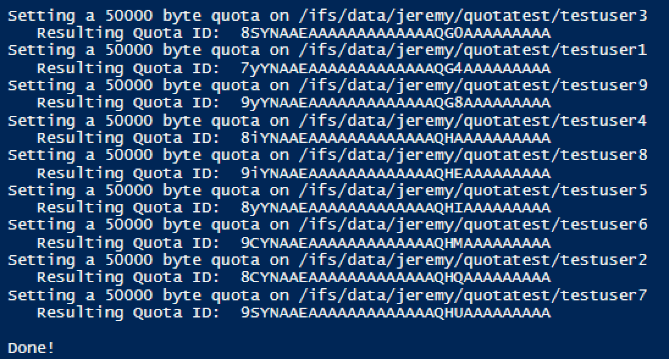
この投稿に添付されているスクリプトを実行した場合の出力を次に示します。
Affected Products
Isilon, PowerScale OneFS, Isilon Platform APIArticle Properties
Article Number: 000132770
Article Type: Solution
Last Modified: 30 Jan 2026
Version: 6
Find answers to your questions from other Dell users
Support Services
Check if your device is covered by Support Services.