Headless Operation Mode Active: What It Means & How to Fix It
Summary: Learn what the Headless Operation Mode Active message means on a Dell computer, why it appears during POST, and how to stop it in BIOS.
This article applies to
This article does not apply to
This article is not tied to any specific product.
Not all product versions are identified in this article.
Symptoms
Quick Answer: Headless Operation Mode Active is an informational BIOS POST message, not a hardware error or sign of a problem. It appears for about two seconds during startup when your Dell computer's BIOS is configured to continue through POST instead of stopping to display warnings and errors. You can stop it from appearing by changing one setting in your BIOS.
If your Dell computer displays the following text briefly during startup, you're seeing an informational message — not an error:
***HEADLESS OPERATION MODE ACTIVE***
This message appears on-screen for about two seconds during POST (Power-On Self-Test), then disappears as your computer continues booting normally.
This applies to all Dell systems with this BIOS setting, not a specific model line. If you're seeing a different message during boot, search using that exact message text instead, this guide is specific to the Headless Operation Mode Active message.
Cause
This message appears because your BIOS's Warnings and Errors setting under POST Behavior isn't configured to pause and display warnings and errors during startup. Instead, it's set to continue past them. The message is a confirmation of that configuration, not an indication that anything is wrong with your computer's hardware.
There are three possible BIOS configurations for this setting:
- Prompt on Warnings and Errors — Stops the computer during POST whenever a warning or error occurs.
- Continue on Warnings — Continues through POST without stopping for warnings, but still stops for errors.
- Continue on Warnings and Errors — Continues through POST without stopping for either warnings or errors.
The two "Continue" options are what trigger the Headless Operation Mode Active message. If a different message appears during your boot process, search using that message's exact on-screen text for a guide specific to that issue.
Resolution
How to Stop the Headless Operation Mode Active Message During POST
Stop the message from appearing by configuring your BIOS to prompt for warnings and errors instead of continuing past them. This takes about two minutes and only requires your keyboard.
Before you start, confirm:
- You have physical access to the computer at startup (this setting can't be changed remotely).
- You're comfortable entering BIOS setup — no advanced technical knowledge required.
Steps:
- Restart your computer.
- As soon as you see the Dell logo (Splash Screen), rapidly press F2 to enter BIOS setup.
- Select POST Behavior from the BIOS menu.
- Under Warnings and Errors, select Prompt on Warnings and Errors.
- Press Esc, then select Exit and Save Changes to apply the setting and restart.
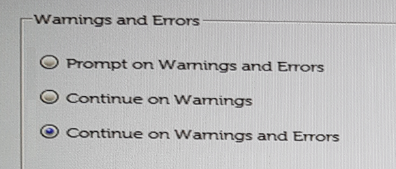
Note: Any error considered critical to your computer's hardware operation will still stop the boot process, regardless of which option you choose. This setting only controls whether non-critical warnings and errors pause startup.
To confirm the fix worked: Restart your computer and watch the screen during POST. The Headless Operation Mode Active message will no longer appear. If a warning or error does exist, you'll now see it displayed on-screen instead of being passed through silently.
If the message still appears: Ensure that you saved the changes before exiting BIOS — unsaved settings revert on restart. If the message persists after confirming the save, contact Dell Support with your Service Tag or Express Service Code ready, as this may indicate a BIOS update is needed.
Frequently Asked Questions (FAQs)
Q: What does Headless Operation Mode Active mean on a Dell computer?
A: It means your Dell BIOS is currently set to continue through startup without pausing for warnings or errors. It's an informational message, not an indication of a problem with your computer.
Q: Is Headless Operation Mode Active an error message?
A: No. It's an informational BIOS POST message. It doesn't indicate that anything is wrong with your computer — it simply confirms how your BIOS is configured to handle warnings and errors during startup.
Q: Why does Headless Operation Mode Active appear when my Dell computer starts?
A: It appears because your BIOS's Warnings and Errors setting under POST Behavior is set to either Continue on Warnings or Continue on Warnings and Errors. Both of these options trigger the message as confirmation that POST will continue without pausing.
Q: How do I stop the Headless Operation Mode Active message from appearing?
A: Enter BIOS setup by pressing F2 at startup, go to POST Behavior, and under Warnings and Errors, select Prompt on Warnings and Errors. Save your changes and restart.
Q: Does Headless Operation Mode Active mean my Dell computer has a hardware problem?
A: No. This message is unrelated to hardware issues. It only reflects a software-level BIOS configuration choice about how startup warnings and errors are displayed.
Q: What are the Dell BIOS Warnings and Errors options?
A: There are three: Prompt on Warnings and Errors (stops for both), Continue on Warnings (stops only for errors), and Continue on Warnings and Errors (stops for neither). Critical hardware errors will stop the boot process regardless of which option is selected.
Affected Products
Dell Laptops, Dell Plus, Dell Pro, Dell Pro Max, Dell Pro Plus, Dell Pro Premium, Latitude, Dell Pro Rugged, XPS, Mobile Workstations, Dell Canvas 27Article Properties
Article Number: 000139731
Article Type: Solution
Last Modified: 10 Nov 2026
Version: 15
Find answers to your questions from other Dell users
Support Services
Check if your device is covered by Support Services.