Welcome to the Premier Account experience
Summary: Discover how to view your Premier account settings at a glance, check your order history, quickly manage your shipping addresses… and more.
This article applies to
This article does not apply to
This article is not tied to any specific product.
Not all product versions are identified in this article.
Instructions

The Account home page provides you with simple access to maintenance features as well as personal information. Self-service capabilities may vary by country or region.
To get the most out of your new Account page, familiarize yourself with everything the page has to offer:
1-Top Navigation: The expandable left navigation enables you to switch profiles, move to another page (if enabled) and access maintenance features. Please note: Self-service capabilities may vary by country or region.
2-Profile Settings: From the drop-down beside your name, you can access your "Profile Information" for editing, and "Switch to Personal Account" for navigation between your Premier or personal account. Direct access to frequently used Account features like Address Book, Quote information, saved payments and more.
3-The Overview page provides an at-a-glance overview and allows you to complete key tasks with a few clicks. It enables direct access to frequently used Account features like your latest quotes, order history, reports, preferred payment method, and more. Please note: Self-service capabilities may vary by country or region.
4-Account Settings: View and manage your shipping and billing addresses.
Set up, change, or view the payment types you use when shopping Premier. As a user with administration rights, you can get greater visibility into payment credit limits and assign payment method access (depending on the user role).
Access and manage previously saved checkout profiles from the list.
5-Manage Users
a. Premier Users: If you have a Site Administrator role, you are authorized to manage users, download your own user list and remove users.
b. Subscription users: If there is a subscription associated with your Premier account through one of your Dell Customer Numbers, you can also manage the access of the individual users to the subscriptions here.
c. Single Sign-On: As a Site Administrator you can set up Single Sign-On (SSO) for your organization using your Premier Account page. This needs to be enabled by Dell. Contact your sales representative if you are interested in initiating SSO.
6-Orders provide an overview of your invoices with many self-serve options for paid and unpaid invoices.
Buy Again (US) / Recent Online Orders - Access your recent online orders (placed online in the last 60 days) and add to Cart with a single click.
Order History (US only) - provides access to the Order Status from within Premier to get the most up-to-date information related to order history.
7-Financing (in supported regions only) Where enabled, this section allows you to manage your financing products directly from within Premier Account.
8-With "Manage Service Contracts," you can select your assets, support services duration, and service plans for renewal. You can review your products and renew or upgrade the corresponding service contracts. Note: This capability is not available for Shopper roles. (Not available in all countries)
9-With Software and Subscriptions, you can manage your company’s software subscriptions purchased through Dell Technologies.
10-Dell Support
a. Contacts - View and contact your Dell Account team.
b. Support History - Provides visibility to your organization's support history and enables tracking of all service requests for your service-tagged devices (Assets associated with their Dell Customer Number.)
c. Documents - View and retrieve documentation posted by your Dell Account team.
11-"Reports" offers various options relating to current and past Dell purchases. A list of different reports is available to users with reporting access.
12-"Devices" allows you to manage your assets by accessing their warranty status and service tags for all Dell systems associated with your Dell Customer Number in Premier.
13-"Video Library (US Only)" provides quick access to demo videos of Premier features, without leaving the page.
14-Digital Signature This e-Sign capability allows you to securely sign your Dell Custom Services Statement of Work (SOW) directly from your Dell Premier Account. This must be initiated by your Dell Sales Representative. 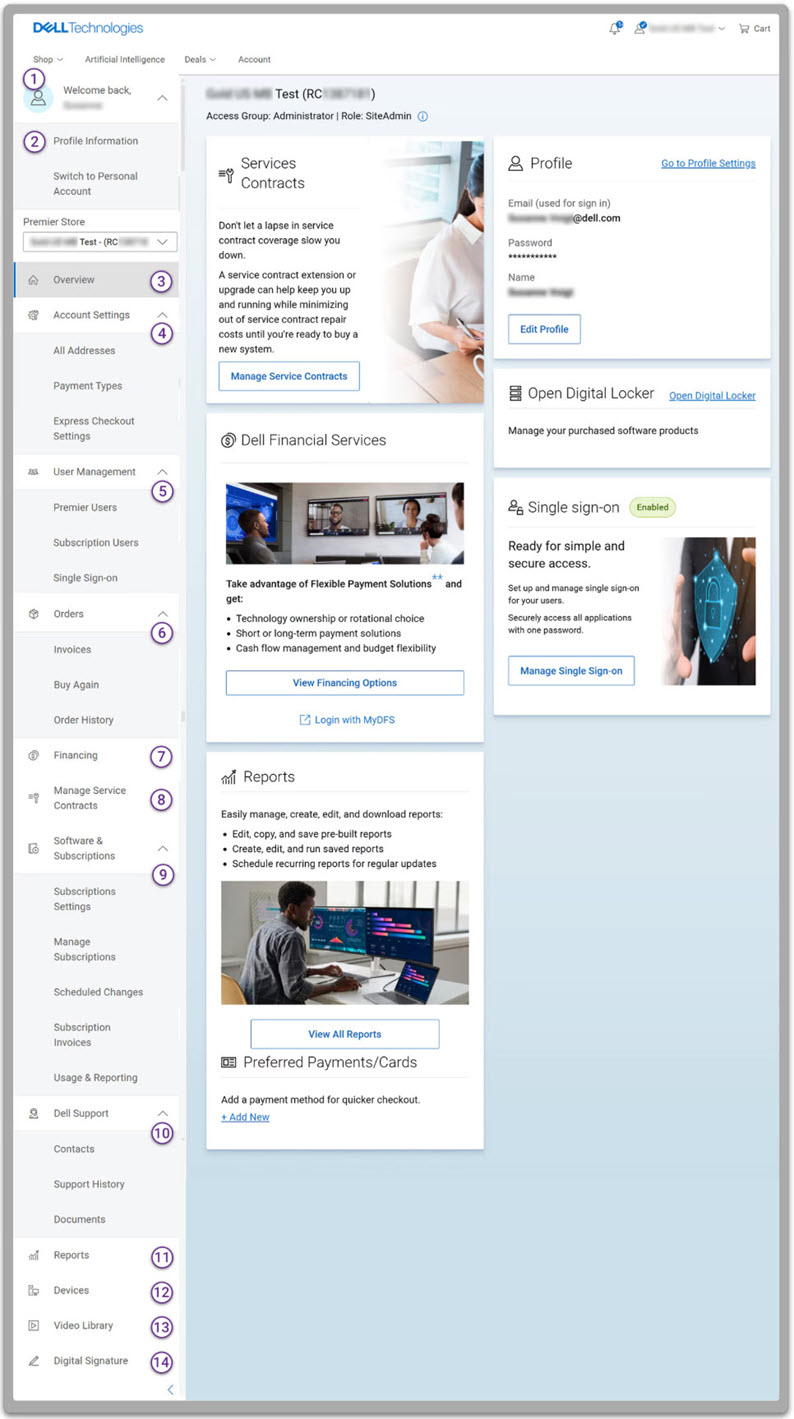
If you have questions or need assistance, engage the Premier Support Teams.
Article Properties
Article Number: 000189063
Article Type: How To
Last Modified: 04 Jul 2025
Version: 8
Find answers to your questions from other Dell users
Support Services
Check if your device is covered by Support Services.