Data Domain: How to Configure an ECS Cloud Tier with Data Domain
Summary: This article goes through the process of configuring ECS cloud tier with Data Domain (DD) for cloud capacities.
This article applies to
This article does not apply to
This article is not tied to any specific product.
Not all product versions are identified in this article.
Instructions
The following article goes through the steps required to configure an ECS cloud tier with Data Domain.
This guide contains five steps:
- Add the cloud capacity license
- Configure the cloud local metadata for ECS
- Run the cloud provider verify to verify Load Balancer and ECS connections, and import the CA certificate to enable the communication between Data Domain, Load Balancer, and ECS.
- Create the cloud profile on Data Domain
- Create the cloud unit
Steps:
1. Add the cloud capacity license:
- Add the license:
Use the command
elicense update to add a cloudtier-capacity license.
- Verify that that license has been added:
Once added, the command
elicense show should list the cloud capacity license similar to the following:

2. Configure the cloud local metadata for ECS:
- Check the addable storage:
Use the
storage show all command to list assigned and addable storage.
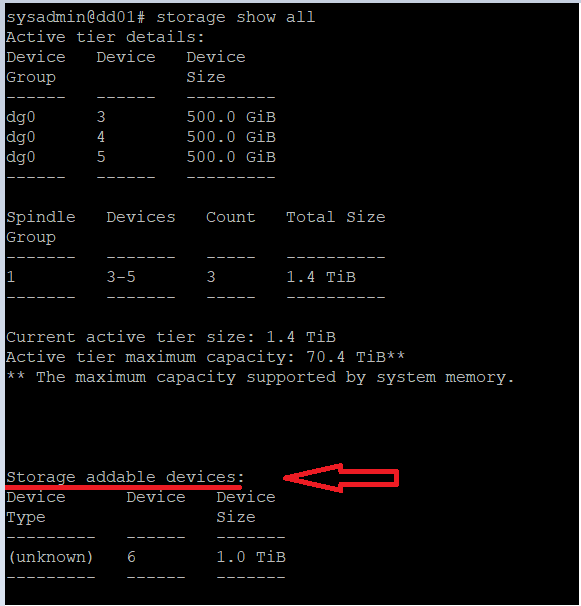
In this example it shows:
- Devices 3-5 have already been assigned to the Active tier
- Device 6 is a 'storage addable device'
- Device 6 can be used to configure cloud tier local metadata.
Note: In general, the local metadata capacity for cloud tier is configured as 1/10 of the total cloud tier licensed capacity (based on the compression ratio of
10x). A portion can be configured initially and add more devices at later stages.
- Create cloud tier with addable devices and form cloud local metadata:
- Run the
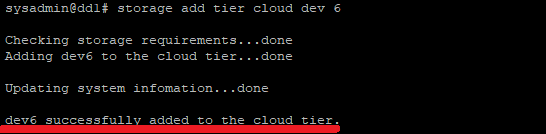
storage add tier cloudcommand to add the device to cloud tier as local metadata.
- Run the
In this example, dev 6 is added:
- Run the
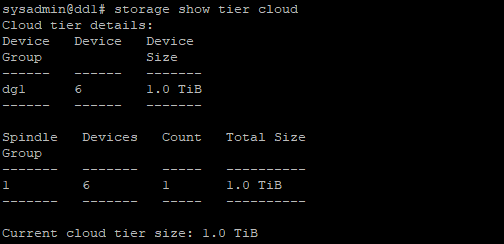
storage show tier cloudto verify the addition:
This is the result of adding dev 6 as the cloud tier:
3. Verify Load Balancer (LB) and ECS connections.
- Verify that the time on Data Domain and ECS and consistent as a time gap may cause the connection, and the next command
cloud provider verifyto fail. - Run the
cloud provider verifycommand to verify Load Balancer and ECS accessibilities.
Note: Load Balancer is required as a valid setup to integrate ECS cloud with Data Domain. LB relays the connections coming from the DD to one of the ECS nodes.
There are three types of endpoint connections:
- Nonsecure, use https port 80 for connection, no certification is required on DD.
- SSL termination at Load Balancer, use https port 443 secure endpoint; this requires LB certificate being presented to DD (this is automatically imported during verification).
- Full SSL secure endpoint, use https port 8443; this requires LB certificate being presented to DD and root CA for ECS being installed on Load Balancer.
In this example, a self-signed certificate is used. (A self-signed or CA signed certificate can be used.)
- If no port is specified in endpoint entry, when using https, by default 443 is used for verification with LB.
- Access and secret keys are obtained from ECS for authentication
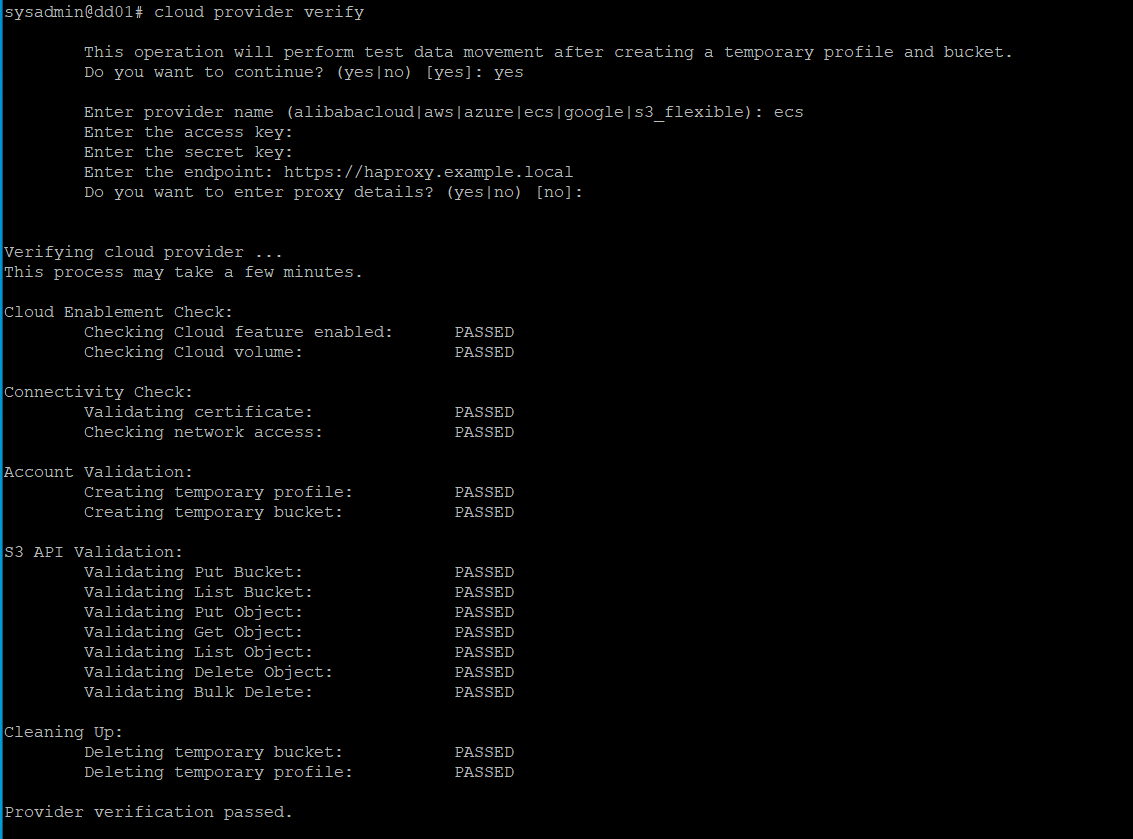
During the verification, the Load Balance certificate was automatically imported to Data Domain.
To verify, use the adminaccess cert show command:

4. Create the cloud profile on Data Domain:
- Run the
cloud profile addcommand to create a cloud profile. The inputs are similar to thecloud provider verifycommand:

- Run the
cloud profile showcommand to verify the creation:
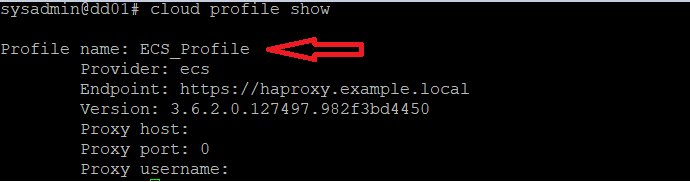
5. Create the cloud unit on the configured cloud profile:
- Run the
cloud unit addcommand to create a cloud unit for the cloud profile. This step may take some time to complete.

- Run the
cloud unit listcommand to verify that the cloud unit exists:

The ECS cloud creation process is complete, and data can begin migrating to the cloud tier.
Additional Information
For more information about the certificate requirements for a secured DD Cloud Tier connection to ECS and Best Practices, see article Data Domain: Certificate requirements for secured DD Cloud Tier connection to ECS and Best Practice guide. (Log in as a registered user to Dell Support may be required to view the article.)
For more information about the Cloud Provider Verify tool, see article Data Domain: How to use the Data Domain cloud provider verification tool.
Watch this published video:
Affected Products
Data Domain Extended RetentionArticle Properties
Article Number: 000204368
Article Type: How To
Last Modified: 29 May 2026
Version: 10
Find answers to your questions from other Dell users
Support Services
Check if your device is covered by Support Services.