128GB eMMC Device Reported As A 125GB Device In BIOS Setup Or e-Diags In Dell DCXXXXX, Pro Essential, Inspiron, and Vostro Laptops
Summary: This article describes why 128 GB eMMC devices are reported as only 125 GB in BIOS Setup and e-Diags.
This article applies to
This article does not apply to
This article is not tied to any specific product.
Not all product versions are identified in this article.
Symptoms
Affected Platforms:
- Dell 15 DC15250
- Dell 15 DC15255
- Dell Pro 15 Essential PV15250
- Dell Pro 15 Essential PV15255
- Inspiron 15 3530
- Inspiron 15 3535
- Vostro 15 3535
- Vostro 14 3435
- Vostro 15 3530
- Vostro 14 3430
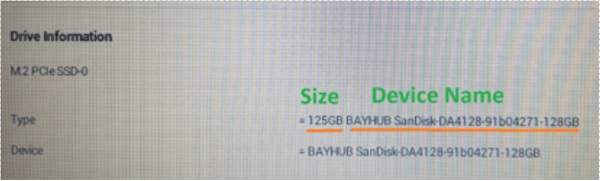
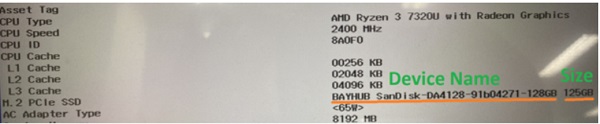
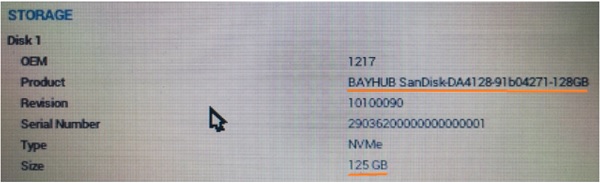
A 128GB eMMC device appears to be a 125GB device in the BIOS and in e-Diags. The Embedded Multi Media Card (eMMC) is an internal data storage card, built using NAND flash storage.
Intel BIOS setup information:
AMD BIOS setup information:
e-Diag information: eMMC:
Cause
NAND storage products reserve some capacity for bad block management to increase endurance.
Resolution
This is expected behavior for eMMC devices and represents a stability and performance feature. The space cannot be reclaimed and is required for bad block management.
Affected Products
Dell 15 DC15250, Dell 15 DC15255, Dell Pro 15 Essential PV15250, Dell Pro 15 Essential PV15255, Inspiron 15 3530, Inspiron 15 3535, Vostro 14 3430, Vostro 14 3435, Vostro 15 3530, Vostro 15 3535Article Properties
Article Number: 000208097
Article Type: Solution
Last Modified: 10 Nov 2025
Version: 7
Find answers to your questions from other Dell users
Support Services
Check if your device is covered by Support Services.