NVP vProxy: (Troubleshooting Guide) Backups fail with "NSR VMware proxy is not available for datastores"
Summary: This is a general troubleshooting KB intended for support to aid in understanding possible causes for the error "NSR VMware proxy is not available for datastores" when performing vProxy backups. ...
This article applies to
This article does not apply to
This article is not tied to any specific product.
Not all product versions are identified in this article.
Instructions
During VM backups performed with the NetWorker VMware Protection (NVP) vProxy appliance the VM backup fails for one or more VMs with the error:
NSR VMware proxy is not available for datastores (DATASTORE_NAME) in vCenter 'VCENTER_NAME'.
This error can be found when looking at the failed backup action details in the NMC Monitoring window.

Or in the backup action logs on the NetWorker server:
root@linux1:~# nsr_render_log /nsr/logs/policy/Gold/VMware/Backup_235896.raw | grep -i error
164882 02/07/2023 09:44:11 AM  3 5 0 1296803648 11621 0 linux1.amer.lan nsrvproxy_save NSR error Unable to process VM 'linuxclient01': NSR VMware proxy is not available for datastores (datastore1) in vCenter 'vcsa.amer.lan'. Check if it is enabled.
164546 02/07/2023 09:44:11 AM  3 5 0 1296803648 11621 0 linux1.amer.lan nsrvproxy_save NSR error linuxclient01: Backup failed.
164882 02/07/2023 09:44:11 AM  3 5 0 1296803648 11621 0 linux1.amer.lan nsrvproxy_save NSR error Unable to process VM 'winclient02': NSR VMware proxy is not available for datastores (datastore1) in vCenter 'vcsa.amer.lan'. Check if it is enabled.
164546 02/07/2023 09:44:11 AM  3 5 0 1296803648 11621 0 linux1.amer.lan nsrvproxy_save NSR error winclient02: Backup failed.
164882 02/07/2023 09:44:45 AM  3 5 0 1296803648 11621 0 linux1.amer.lan nsrvproxy_save NSR error Unable to process VM 'linuxclient01': NSR VMware proxy is not available for datastores (datastore1) in vCenter 'vcsa.amer.lan'. Check if it is enabled.
164546 02/07/2023 09:44:45 AM  3 5 0 1296803648 11621 0 linux1.amer.lan nsrvproxy_save NSR error linuxclient01: Backup failed.
164882 02/07/2023 09:44:45 AM  3 5 0 1296803648 11621 0 linux1.amer.lan nsrvproxy_save NSR error Unable to process VM 'winclient02': NSR VMware proxy is not available for datastores (datastore1) in vCenter 'vcsa.amer.lan'. Check if it is enabled.
164546 02/07/2023 09:44:45 AM  3 5 0 1296803648 11621 0 linux1.amer.lan nsrvproxy_save NSR error winclient02: Backup failed.
This error appears for several reasons. The below details a couple of common causes and how to address them.
vProxy Availability:
vProxy state: Is there a vProxy enabled for backups?
root@linux1:~# nsradmin
NetWorker administration program.
Use the "help" command for help, "visual" for full-screen mode.
nsradmin> show enabled; name
nsradmin> print type: nsr vmware proxy
                        name: vproxy01.amer.lan;
                     enabled: Yes;
Or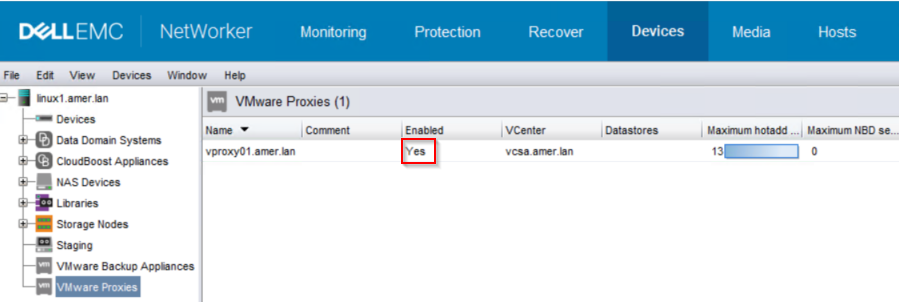
If the vProxy shows Enabled "No," set to Enabled "Yes." This can be done from NMC:
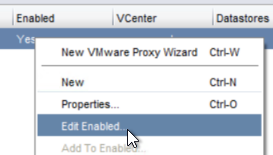
Or nsradmin:
nsradmin> . type: nsr vmware proxy; name: vproxy01.amer.lan
Current query set
nsradmin> update enabled: Yes
                     enabled: Yes;
Update? y
updated resource id 141.0.147.119.0.0.0.0.114.88.175.99.192.168.7.101(28)
nsradmin>
If vProxy does not go into "Enabled" state:
- Verify port 9090 communication between the vProxy and NetWorker server (bi-directional):
- vProxy:
curl -v NW_SERVERNAME:9090 - NetWorker server:
nsrports -t VPROXY_NAME -p 9090 - NVP vProxy: Troubleshooting Network Connectivity For Backup and Restore Operations
- vProxy:
- Attempt manual re-registration of vProxy: NVP vProxy: How To Unregister/Re-Register a vProxy Appliance?
VMware Configuration:
One way to test if there is an issue with hot add as to perform the VM backup using Network Block Device (NBD) method instead.
Does vProxy have NBD sessions enabled (by default the NBD sessions is set to 0 (disabled)):
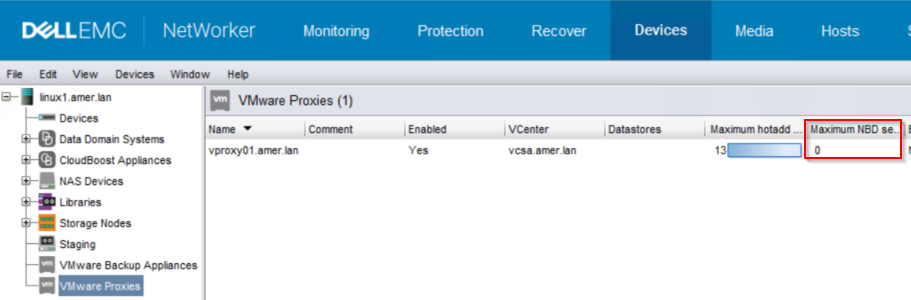
If NBD sessions are enabled, set the NBD sessions to match hot add:
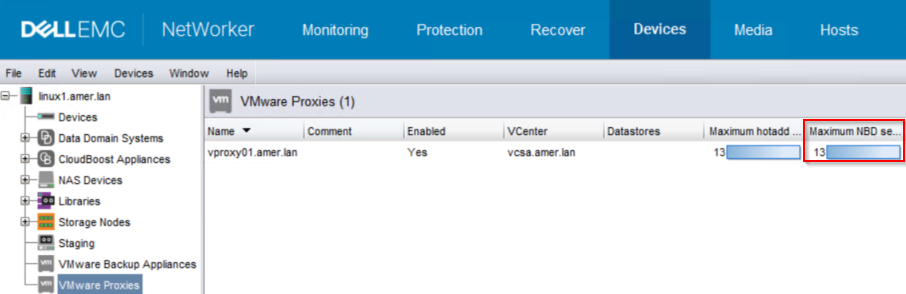
OR:
root@linux1:~# nsradmin
NetWorker administration program.
Use the "help" command for help, "visual" for full-screen mode.
nsradmin> show name; maximum NBD sessions
nsradmin> . type: nsr vmware proxy; name: vproxy01.amer.lan
Current query set
nsradmin> update maximum NBD sessions: 13
        maximum NBD sessions: 13;
Update? y
updated resource id 141.0.147.119.0.0.0.0.114.88.175.99.192.168.7.101(31)
nsradmin> print
                        name: vproxy01.amer.lan;
        maximum NBD sessions: 13;
Perform the backup again. A successful backup suggests the vProxy cannot connect to VM files over hot add but can connect to VMs over the management network using NBD.
NOTE: See the Additional Information field for a
ProxyHC example for checking hot add connectivity.
If NBD backups are successful and ProxyHC reports an issue accessing the VM using hot add, perform the following:
Make note of:
- The specific VMs reporting the error
- Which datastore is specified in the error.
- The vCenter name reported in the error.
- The vProxy appliance used by the backup/reported in the error
1. Log in to the vSphere web client for the vCenter where backup is performed.
2. Go To Inventory and go to VMs and Templates.
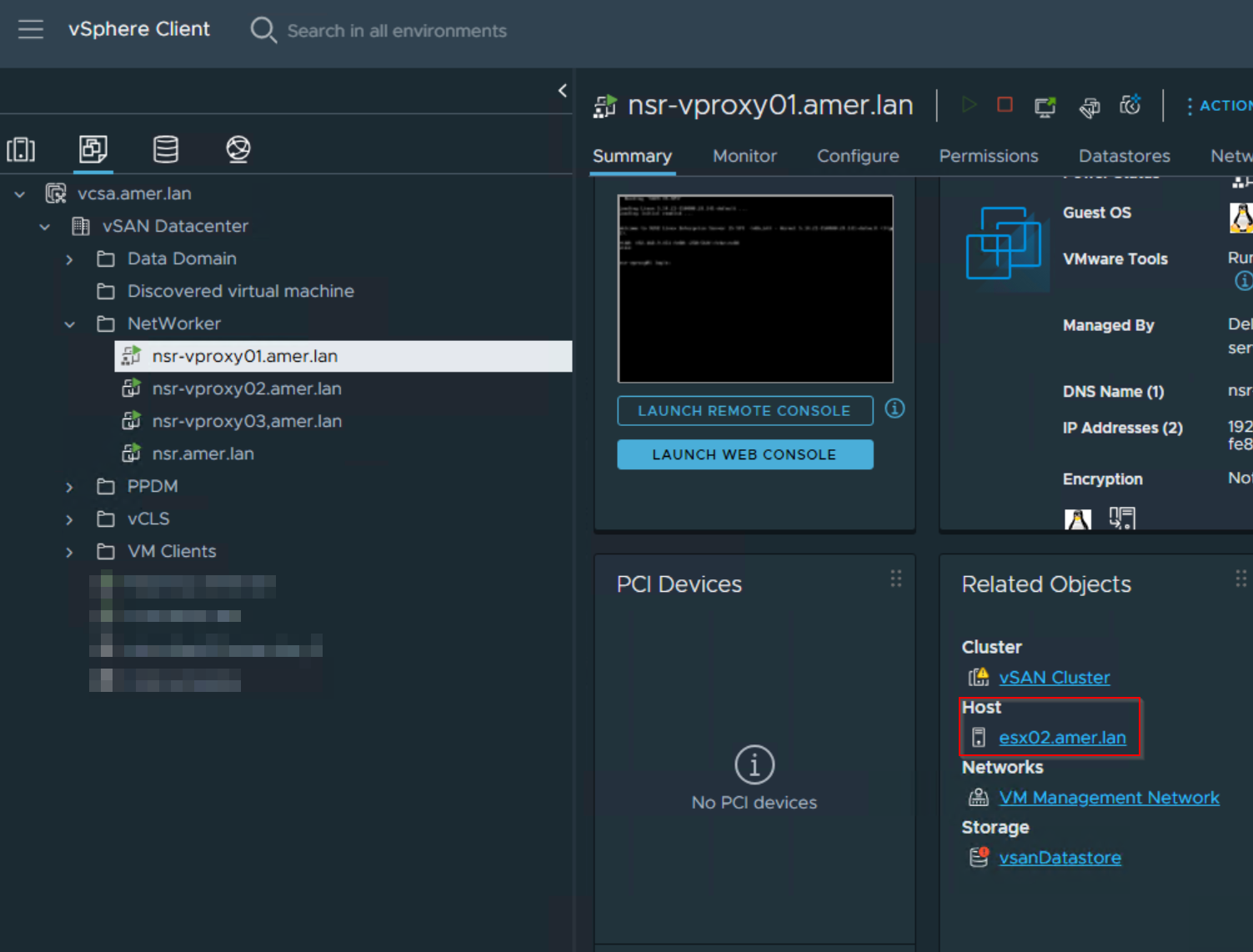
3. Go to (or search for) the vProxy VM, in the summary tab make note of the ESXi host the vProxy resides on:
4. Go to the Hosts and Clusters tab, select the ESXi host the vProxy resides on then click Datastores:
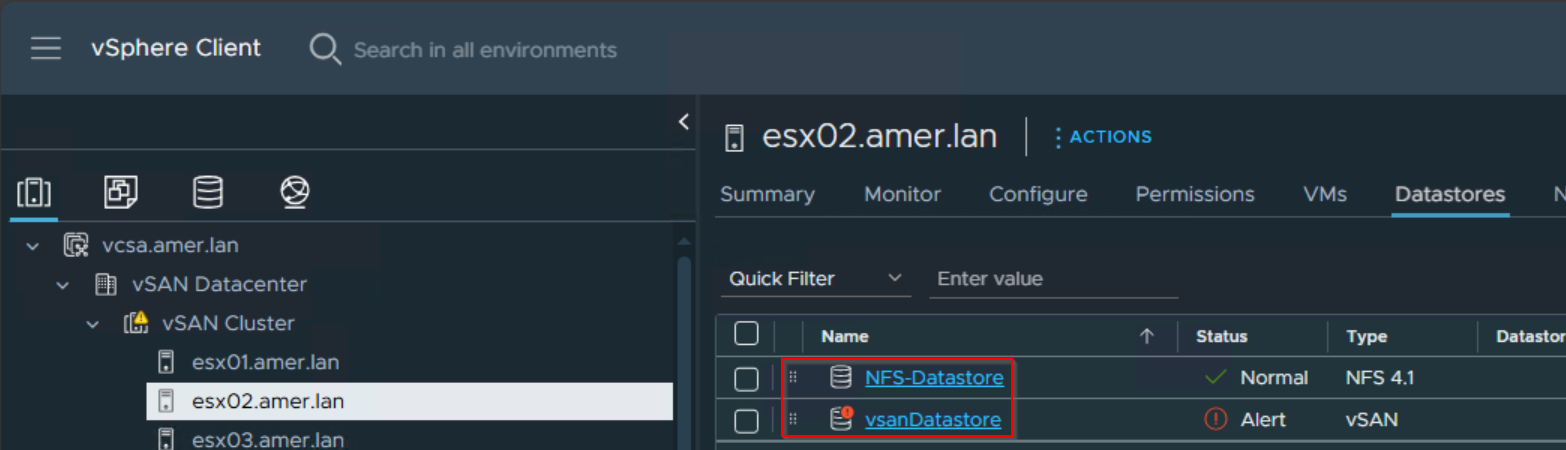
This lists the VMware datastores which are visible to the ESXi host the vProxy resides on. If the datastore in the backup error 'NSR VMware proxy is not available for datastores (DATASTORE_NAME)' is not listed, the vProxy cannot access VM files using hot add. To support hot add, the vProxy must be deployed on an ESXi host that has a path to the VM datastores. Similarly, check the ESXi host's datastores where the VM resides. If the vProxy's datastore is not listed, there is no path between the vProxy and VM.
Possible solutions for this are:
- VMware vSphere vMotion the vProxy appliance to an ESXi host that has access to all the datastores required for VM backups.
- Configure the ESXi host the vProxy resides on to have access to VMware datastores which the VMs reside on.
- Deploy a vProxy appliance on ESXi hosts connected to unique Datastores (not accessible through hosts where vProxies are already deployed).
The above configuration changes must be performed by VMware administrator, not NetWorker support. If no configuration changes can be made to allow hot add to work, then NBD must be used.
The NetWorker VMware Integration Guide includes more details about transport mode recommendations, requirements, and limitations: https://www.dell.com/support/home/product-support/product/networker/docs
IDE Disks:
If there are no datastore issues observed, check the failing VMs to see if they are configured to use IDE disks. This can be seen in the VM settings in vSphere:
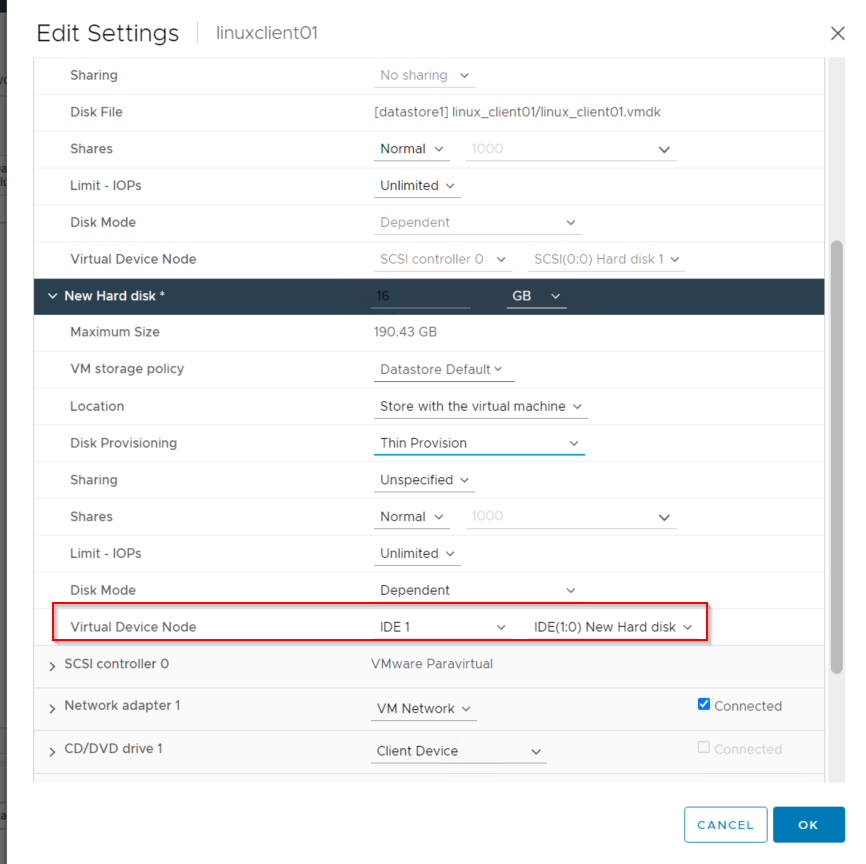
NOTE: IDE disks do not support hot add.
Use the NetWorker Web User Interface (NWUI) to configure the VMware Protection Policy with Auto Mode.
VMs which contain IDE disks should be configured in the same protection group. The protection group can be configured to use a specific vProxy that has NBD sessions enabled. Configure the Protection policy that backs up IDE VMs to use the auto transport mode. This option is only available from the NetWorker Web User Interface (NWUI):
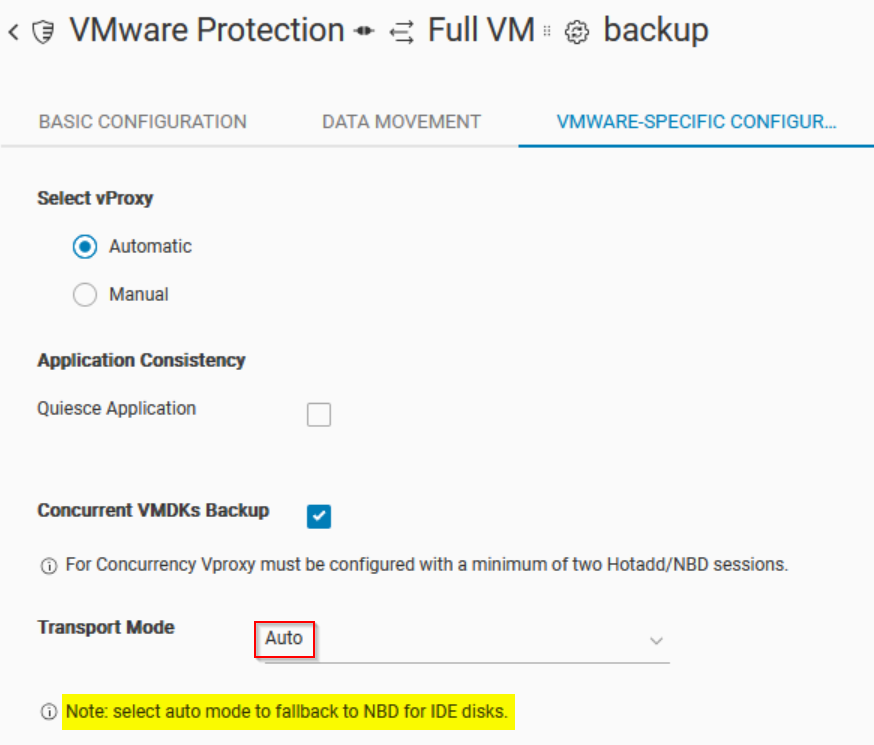
This setting can be enabled if NBD sessions are set to zero, but the workflow contains VMs with IDE disks. Only the VMs with IDE disks backup using NBD; all other VMs with SCSI disks backup over hot add. It is not recommended to deploy VMs with IDE disks, ISCSI disks should be used whenever possible.
Additional Information
NVP vProxy: VM backups fail with "VDDK Error 13: You do not have access rights to this file" - Troubleshooting/Triage Guide
Hot add connectivity can also be verified using ProxyHC: NVP-vProxy: How to use health check tool ProxyHC on vProxy appliance
vproxy01:~ # ./ProxyHC hotadd
Info: Checking OS account status -------> Passed
Info: Checking configuration files
        Info: Proxy is registered to: linux1.amer.lan
        Info: Proxy version is: 4.3.0-38
Info: Checking OS
        Info: Checking attached disks -------> Passed
        Info: Checking disk usage -------> Passed
        Info: Checking memory usage -------> Passed
Info: Checking connectivity
        Info: Checking primary NIC ------->  192.168.9.123
        Info: Testing ping to gateway 192.168.7.100 -------> Passed
        Info: Testing ping to DNS 192.168.10.100 -------> Passed
        Info: Testing ping to DNS 192.168.7.100 -------> Passed
        Info: Testing ping to DNS 192.168.9.100 -------> Passed
        Info: Checking DNS response
        Info: Testing name lookup for linux1.amer.lan -------> Passed
        Info: Testing name lookup for vcsa.amer.lan -------> Passed
Info: Checking package details
        Info: Checking vProxy package version -------> Found version 4.3.0
        Info: Verifying vProxy package -------> command returned error
Info: Checking service state
        Info: Checking status for vbackupd -------> Passed
        Info: Checking status for vflragent -------> Passed
        Info: Checking status for vflrd -------> Passed
        Info: Checking status for vkpod -------> Passed
        Info: Checking status for vrapid -------> Passed
        Info: Checking status for vrecoverd -------> Passed
        Info: Checking status for vsessionsd -------> Passed
Info: Checking engine logs
        Info: Checking vsessionsd engine log -------> Passed
        Info: Checking vrapid engine log -------> Passed
        Info: Checking vrecoverd engine log -------> Passed
        Info: Checking vbackupd engine log -------> Found 2 failed sessions
        Info: Checking vkpod engine log -------> Passed
        Info: Checking vflragent engine log -------> Passed
        Info: Checking vflrd engine log -------> Passed
Info: Checking vCenter access
        Please specify vCenter USER name for vcsa.amer.lan: bkupadmin@amer.lan
        Please provide vCenter server password:
        Info: Validating vCenter server connectivity -------> Passed
Info: Checking for hotadd access
        Please provide DNS name of VM(as shown in vSphere): linuxclient01.amer.lan
        Info: Looking for vProxy VM -------> Passed
        Info: Checking vCenter user permissions
        Info: Looking for user permissions to root object -------> Failed
        Info: Validating datacenter match -------> Passed
        Info: Looking for IDE disks -------> Passed
        Info: Checking virtual hardware version -------> Passed
        Info: Looking for independent disk -------> Passed
        Info: Checking datastore access -------> Passed
        Info: Checking entity names -------> Passed
Affected Products
NetWorkerProducts
NetWorker Family, NetWorker SeriesArticle Properties
Article Number: 000208393
Article Type: How To
Last Modified: 15 Jan 2026
Version: 6
Find answers to your questions from other Dell users
Support Services
Check if your device is covered by Support Services.