Windows Server: RD Web or RD Gateway Error - Cannot Connect Because the Gateway Server Address Does Not Match the Certificate
Summary: Error message for rdweb and rdgateway: Your computer cannot connect to the remote computer because the remote desktop gateway server address, and the certificate subject name do not match. ...
This article applies to
This article does not apply to
This article is not tied to any specific product.
Not all product versions are identified in this article.
Instructions
Issue:
Error message: Your computer cannot connect to the remote computer because the remote desktop gateway server address requested, and the certificate subject name do not match.
RDweb and RDgateway have several reasons why the names do not match.

Figure 1: Name and Value Pair Storage
Cause:
The issues can be one or more of several items:
- The DNS zone does not have a split zone. This means that the domain is
.localbut the DNS cert name is.com. - For this, you add a new Zone for
domain.comand add a new record called remote. Put the IP address of remote to the RD gateway server. - Make a new Primary zone for domain.com and place the record remote in this zone, with the IP of the
RDGATEWAY.
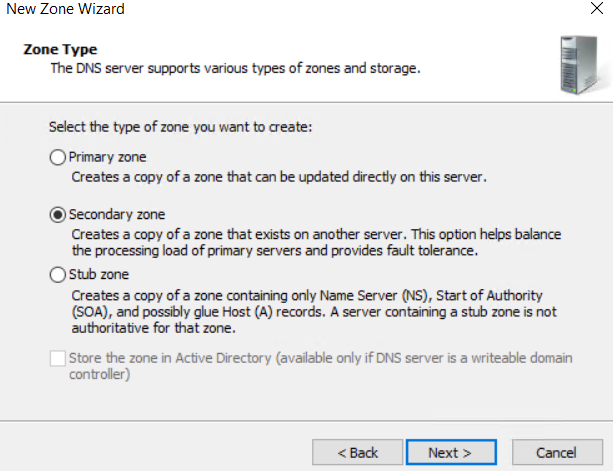
Figure 2: New Zone Wizard
- The Public A record (
godaddy) for the Remote A record has the wrong name. You have the Remote pointing to another record that then points tonotremoteor some other name. - The Value for
DefaultTSGatewayis missing or the certificate bound toInetmgr.mscis not the same. The Certificate name and the Cert used in IIS must be the same Thumbprint. - There can be a name mismatch where the certificate has multiple names, but the needed name is not in the list, look under the alternative subject name field.
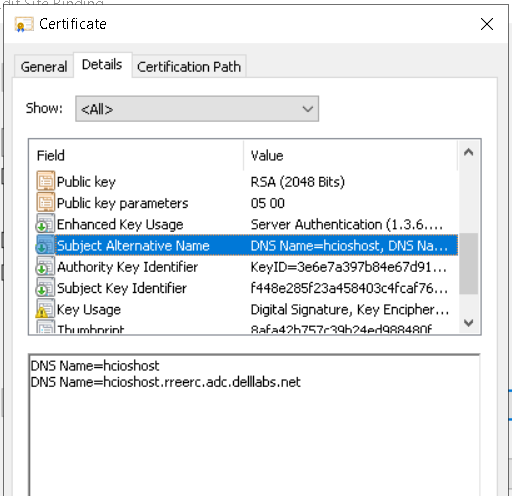
Figure 3: Certificate Has Multiple Names-Alternative Name.
If the name is not there, then the cert must be re-created with a new certificate request. DigiCert windows tool can be used to make the request file, then send the request to godaddy or some other provider.
The intermediate cert goes to the intermediate store, and the other cert goes to the internal store.
Use the DigiCert tool to repair the certificate if needed (fix button).
Affected Products
Microsoft Windows Server 2016, Microsoft Windows Server 2019, Microsoft Windows Server 2022, Microsoft Windows Server 2025Products
C Series, HS Series, Modular Infrastructure, PowerEdge R240, PowerEdge R250, PowerEdge R260, PowerEdge R340, PowerEdge R350, PowerEdge R360, PowerEdge R440, PowerEdge R450, PowerEdge R470, PowerEdge R540, PowerEdge R550, PowerEdge R570
, PowerEdge R640, PowerEdge R6415, PowerEdge R650, PowerEdge R650xs, PowerEdge R6515, PowerEdge R6525, PowerEdge R660, PowerEdge R660xs, PowerEdge R6615, PowerEdge R6625, PowerEdge R670, PowerEdge R6715, PowerEdge R6725, PowerEdge R740, PowerEdge R740XD, PowerEdge R740XD2, PowerEdge R7415, PowerEdge R7425, PowerEdge R750, PowerEdge R750XA, PowerEdge R750xs, PowerEdge R7515, PowerEdge R7525, PowerEdge R760, PowerEdge R760XA, PowerEdge R760xd2, PowerEdge R760xs, PowerEdge R7615, PowerEdge R7625, PowerEdge R770, PowerEdge R7715, PowerEdge R7725, PowerEdge R840, PowerEdge R860, PowerEdge R940, PowerEdge R940xa, PowerEdge R960, PowerEdge T140, PowerEdge T150, PowerEdge T160, PowerEdge T340, PowerEdge T350, PowerEdge T360, PowerEdge T440, PowerEdge T550, PowerEdge T560, PowerEdge T640
...
Article Properties
Article Number: 000210331
Article Type: How To
Last Modified: 21 May 2025
Version: 5
Find answers to your questions from other Dell users
Support Services
Check if your device is covered by Support Services.