CyberLink Media Suite DVD Installation is Slow
Summary: Installation of CyberLink Media Suite from a DVD using a Dell External USB Slim DVD +/- RW Optical Drive DW316 takes a long time or fails.
This article applies to
This article does not apply to
This article is not tied to any specific product.
Not all product versions are identified in this article.
Symptoms
CyberLink Media Suite may be slow to install or fail to install when the install is using an installation DVD with a Dell External USB Slim DVD +/- RW Optical Drive DW316. The installation may take 45 minutes or fail. When the installation fails, it gives an error message from User Account Control that says, "This app has been blocked for your protection. An administrator has blocked you from running this app. For more information, contact the administrator."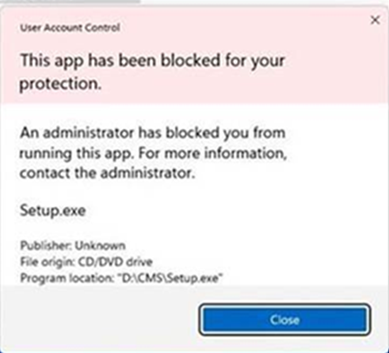
Affected Platforms:
- Alienware m18 R2
- Dell 14 DC14250
- Dell 14 DC14255
- Dell 24 All-in-One EC24250
- Dell 27 All-in-One EC27250
- Dell Pro 14 Essential PV14250
- Dell Pro 14 Essential PV14255
- Dell Pro 24 All-in-One QC24250
- Dell Pro 24 All-in-One QC24251
- Dell Pro 24 All-in-One Plus QB24250
- Inspiron 14 5440
- Inspiron 14 5445
- Inspiron 3030 Desktop
- Inspiron 3030 Small Desktop
- Inspiron 24 5430 All-in-One
- Inspiron 27 7730 All-in-One
- Latitude 3450
- Latitude 3550
- Latitude 5350
- Latitude 5450
- Latitude 5550
- Latitude 7350
- Latitude 7450
- Latitude 7650
- Mobile Precision 3591
- OptiPlex Small Form Factor 7010
- OptiPlex Small Form Factor 7020
- OptiPlex Small Form Factor Plus 7020
- OptiPlex Tower 7020
- OptiPlex Tower Plus 7020
- Precision 3590
- Precision 5490
Affected Optical Drive:
- Dell External USB Slim DVD +/- RW Optical Drive DW316
Cause
A conflict between Enhanced Sign-in Security (ESS) in Windows and the Dell External USB Slim DVD +/- RW Optical Drive DW316 causes this issue.
Resolution
Download and install the latest version of the Dell Optical Drive DW316 CMS Application from Support for Dell External USB Slim DVD +/- RW Optical Drive DW316 | Drivers & Downloads instead of installing it from the DVD.
Affected Products
Alienware m18 R2, Dell 14 DC14250, Dell 14 DC14255, Dell 24 All-in-One EC24250, Dell 27 All-in-One EC27250, Dell External USB Slim DVD +/- RW Optical Drive DW316, Dell Pro 14 Essential PV14250, Dell Pro 14 Essential PV14255
, Dell Pro 24 All-in-One Plus QB24250, Dell Pro 24 All-in-One QC24250, Dell Pro 24 All-in-One QC24251, Inspiron 14 5440, Inspiron 14 5445, Inspiron 24 5430 All-in-One, Inspiron 27 7730 All-in-One, Inspiron 3030 Desktop, Inspiron 3030 Small Desktop, Latitude 5350, Latitude 7350, Latitude 3450, Latitude 5450, Latitude 7450, Latitude 3550, Latitude 5550, Latitude 7650, OptiPlex Small Form Factor 7010, OptiPlex Small Form Factor Plus 7020, OptiPlex Small Form Factor 7020, OptiPlex Tower 7020, OptiPlex Tower Plus 7020, Precision 5490, Precision 3590, Mobile Precision 3591
...
Article Properties
Article Number: 000289867
Article Type: Solution
Last Modified: 23 Oct 2025
Version: 4
Find answers to your questions from other Dell users
Support Services
Check if your device is covered by Support Services.