Alienware Command Center FX設定がAlienware Area-51で機能しない
Summary: Alienware Command Centerの[FX]タブで行った変更が、Alienware Area-51 PCのライトに表示されない場合の解決方法について説明します。
This article applies to
This article does not apply to
This article is not tied to any specific product.
Not all product versions are identified in this article.
Symptoms
Alienware Command Centerバージョン6.9.15.0の [FX ]タブで変更を行うと、Alienware PCのライトが変更されても表示されない場合があります。場合によっては、 FX タブがAlienware Command Centerに表示されないことがあります。
影響を受けるプラットフォーム:
- Alienware 18 Area-51 AA18250
- Alienware Area-51 AAT2250
- Alienware Area-51 AAT2265
影響を受けるソフトウェア:
- Alienware Command Centerバージョン6.9.15.0
対象オペレーティング システム:
- Windows 11
Cause
この問題は、工場出荷時にインストールされたイメージでAlienware Command Centerをインストールしている間に、互換性の問題または依存関係が欠落していることに起因している可能性があります。
Resolution
- [設定]の[インストール済みアプリ]に移動して、Alienware Command Centerの修復プロセスを開始します。
- Alienware Command Centerアプリケーションを選択し、[変更 ]オプションを選択して修復機能にアクセスします。
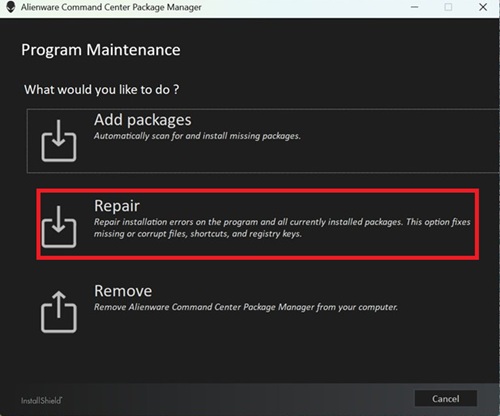
- 修復を選択し、ALIENFXコンポーネントを選択して照明効果機能を復元します。
![[修復]を選択します](https://supportkb.dell.com/img/ka0Do0000005uW6IAI/ka0Do0000005uW6IAI_ja_2.jpeg)
- 画面の手順に従って修復を完了します。
- コンピューターを再起動し、 FX タブがAlienware Command Centerに表示されているかどうかを確認します。
- それでも [FX ]タブが表示されない場合は、Alienware Command Centerの最新バージョンにアップデートしてください。Alienware Command Centerの最新バージョンへのアップデートの詳細については、 Alienware Command Centerのマニュアルおよび文書のサポートにあるユーザーズ ガイドを参照してください。
Affected Products
Alienware 18 Area-51 AA18250, Alienware Area-51 AAT2250, Alienware Area-51 AAT2265Article Properties
Article Number: 000373023
Article Type: Solution
Last Modified: 29 Jul 2026
Version: 5
Find answers to your questions from other Dell users
Support Services
Check if your device is covered by Support Services.