Alienware Command Center FX 设置在 Alienware Area-51 上不起作用
Summary: 了解如何解决在 Alienware Command Center 的 FX 选项卡中所做的更改在 Alienware Area-51 计算机的指示灯上看不到的问题。
This article applies to
This article does not apply to
This article is not tied to any specific product.
Not all product versions are identified in this article.
Symptoms
在 Alienware Command Center 版本 6.9.15.0 的 FX 选项卡中进行更改时,可能看不到对 Alienware 计算机指示灯的更改。在某些情况下,Alienware Command Center 中可能缺少 FX 选项卡。
受影响的平台:
- Alienware 18 Area-51 AA18250
- Alienware Area-51 AAT2250
- Alienware Area-51 AAT2265
受影响的软件:
- Alienware Command Center 版本 6.9.15.0
受影响的操作系统:
- Windows 11
Cause
在出厂安装映像中安装 Alienware Command Center 期间,此问题可能源于兼容性问题或缺少依赖项。
Resolution
- 转至“设置”中的“已安装应用程序”,开始 Alienware Command Center 的修复过程。
- 选择 Alienware Command Center 应用程序,然后选择修改 选项以访问修复功能。
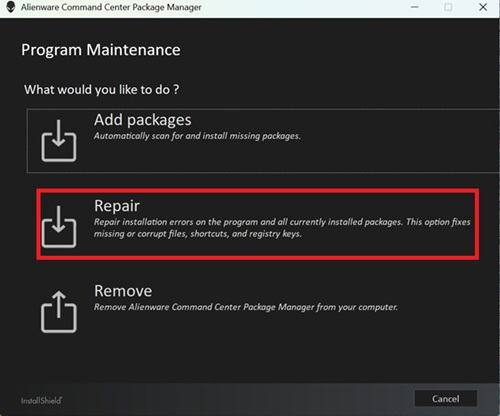
- 选择 修复并 选择 ALIENFX 组件以还原照明效果功能。
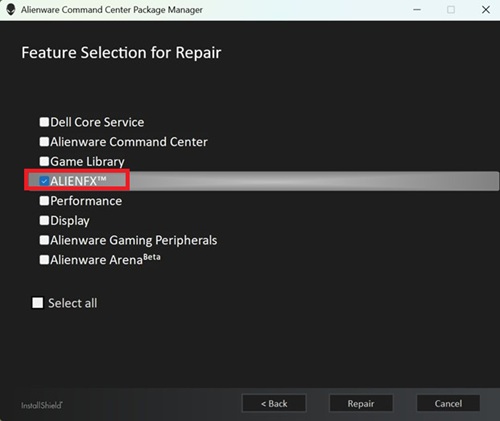
- 按照屏幕上的任意步骤完成修复。
- 重新启动计算机并检查 FX 选项卡现在是否显示在 Alienware Command Center 中。
- 如果 “FX ”选项卡仍然不可见,请更新到最新版本的 Alienware Command Center。有关更新到 Alienware Command Center 最新版本的信息,请参阅 Alienware Command Center 支持手册和文档中的用户指南。
Affected Products
Alienware 18 Area-51 AA18250, Alienware Area-51 AAT2250, Alienware Area-51 AAT2265Article Properties
Article Number: 000373023
Article Type: Solution
Last Modified: 29 Jul 2026
Version: 5
Find answers to your questions from other Dell users
Support Services
Check if your device is covered by Support Services.