NMC-installatie mislukt met de foutmelding "Unable to Verify Authentication Server's Hostname or Port" (Kan de hostnaam of poort van de authenticatieserver niet verifiëren)
Summary: NMC-installatie mislukt op een Windows-host met de fout: Kan de hostnaam of poort van de authenticatieserver niet verifiëren.
This article applies to
This article does not apply to
This article is not tied to any specific product.
Not all product versions are identified in this article.
Symptoms
- De installatie van de NetWorker Management Console (NMC) mislukt op een Windows-host met een verificatiefoutbericht.
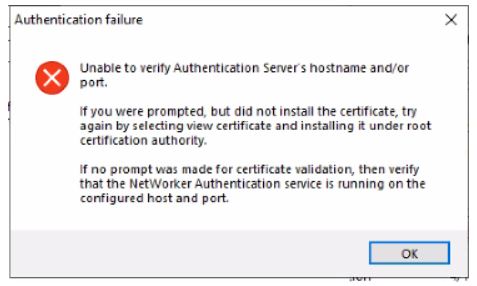
Afbeelding 1: Er wordt een verificatiefoutbericht weergegeven tijdens de installatie van NMC in Windows.
- De NMC-server is geïnstalleerd op een Windows-host die los staat van de NetWorker-server.
- De NetWorker authenticatieservice is actief.
- Poort 9090 is geopend.
nsrports -t NetWorker_ServerName -p 9090
Cause
De NMC-installatie onderhandelt met de NetWorker-authenticatieservice via TLS ouder dan versie 1.2.
Resolution
Voer het volgende uit op de NetWorker-server:
- Maak een back-up van:
C:\Program Files\EMC NetWorker\nsr\authc-server\tomcat\conf\server.xml.
- Bewerk het bestand server.xml en zoek de tekenreeks.
sslEnabledProtocols="TLSv1.2"
Wijzig de tekenreeks in
sslEnabledProtocols="TLSv1.2, TLSv1.1, TLSv1"
OPMERKING: Deze wijzigingen zijn tijdelijk en worden alleen uitgevoerd om de NMC-installatie te voltooien. Ze kunnen worden teruggezet zodra de NMC-installatie is voltooid.
- Sla de wijzigingen in het bestand op.
- Start de NetWorker-service opnieuw op.
net stop nsrexecd /y
net start nsrd
- Installeren NetWorker en NMC op de NMC-server. Deze keer wordt de prompt om het certificaat te installeren weergegeven.
- Voeg het certificaat toe aan de lijst met vertrouwde basiscertificaten. Ga door totdat de installatie is voltooid.
Affected Products
NetWorker FamilyArticle Properties
Article Number: 000219009
Article Type: Solution
Last Modified: 23 Jul 2024
Version: 4
Find answers to your questions from other Dell users
Support Services
Check if your device is covered by Support Services.