Upgrading Dell Security Management Server Virtual Appears to Stop Responding
Summary: Learn what to do if a Dell Security Management Server Virtual upgrade appears to stop responding during a GRUB update.
Symptoms
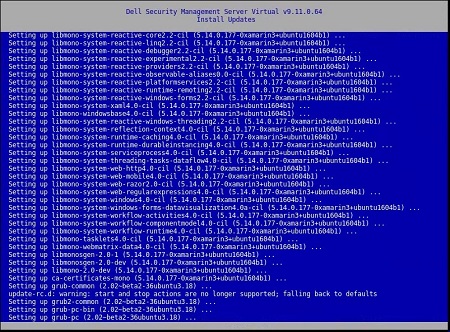
Upgrading Dell Security Management Server Virtual may fail due to a migration that appears to stop responding.
Affected Products:
- Dell Security Management Server Virtual
Dell Security Management Server Virtual requires end-user input to upgrade to a new version (v2) of Grand Unified Bootloader (GRUB). During the upgrade process, Dell Security Management Server Virtual may appear to stop responding on Setting up grub-pc.
Cause
Not applicable
Resolution
Press Enter after the Setting up grub-pc message appears to proceed with the GRUB v2 update and allow the Dell Security Management Server Virtual v10.0 upgrade to continue.
grub-pc package is installing the GRUB v2 update.
To contact support, reference Dell Data Security International Support Phone Numbers.
Go to TechDirect to generate a technical support request online.
For additional insights and resources, join the Dell Security Community Forum.