OpenManage Enterprise: SupportAssist Plugin Registration failure
Summary: When a customer attempts to register a SupportAssist (SA) plugin, they receive an error indicating the Access key or PIN is invalid. SA plugin registration fails.
This article applies to
This article does not apply to
This article is not tied to any specific product.
Not all product versions are identified in this article.
Symptoms
Issue found in SA Plugin version: 1.0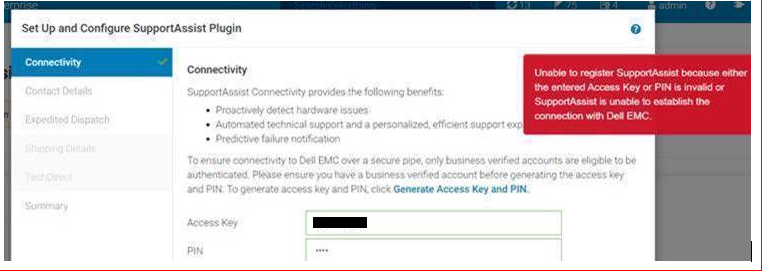
Validating in the application log: Ensure that you have the application log with debug mode.
- In the application log, check for "SRSServiceAPI#enableConnectivity." This API call where SRS enables connectivity for a given Serial number has a failed response.
[SRSServiceAPI#enableConnectivity] <--- HTTP/1.1 500 Internal Server Error (1341ms)
- The below error message indicates the enableSRSConnectivity:
UPDATE_SRS_CONNECTIVITY failed (RECIPIENT_FAILURE,-1) {"errorCode":"","errorMessage":"{\"status\":500,\"errorCode\":\"SRS028999\",\"message\":\"Error from downstream application: unknown error\"}","httpStatus":500,"errorReason":"Internal Server Error"} - Check customer Site Name if it has "&."
Cause
Root cause: The Customer Site Name has special characters such as "&" (ampersand) in it. During the plugin registration, SRS generates a certificate which converts "&" to "_ " (underscore with white spaces). While validating the serial number from the certificate, the SRS call fails.
SRS team fixed this issue in the test environment, and it has been tested and verified. Team yet to deploy the fix in a production environment.
Resolution
Workaround:
- Update customer Site name to remove "&" character replace with "and." Get a confirmation from the customer if they approve of this change in the Site name. Once customer approves, contact support@emc.com to update existing customer Site Name to remove "&" character replace with "and." Share the Site ID and current Site Name.
- Example: Update current Site Name "
XYZ Company & Co" to "XYZ Company and Co" - For guidance, see Dell internal article 000176637.
- Example: Update current Site Name "
- Retry SA plugin registration after the Site Name has been updated. Make sure to uninstall and reinstall the plugin, generate a new access key, and retry.
Affected Products
OpenManage Enterprise SupportAssist, Dell EMC OpenManage Enterprise, OpenManage Enterprise SupportAssistArticle Properties
Article Number: 000184658
Article Type: Solution
Last Modified: 05 Nov 2025
Version: 3
Find answers to your questions from other Dell users
Support Services
Check if your device is covered by Support Services.