「Dell EMC Unity:UnityでNFSエクスポート用のNIS/ネットグループを構成する方法(ユーザーによる修正可能)
Summary: UnityでNFSエクスポート用のNIS/ネットグループローカルファイル/ネットグループを構成する方法
This article applies to
This article does not apply to
This article is not tied to any specific product.
Not all product versions are identified in this article.
Instructions
前提条件:
UnityのNIS/Netgroup:
UnityはNISサーバーと連携してネットグループ>ホスト名の解決を行います。動作メカニズムは以下の通りです(詳細については、添付のtcpdump NIS.capを参照)。
Unityのローカル/ネットグループ:
手順(NISサーバーでネットグループを定義):
手順1 - Unityでの設定

メモ


手順2 - NISサーバーでの構成(CentOS6.2とそのネイティブNISソフトウェアをNISサーバーとして使用)
テスト
netgroup mfgnasrootに属していないホストからNFS共有をマウントすると、アクセスが拒否される。
- UnityでNFS共有のネットグループを構成します。
- NISサーバーを使用して、ネットワーク グループ>ホスト名の解決を行います。このKBでは、CentOS 6.2のネイティブNISサーバーをテスト用に使用します。他のNISサーバーに独自の構成方法があっても、理論は同じである必要があります。
- NIS/NFS/RPCのネットワークポートを許可します。
UnityのNIS/Netgroup:
UnityはNISサーバーと連携してネットグループ>ホスト名の解決を行います。動作メカニズムは以下の通りです(詳細については、添付のtcpdump NIS.capを参照)。
- NFSクライアントがUnityにNFS共有をマウントしようとすると、UnityはNFSクライアントのIPアドレスを取得します。
- Unityが、NFSクライアントIPアドレスを含む「YP match call」をNISサーバーに送信すると、NISサーバーはホスト名を含む「YP match reply」を返します。
- NISサーバーに正しいホスト名 エントリーがない場合(手順2)、UnityはDNS PTRクエリーをDNSサーバーに送信し、ホスト名のPTRレコードをクエリーします。
- Unityが、NFSクライアント ホスト名を含む「YP match call」をNISサーバーに送信すると、NISサーバーはネットグループ名を含む「YP match call」を返します。
Unityのローカル/ネットグループ:
- NFSクライアントがUnityにNFS共有をマウントしようとすると、UnityはNFSクライアントのIPアドレスを取得します。
- Unityは、NASサーバー内のローカルホストのホスト名とIPアドレスを一致させようとします。
- ローカルホストファイルに 正しいホスト名のエントリーがない場合(手順2)、UnityはDNS PTRクエリーをDNSサーバーに送信し、ホスト名のPTRレコードをクエリーします。
- Unityは、NASサーバー内のローカルネットグループ内のホスト名とホスト名を一致させようとします。
注意:
Unityは、Unity OE 4.1.x以降のローカル ネットグループ ファイルでのネットグループの定義をサポートしています。
Unity OE 4.1.xより前のローカル ネットグループファイルはサポートしていません。
Unityは、Unity OE 4.1.x以降のローカル ネットグループ ファイルでのネットグループの定義をサポートしています。
Unity OE 4.1.xより前のローカル ネットグループファイルはサポートしていません。
手順(NISサーバーでネットグループを定義):
手順1 - Unityでの設定
- [Hosts]メニューで、[Netgroup]に「mfgnasroot」を指定して「Test1」を追加します。
メモ
- 定義された[Netgroup]名の「mfgnasroot」は、NISサーバーのネットグループ名と一致する必要があります。
- ネットグループ名に「_」を使用しないでください。ネットグループ名に「_」を使用すると、問題が発生する可能性があります。
- [File]>[NAS Servers]>[NAS Server Properties]>[Naming Services]>[LDAP/NIS]に移動し、次のスクリーンショットに示すように、[NIS Domain]に[celerra]と指定してNISサーバーを追加します。
- [File]>[NFS Shares]>[Share Properties]>[Host Access]で、root権限を使用してネットグループ テストを追加します。
手順2 - NISサーバーでの構成(CentOS6.2とそのネイティブNISソフトウェアをNISサーバーとして使用)
- 以下のパケットがインストールされていることを確認します。
# rpm -qa|egrep -i "^yp|^rpc"
ypserv-2.19-22.el6.x86_64
ypbind-1.20.4-29.el6.x86_64
yp-tools-2.9-12.el6.x86_64
rpcbind-0.2.0-8.el6.x86_64
ypserv-2.19-22.el6.x86_64
ypbind-1.20.4-29.el6.x86_64
yp-tools-2.9-12.el6.x86_64
rpcbind-0.2.0-8.el6.x86_64
- NISドメイン名を定義します。
# cat /etc/sysconfig/network
NETWORKING=yes
HOSTNAME=nis.example.com
GATEWAY=xxx.xxx.xxx.xxx
NISDOMAIN=celerra
NETWORKING=yes
HOSTNAME=nis.example.com
GATEWAY=xxx.xxx.xxx.xxx
NISDOMAIN=celerra
- ホスト名とそのIPアドレスを 「/etc/hosts」 (青色)に追加します。ypinitは「/etc/hosts」ファイルを使用してYPデータベースを構築します。
# cat /etc/hosts
127.0.0.1localhost localhost.localdomain localhost4 localhost4.localdomain4
::1localhost localhost.localdomain localhost6 localhost6.localdomain6
xxx.xxx.xxx.xxx 5700CS139.example.com
xxx.xxx.xxx.xxx VNX5400_107.example.com
xxx.xxx.xxx.xxx nis.example.com nis
127.0.0.1localhost localhost.localdomain localhost4 localhost4.localdomain4
::1localhost localhost.localdomain localhost6 localhost6.localdomain6
xxx.xxx.xxx.xxx 5700CS139.example.com
xxx.xxx.xxx.xxx VNX5400_107.example.com
xxx.xxx.xxx.xxx nis.example.com nis
- 「/etc/netgroup」 ファイルにホスト名を追加し、次に示すようにNISドメイン名を追加します(NISドメイン フィールドが空白のままの場合、NFSマウントは失敗します)
# cat /etc/netgroup
mfgnasroot (5700CS139.example.com,,celerra) (VNX5400_107.example.com,,celerra)
mfgnasroot (5700CS139.example.com,,celerra) (VNX5400_107.example.com,,celerra)
- ypbind、ypserver、rpcbindサービスが実行されていることを確認します。
# service ypbind status
ypbind (pid16711) is running...
# service ypserv status
ypserv (pid16758) is running...
# service rpcbind status
rpcbind (pid1274) is running...
ypbind (pid16711) is running...
# service ypserv status
ypserv (pid16758) is running...
# service rpcbind status
rpcbind (pid1274) is running...
- YPデータベースを初期化します。
#/usr/lib64/yp/ypinit -m
この時点で、NISサーバーを実行するホストのリストを作成する必要があります。nis.example.comは、NISサーバー ホストのリストに含まれています。続いて、他のホストのホスト名を追加し、1行に1つのホスト名エントリーを追加します。リストが完了したら、<Control D>を入力します。
次に追加するホスト:nis.example.com
次に追加するホスト:
NISサーバーの現在のリストは次のように表示されます:
nis.example.com
Is this correct?[y/n: y]y
We need a few minutes to build the databases...
Building /var/yp/celerra/ypservers...
Running /var/yp/Makefile...
gmake[1]: Entering directory `/var/yp/celerra'
Updating passwd.byname...
Updating passwd.byuid...
Updating group.byname...
Updating group.bygid...
Updating hosts.byname...
Updating hosts.byaddr...
Updating rpc.byname...
Updating rpc.bynumber...
Updating services.byname...
Updating services.byservicename...
Updating netid.byname...
Updating protocols.bynumber...
Updating protocols.byname...
Updating mail.aliases...
Updating netgroup...
Updating netgroup.byhost...
Updating netgroup.byuser...
gmake[1]: Leaving directory `/var/yp/celerra'
nis.example.comがNISマスター サーバーとして設定されました。
これで、すべてのスレーブ サーバーで「ypinit -s nis.example.com」を実行できます。
この時点で、NISサーバーを実行するホストのリストを作成する必要があります。nis.example.comは、NISサーバー ホストのリストに含まれています。続いて、他のホストのホスト名を追加し、1行に1つのホスト名エントリーを追加します。リストが完了したら、<Control D>を入力します。
次に追加するホスト:nis.example.com
次に追加するホスト:
NISサーバーの現在のリストは次のように表示されます:
nis.example.com
Is this correct?[y/n: y]y
We need a few minutes to build the databases...
Building /var/yp/celerra/ypservers...
Running /var/yp/Makefile...
gmake[1]: Entering directory `/var/yp/celerra'
Updating passwd.byname...
Updating passwd.byuid...
Updating group.byname...
Updating group.bygid...
Updating hosts.byname...
Updating hosts.byaddr...
Updating rpc.byname...
Updating rpc.bynumber...
Updating services.byname...
Updating services.byservicename...
Updating netid.byname...
Updating protocols.bynumber...
Updating protocols.byname...
Updating mail.aliases...
Updating netgroup...
Updating netgroup.byhost...
Updating netgroup.byuser...
gmake[1]: Leaving directory `/var/yp/celerra'
nis.example.comがNISマスター サーバーとして設定されました。
これで、すべてのスレーブ サーバーで「ypinit -s nis.example.com」を実行できます。
テスト
netgroup mfgnasrootに属していないホストからNFS共有をマウントすると、アクセスが拒否される。
[root@nis ~]# mount xxx.xxx.xxx.xxx:/Test /mnt
mount.nfs: access denied by server while mounting xxx.xxx.xxx.xxx:/Test
mount.nfs: access denied by server while mounting xxx.xxx.xxx.xxx:/Test
netgroup mfgnasrootに属するホストからNFS共有をマウントすると、アクセスに成功する。
[root@5700CS139 nasadmin]# mount xxx.xxx.xxx.xxx:/Test /mnt
[root@5700CS139 nasadmin]# cd /mnt
[root@5700CS139 mnt]# touch 139
[root@VNX5400_107 nasadmin]# mount xxx.xxx.xxx.xxx:/Test /mnt
[root@VNX5400_107 nasadmin]# cd /mnt
[root@VNX5400_107 mnt]# touch 107
[root@5700CS139 nasadmin]# cd /mnt
[root@5700CS139 mnt]# touch 139
[root@VNX5400_107 nasadmin]# mount xxx.xxx.xxx.xxx:/Test /mnt
[root@VNX5400_107 nasadmin]# cd /mnt
[root@VNX5400_107 mnt]# touch 107
手順(ローカルファイルでネットグループを定義):
手順1 - Unityでの設定

メモ
ホスト ファイルの例:
# The hosts file contains a list of IP addresses with their corresponding hostnames.
#
# Each line of the hosts file defines a host and has the format:
# IP_address hostname aliases
# where:
# - IP_address is the host's IP address.
# - hostname is the official name of the host.
# - aliases provides for name changes, alternate spellings, shorter hostnames, or generic hostnames (for example, localhost).
#
# Fields are separated by any number of blanks or tab characters or both.
#
xxx.xxx.xxx.xxx opennms.example.com opennms
xxx.xxx.xxx.xxx vnx5400-1cs0.example.com vnx5400-1cs0
xxx.xxx.xxx.xxx vnx5400-1cs1.example.com vnx5400-1cs1
ネットグループ ファイルの例:
# The netgroup file contains a list of network group names with the list of hostnames for hosts belonging to the group.
# In addition to mapping hosts to network groups, it also maps users to network groups.
#
# Each line of the netgroup file defines a group and has the format:
# groupname member1 member2 ...
#
# Each member is either the name of another group or indicates specific hosts, users, and domains, referred to as a triple, as follows:
# (hostname,username,domainname)
#
# Any of the triple's three fields can be blank, meaning all the values in that field are included.
# A dash (-) in any of the fieldsmeans there are no valid values.
# For example, the following line defines a group called ouruniverse that consists of all hosts and users in the NIS domain ourdomain.
# ouruniverse (,,ourdomain)
#
# The following lines define a group called ourhosts that includes all of the hosts but none of the users in the domain,
# and a group called ourusers that includes all users but no hosts.
# ourhosts (,-,ourdomain)
# ourusers (-,,ourdomain)
#
# The following line defines a group called ouruniverse that consists of two hosts hostatlanta and hostboston.
# ouruniverse (hostatlanta,,),(hostboston,,)
#
# Note: IP addresses are not allowed.
#
# A netgroup file can include as many lines as required; however, each line must be less than 1 KB in length.
# If necessary, a line can be continued on another line by using the backslash (\) as a continuation character.
# A triple, however, cannot be split across two lines.
#
# 注: If you use a backslash (\) as a continuation character, it must be the last character on the line. It cannot be followed by spaces.
mfgnasroot (opennms,,example.com),(vnx5400-1cs1,,example.com),(vnx5400-1cs0,,example.com)
テスト
netgroup mfgnasrootに属していないホストからNFS共有をマウントすると、アクセスが拒否される。
手順1 - Unityでの設定
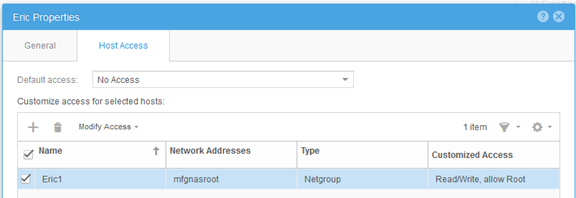
- [Hosts]メニューで、[Netgroup]に「mfgnasroot」を指定して「Eric1」を追加します。
メモ
- 定義された[Netgroup]名の「mfgnasroot」は、ローカル ファイル ネットグループのネットグループ名と一致する必要があります。
- ネットグループ名に「_」を使用しないでください。ネットグループ名に「_」を使用すると、問題が発生する可能性があります。
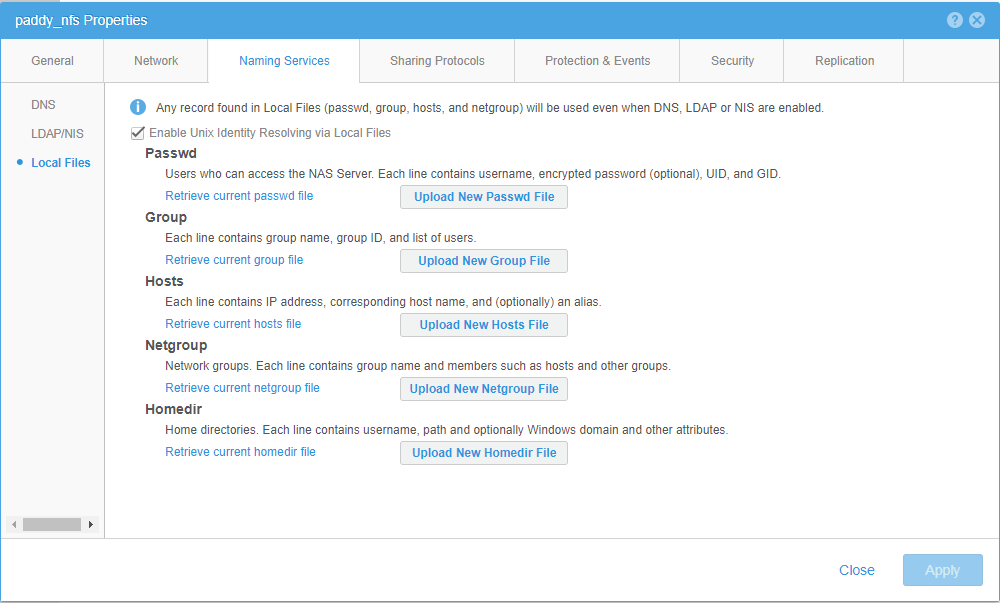
- [ファイル]>[NASサーバー]>[NASサーバーのプロパティ]>[ネーム サービス]>[ローカル ファイル]に移動します。現在のホスト ファイルとネットグループ ファイルを取得して、Notepad++で更新し、UNIX形式で保存して、最後にアップロードしてください。
ホスト ファイルの例:
# The hosts file contains a list of IP addresses with their corresponding hostnames.
#
# Each line of the hosts file defines a host and has the format:
# IP_address hostname aliases
# where:
# - IP_address is the host's IP address.
# - hostname is the official name of the host.
# - aliases provides for name changes, alternate spellings, shorter hostnames, or generic hostnames (for example, localhost).
#
# Fields are separated by any number of blanks or tab characters or both.
#
xxx.xxx.xxx.xxx opennms.example.com opennms
xxx.xxx.xxx.xxx vnx5400-1cs0.example.com vnx5400-1cs0
xxx.xxx.xxx.xxx vnx5400-1cs1.example.com vnx5400-1cs1
ネットグループ ファイルの例:
# The netgroup file contains a list of network group names with the list of hostnames for hosts belonging to the group.
# In addition to mapping hosts to network groups, it also maps users to network groups.
#
# Each line of the netgroup file defines a group and has the format:
# groupname member1 member2 ...
#
# Each member is either the name of another group or indicates specific hosts, users, and domains, referred to as a triple, as follows:
# (hostname,username,domainname)
#
# Any of the triple's three fields can be blank, meaning all the values in that field are included.
# A dash (-) in any of the fieldsmeans there are no valid values.
# For example, the following line defines a group called ouruniverse that consists of all hosts and users in the NIS domain ourdomain.
# ouruniverse (,,ourdomain)
#
# The following lines define a group called ourhosts that includes all of the hosts but none of the users in the domain,
# and a group called ourusers that includes all users but no hosts.
# ourhosts (,-,ourdomain)
# ourusers (-,,ourdomain)
#
# The following line defines a group called ouruniverse that consists of two hosts hostatlanta and hostboston.
# ouruniverse (hostatlanta,,),(hostboston,,)
#
# Note: IP addresses are not allowed.
#
# A netgroup file can include as many lines as required; however, each line must be less than 1 KB in length.
# If necessary, a line can be continued on another line by using the backslash (\) as a continuation character.
# A triple, however, cannot be split across two lines.
#
# 注: If you use a backslash (\) as a continuation character, it must be the last character on the line. It cannot be followed by spaces.
mfgnasroot (opennms,,example.com),(vnx5400-1cs1,,example.com),(vnx5400-1cs0,,example.com)
- [File]>[NFS Shares]>[Share Properties]>[Host Access]で、root権限を使用してネットグループ「Eric1」を追加します。
テスト
netgroup mfgnasrootに属していないホストからNFS共有をマウントすると、アクセスが拒否される。
[root@VNX5400-1CS0 ~]# mount xxx.xxx.xxx.xxx:/unity_nfs /mnt
mount: xxx.xxx.xxx.xxx: /unity_nfs failed, reason given by server: アクセス権が拒否される
mount: xxx.xxx.xxx.xxx: /unity_nfs failed, reason given by server: アクセス権が拒否される
netgroup mfgnasrootに属するホストからNFS共有をマウントすると、アクセスに成功する。
[root@opennms ~]# mount xxx.xxx.xxx.xxx:/unity_nfs /mnt
[root@opennms ~]# umount /mnt
[root@opennms ~]# mount xxx.xxx.xxx.xxx:/unity_nfs /mnt
[root@opennms ~]# cd /mnt
[root@opennms mnt]# touch opennms
[root@opennms mnt]# ll
total 102528
-rw-r--r-- 1 root root 104857600 Jun 12 23:51 emctest
drwxr-xr-x 6 root root 8192 Jun 13 02:42 eric
drwxr-xr-x 2 root root 8192 Jun 5 06:11 lost+found
-rw-r--r-- 1 root root 0 Jul 13 2017 opennms
[root@opennms ~]# umount /mnt
[root@opennms ~]# mount xxx.xxx.xxx.xxx:/unity_nfs /mnt
[root@opennms ~]# cd /mnt
[root@opennms mnt]# touch opennms
[root@opennms mnt]# ll
total 102528
-rw-r--r-- 1 root root 104857600 Jun 12 23:51 emctest
drwxr-xr-x 6 root root 8192 Jun 13 02:42 eric
drwxr-xr-x 2 root root 8192 Jun 5 06:11 lost+found
-rw-r--r-- 1 root root 0 Jul 13 2017 opennms
Additional Information
- UnityGUIでネットグループを追加する場合は、ネットグループ名に「_」を使用しないでください。そうしないと、「failed invalid DNS name...」というエラー メッセージが返されます。
- ネットグループ内の複数のIPアドレスの場合、NFS共有のIPアドレス/範囲を定義する必要がある場合は、ホスト メニューでホスト/サブネット エントリーを作成します。
Affected Products
Dell EMC Unity FamilyProducts
Dell EMC Unity Family, Dell EMC Unity HybridArticle Properties
Article Number: 000022455
Article Type: How To
Last Modified: 16 Jun 2025
Version: 3
Find answers to your questions from other Dell users
Support Services
Check if your device is covered by Support Services.