ViPR SRM | VMAX not Registered in Unisphere for VMAX
Summary: ViPR SRM | VMAX not Registered in Unisphere for VMAX
This article applies to
This article does not apply to
This article is not tied to any specific product.
Not all product versions are identified in this article.
Symptoms
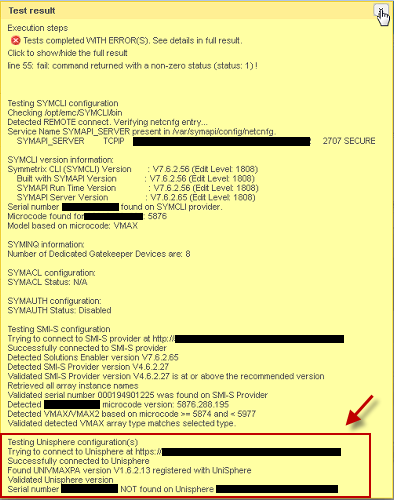
VMAX array is not reporting data in the ViPR SRM Report Library. This array had been reporting data successfully discovered, but now is not. The following error pertaining to the testing of the Unisphere configuration (at the bottom of this "Test result") was encountered:
Serial number <array s/n> NOT found on Unisphere <Unisphere host name>
Cause
Register the array in the Unisphere for VMAX, wait for a few minutes before using the Test Button.
Resolution
The array that is being registered must display in the Unisphere user interface on the main "Home" screen, All Symmetrix > Home.
1. Click the array in question.
2. Click the "Performance" Header in the above blue bar.
3. In the drop-down under "Performance", choose "Settings."
4. There are six options shown:
System Registrations
Performance Thresholds and Alerts
Reports
Metrics
Real Time Traces
Databases
Click "System Registrations."
5. The array to be registered should be seen on the "System Registrations" screen. Click the array's line to highlight.
6. Once the array's line is highlighted, there are two options towards the bottom left of the screen, "Details" & "Register." Choose "Register."
7. In the next window, verify that the correct array is in the "Selected Symmetrix(s)" window. Click either "OK" or if you want to collect "Real Time" or "Diagnostic." Clicking "Real Time" automatically checks off the box for "Diagnostic."
8. Click "OK" when ready to register the array.
9. Unisphere will update and after the screen refreshes, the array will be properly registered within Unisphere for VMAX.
Once the array has been registered in Unisphere for VMAX, wait a short period of time in order for ViPR SRM to make the proper communication with the array before checking the "Test" button again in ViPR SRM's Discovery Center.
At this point, the "Test" button in ViPR SRM's Discovery Center displays a green check and the array reports data. However, depending on the size of the array, it could take up to 24 hours for ViPR SRM to start displaying the data in the VMAX reports.
Affected Products
SRMArticle Properties
Article Number: 000065229
Article Type: Solution
Last Modified: 08 May 2025
Version: 3
Find answers to your questions from other Dell users
Support Services
Check if your device is covered by Support Services.