PowerEdge: Il file system BTRFS causa un ritardo in SUSE Linux
Summary: SUSE Linux Enterprise Server con file system BTRFS come root potrebbe riscontrare problemi di prestazioni e un ritardo intermittente.
This article applies to
This article does not apply to
This article is not tied to any specific product.
Not all product versions are identified in this article.
Symptoms
Il server è in ritardo o smette di rispondere per alcuni secondi, minuti di evento quando vengono eseguiti i comandi "ls," "mv."
Eseguire il comando "top" per visualizzare lo stato del processo in tempo reale.
Possiamo vedere i processi btrfs-cleanero btrfs-transacti è in esecuzione con CPU al 100%.
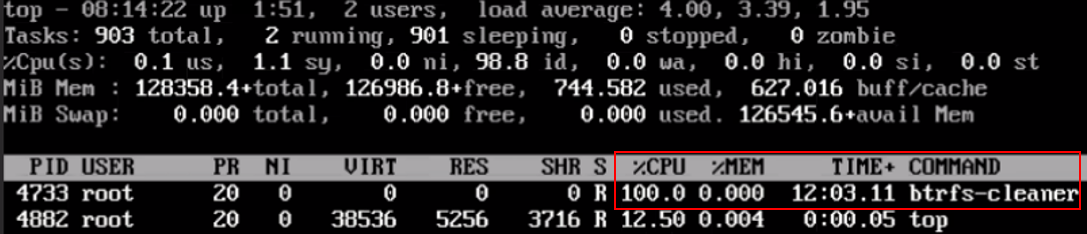
Anche se l'avvio da ISO e il mount del file system root con BTRFS. È anche in ritardo a intermittenza.
Cause
Esiste un problema di prestazioni noto che può verificarsi quando le quote sono abilitate e subvolume si verifica l'eliminazione. Affinché si verifichi il problema, l'eliminazione deve includere la rimozione e la pulizia di un sottoalbero condiviso di grandi dimensioni.
Ciò significa che, se il subvolume L'eliminazione non è un'istantanea, non causerà alcun problema. Se subvolume ha subito molte modifiche ma non ha quasi nessun sottoalbero condiviso con quello originale, anche in questo caso non ci saranno problemi. Se subvolume di per sé è piccolo, quindi ancora nessun problema.
Questo problema viene discusso in un thread a monte al fine di creare una soluzione al problema.
Resolution
Una soluzione alternativa disponibile consiste nell'identificare btrfs File system in Distress (a volte può essere il file system root) e disabilitare le quote su tale file system utilizzando la sintassi seguente:
# btrfs quota disable <filesystem>
Ad esempio, per disabilitare le quote sul file system root:
# btrfs quota disable /
Affected Products
SUSE Linux Enterprise Server 12, OEMR R240, OEMR R250, OEMR R260, OEMR R340, OEMR R350, OEMR R360, OEMR R440, OEMR R450, OEMR R540, OEMR R550, OEMR R640, OEMR R6415, OEMR R650, OEMR R650xs, OEMR R6515, OEMR R6525, OEMR R660, OEMR R660xs, OEMR R6615
, OEMR R6625, OEMR R740, OEMR R740xd, OEMR R740xd2, OEMR R7415, OEMR R7425, OEMR R750, OEMR R750xa, OEMR R750xs, OEMR R7515, OEMR R7525, OEMR R760, OEMR R760xa, OEMR R760XD2, OEMR R760xs, OEMR R7615, OEMR R7625, OEMR R840, OEMR R860, OEMR R940, OEMR R940xa, OEMR R960, OEMR XR4510c, OEMR XR4520c, OEMR XR5610, OEMR XR8610t, OEMR XR8620t, PowerEdge R240, PowerEdge R250, PowerEdge R260, PowerEdge R340, PowerEdge R350, PowerEdge R360, PowerEdge R440, PowerEdge R450, PowerEdge R540, PowerEdge R550, PowerEdge R640, PowerEdge R6415, PowerEdge R650, PowerEdge R650xs, PowerEdge R6515, PowerEdge R6525, PowerEdge R660, PowerEdge R660xs, PowerEdge R6615, PowerEdge R6625, PowerEdge R740, PowerEdge R740XD, PowerEdge R740XD2, PowerEdge R7415, PowerEdge R7425, PowerEdge R750, PowerEdge R750XA, PowerEdge R750xs, PowerEdge R7515, PowerEdge R7525, PowerEdge R760, PowerEdge R760XA, PowerEdge R760xd2, PowerEdge R760xs, PowerEdge R7615, PowerEdge R7625, PowerEdge R840, PowerEdge R860, PowerEdge R940, PowerEdge R960, PowerEdge XR4510c, PowerEdge XR4520c, PowerEdge XR5610, PowerEdge XR8610t, PowerEdge XR8620t, SUSE Linux Enterprise Server 15
...
Article Properties
Article Number: 000201630
Article Type: Solution
Last Modified: 02 Sept 2025
Version: 2
Find answers to your questions from other Dell users
Support Services
Check if your device is covered by Support Services.