PowerVault MD24xx: 서비스 태그를 찾는 방법
Summary: 다음 문서에서는 PowerVault MD24xx 인클로저에서 서비스 태그를 찾는 다양한 방법을 보여줍니다.
This article applies to
This article does not apply to
This article is not tied to any specific product.
Not all product versions are identified in this article.
Instructions
각 인클로저에는 MD24 시리즈 인클로저의 서비스 태그 및 익스프레스 서비스 코드가 포함된 레이블이 있습니다.
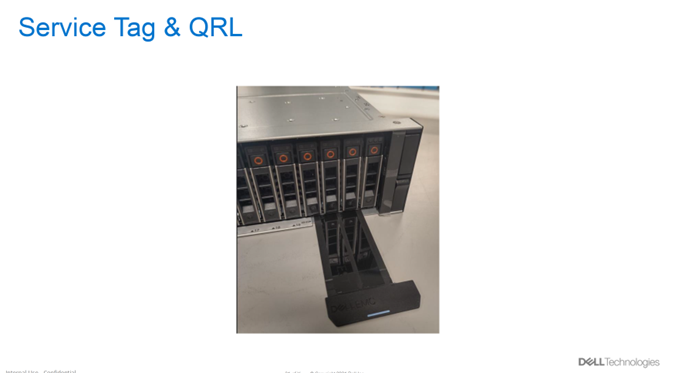
그림 1: 2U 인클로저에서 서비스 태그를 찾습니다.
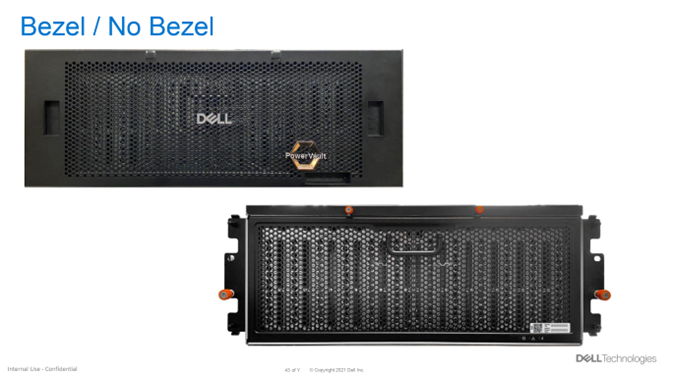
그림 2: 4U 인클로저에서 서비스 태그를 찾습니다. 베젤 또는 베젤 없음
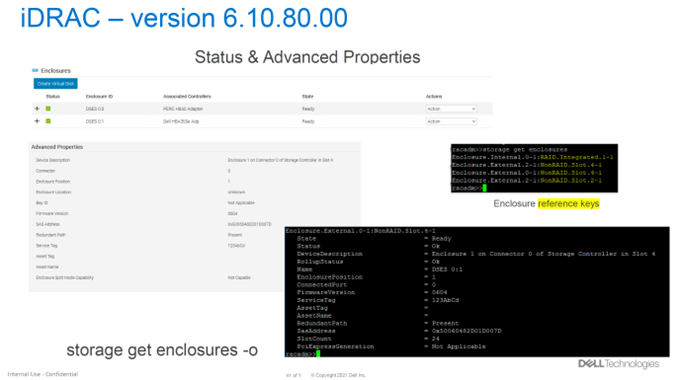
그림 3: iDRAC 버전 6.10.80.00에서 서비스 태그를 찾습니다.
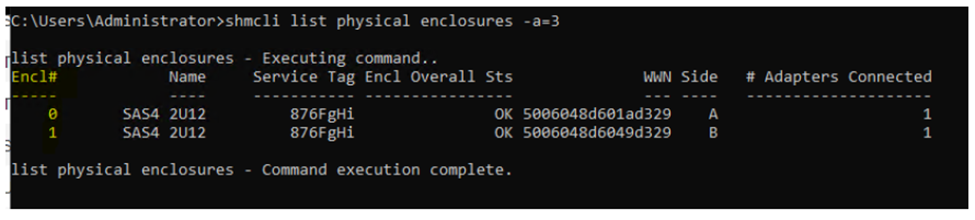
그림 4: PowerTools SHMCLI 툴을 사용하여 MD24 Series 인클로저의 서비스 태그를 찾는 방법.
2U 인클로저에서 서비스 태그 찾기
2U 인클로저(MD2412 및 MD2424)의 서비스 태그 및 익스프레스 서비스 코드는 인클로저 전면의 오른쪽 하단 풀아웃 러기지 태그에 있습니다.
그림 1: 2U 인클로저에서 서비스 태그를 찾습니다.
4U 인클로저에서 서비스 태그 찾기
4U 인클로저(MD2460)의 서비스 태그 및 익스프레스 서비스 코드는 인클로저 전면의 오른쪽 하단 레이블에 있습니다. 4U 엔클로저에는 베젤이 있으며 서비스 태그는 베젤에 있지 않고 베젤 뒤의 엔클로저에 있습니다.
그림 2: 4U 인클로저에서 서비스 태그를 찾습니다. 베젤 또는 베젤 없음
iDRAC에서 서비스 태그 찾기
다음 이미지는 iDRAC UI 인터페이스 및 RACADM(iDRAC CLI)에서 MD24 Series 인클로저의 서비스 태그를 찾는 방법을 보여줍니다.
그림 3: iDRAC 버전 6.10.80.00에서 서비스 태그를 찾습니다.
PowerTools SHMCLI에서 서비스 태그 찾기
다음 이미지는 PowerTools SHMCLI 툴을 사용하여 MD24 시리즈 인클로저의 서비스 태그를 찾는 방법을 보여줍니다.
그림 4: PowerTools SHMCLI 툴을 사용하여 MD24 Series 인클로저의 서비스 태그를 찾는 방법.
Affected Products
PowerVault MD2412, PowerVault MD2424, PowerVault MD2460Article Properties
Article Number: 000214363
Article Type: How To
Last Modified: 09 Aug 2023
Version: 4
Find answers to your questions from other Dell users
Support Services
Check if your device is covered by Support Services.