Connectrix DCX6 and DCX7-8: External ICL port numbering to switchshow Port numbering mapping for core blades
Summary: Brocade X6-8 CR32-8 and X7-8 CR64-8 : External ICL port numbering to "switchshow" Port numbering mapping for core blades
This article applies to
This article does not apply to
This article is not tied to any specific product.
Not all product versions are identified in this article.
Instructions
On Connectrix DCX6 and DCX7 CR32-8 and DCX7-8 CR64-8 core blade, each QSFP(Quad SFP) port is 4 separate 32G or 64G ports. Here is a table that shows the mapping of physical ICL ports to 32G/64G ports on the DCX6 and DCX7.
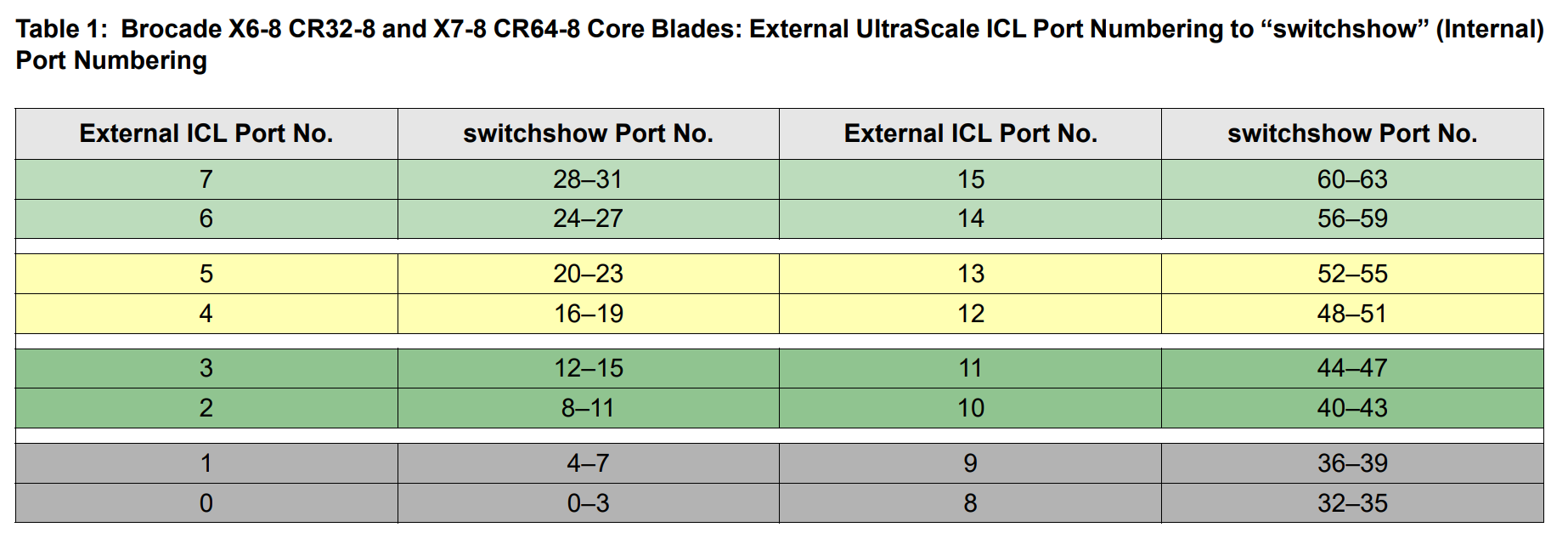
Table 1: External ICL port numbering to "switchshow" Port numbering mapping for DCX6-8 CR32-8 and DCX7-8 CR64-8 code blade
According to above table, physical ICL port 0 corresponds to port 0-3 in "switchshow" (e.g.: slot 7/port 0 -3) and so on and so forth, with four online ports, there will only be one port LED lit on the blade. Below example is output of "switchshow" and a photo taken from DCX6-8B with ICL port 2 lit (port 8-11) accordingly.

Figure 1: "switchshow"output on DCX6-8 with ICL port 2 lit (slot7/8-11)
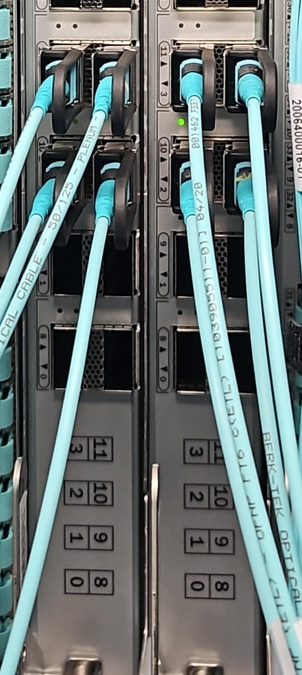
Figure 2: photo taken on DCX6-8B with ICL port 2 lit (port 8-11)
Table 1: External ICL port numbering to "switchshow" Port numbering mapping for DCX6-8 CR32-8 and DCX7-8 CR64-8 code blade
According to above table, physical ICL port 0 corresponds to port 0-3 in "switchshow" (e.g.: slot 7/port 0 -3) and so on and so forth, with four online ports, there will only be one port LED lit on the blade. Below example is output of "switchshow" and a photo taken from DCX6-8B with ICL port 2 lit (port 8-11) accordingly.
Figure 1: "switchshow"output on DCX6-8 with ICL port 2 lit (slot7/8-11)
Figure 2: photo taken on DCX6-8B with ICL port 2 lit (port 8-11)
Affected Products
Connectrix ED-DCX6-4B, Connectrix ED-DCX6-8B, Connectrix ED-DCX7-4B, Connectrix ED-DCX7-8BProducts
Connectrix, Connectrix B-Series, Connectrix B-Series HardwareArticle Properties
Article Number: 000219054
Article Type: How To
Last Modified: 06 Nov 2023
Version: 1
Find answers to your questions from other Dell users
Support Services
Check if your device is covered by Support Services.