VxRail: Disable vLCM "Enforce Live Patch" When Live Patch is not Supported.
Summary: This KB introduces additional operations that must be performed during the VxRail vLCM process. When "Enforce Live Patch" is enabled while some upgrade components do not support live patch, remediating the host reports an error indicating it must enter maintenance mode and reboot to remediate. ...
This article applies to
This article does not apply to
This article is not tied to any specific product.
Not all product versions are identified in this article.
Symptoms
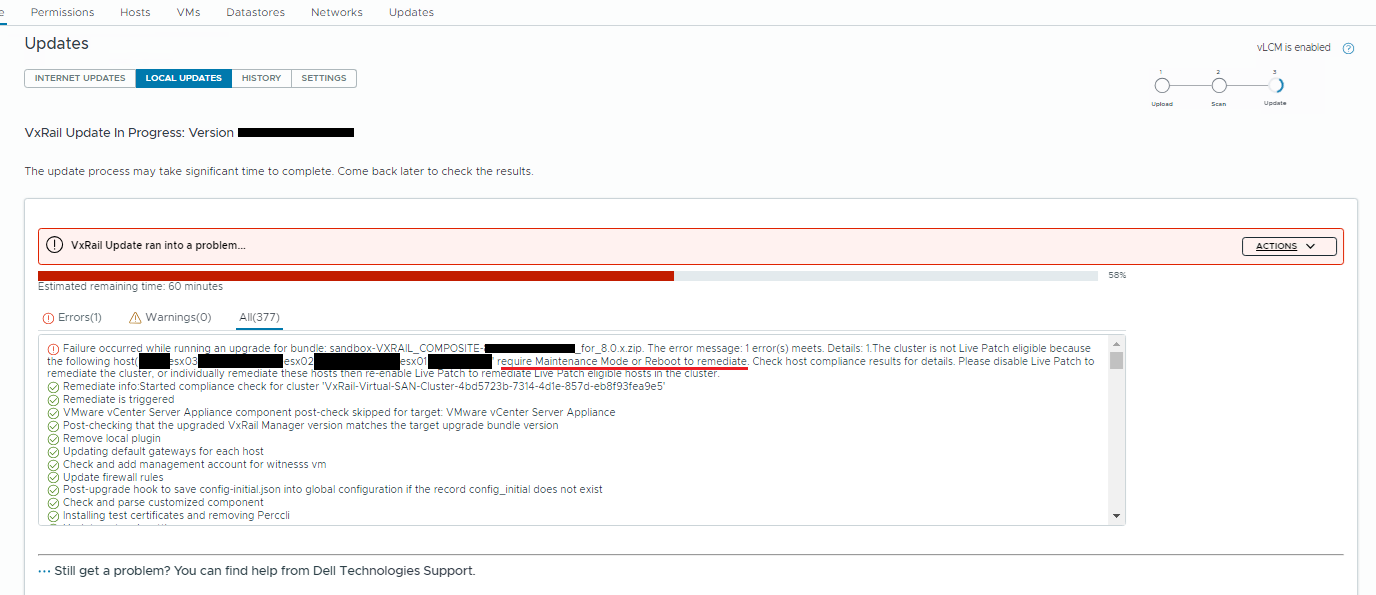
During VxRail vLCM, when the upgrade bundle components do not support live patch while vLCM remediation setting has "Enforce Live Patch" enabled, host remediation fails.
Cause
Enable "Enforce Live Patch" means that cluster remediation will proceed only using the Live Patch method. If any components are not eligible for Live Patch, the remediation stops.
Resolution
- In the cluster Updates tab select Edit the remediation settings

- Unselect the "Enforce Live Patch" box ---> Save the settings.

- Retry the cluster vLCM remediation.
Additional Information
"Live Patch" feature is introduced in vSphere 8.0 U3.
This feature allows users to apply patches to an ESXi host without requiring a reboot of the host or causing downtime to the virtual machines running on it.
"Enforce Live Patch" means the vLCM only allows "Live Patch."
However, not all patches can be applied live, some updates will still require a system reboot to take effect. The ability to apply a patch live depends on the nature of the patch.
For more information, see Broadcom article: Configuring vSphere Lifecycle Manager for Live Patches
Affected Products
VxRail, VxRail Appliance Series, VxRail SoftwareArticle Properties
Article Number: 000224786
Article Type: Solution
Last Modified: 04 Feb 2026
Version: 3
Find answers to your questions from other Dell users
Support Services
Check if your device is covered by Support Services.