Precision 7875 藍色畫面:開機期間WHEA_UNCORRECTABLE_ERROR
Summary: 是否遇到 Precision 7875 藍色畫面錯誤的問題?瞭解如何修正第三方 PCI-E USB 卡在開機期間造成的WHEA_UNCORRECTABLE_ERROR。
This article applies to
This article does not apply to
This article is not tied to any specific product.
Not all product versions are identified in this article.
Symptoms
在開機期間,當已安裝第三方 PCI-E USB 卡時, Precision 7875 Tower 可能會提示 WHEA_UNCORRECTABLE_ERROR 藍色畫面。
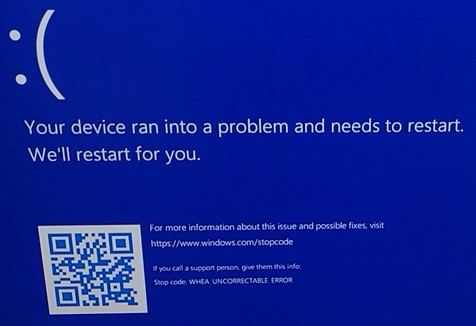
(圖 1 - 錯誤訊息)
設備隨後重新啟動,並一次又一次地顯示相同的藍屏。
只有當某些第三方 USB PCI-E 卡在購買點後安裝在 PCI-E 插槽 1 至 6 時,才會出現此藍色畫面。
當 USB PCI-E 卡安裝在 PCI-E 插槽 3 中,或從其他插槽卸下時,問題不會出現。
一些已回報此問題的插卡範例:
- 解鎖 89008
- Startech Pexusb3s44v
- 蘭伯格 PCE-US3-004
這些卡的共同點是它們使用兩個瑞薩USB控制器之一 - uPD720201或uPD720202。
Cause
此問題是由在握手階段發生的 Precision 和 PCI-E USB 卡之間的 PCI-E 信用額度大小不相符所造成。
由於插槽已連接至平台控制器集線器 (PCH),因此插槽 3 未發生此問題。
Resolution
將電腦更新至 BIOS 版本 01.08.01 或更新版本可解決問題。若要下載和安裝 BIOS,請參閱 BIOS 更新指南。
Affected Products
Precision 7875 TowerArticle Properties
Article Number: 000228523
Article Type: Solution
Last Modified: 13 Nov 2025
Version: 4
Find answers to your questions from other Dell users
Support Services
Check if your device is covered by Support Services.