Data Domain: DD3300 "The watchdog timer expired"
Summary: DD3300 The watchdog timer expired
This article applies to
This article does not apply to
This article is not tied to any specific product.
Not all product versions are identified in this article.
Instructions
Problem Description
The watchdog timer has expired.
Symptoms
IDRAC UI is showing in the system event log "The watchdog timer expired."
Similar to below screenshot and also collect TSR logs to confirm.
Applies To:
DD3300
Resolution
Perform the following resolution steps:
-
From iDRAC go to iDRAC settings >> Services >> Local Configuration >> check if both options are enabled, if yes, then change it to "disabled" similar to the below screenshot.

-
Clearing the system event log as per the following screenshot:
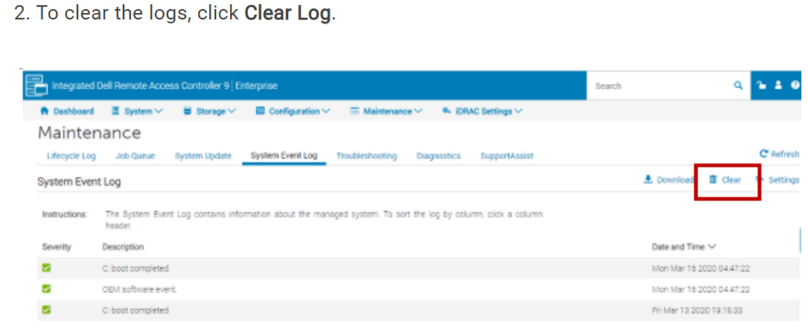
-
If the alert is still triggering, perform a warm reboot from iDRAC after applying all the previous steps as per the screenshot provided below as well:
Affected Products
DD3300 ApplianceProducts
Data DomainArticle Properties
Article Number: 000263097
Article Type: How To
Last Modified: 12 Dec 2025
Version: 3
Find answers to your questions from other Dell users
Support Services
Check if your device is covered by Support Services.