PowerStore: 시스템 상태 점검에서 일치하지 않는 DIMM 일련 번호 감지
Summary: 시스템 상태 점검에서 수행한 일관된 DIMM 일련 번호 검사에서 일치하지 않는 DIMM 일련 번호가 감지되었습니다.
This article applies to
This article does not apply to
This article is not tied to any specific product.
Not all product versions are identified in this article.
Symptoms
시스템 상태에서 "DIMM 일련 번호가 일치하지 않습니다. 지원을 요청하십시오. (KB#000207658)"를 사용합니다.
-
시스템 검사 실행:
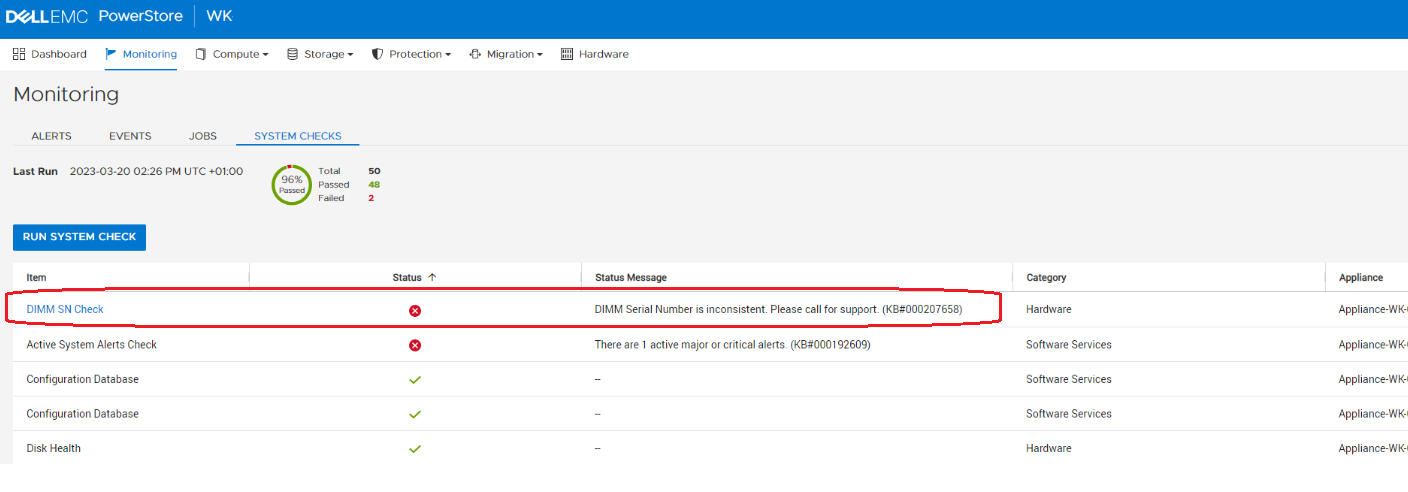
-
시스템 상태 서비스 스크립트(
svc_health_check) SSH 연결을 사용합니다.[BSC:root@6CX1BW2-A cyc_tmp]$ svc_health_check run -rhc dimm_sn_check Name Location Status Description DIMM SN Check node_a Failed DIMM Serial Number is inconsistent. Please call for support. (KB#000207658) SUMMARY Status: Failed Passed: 0 Failed: 1 Total: 1
Cause
위의 메시지는 PowerStore의 여러 구성 요소에서 DIMM SN(Serial Number)이 일치하지 않음을 나타냅니다. 이 문제는 이전 버전에서 3.x로 업그레이드한 후 DIMM 교체를 수행한 후에 발생할 수 있습니다.
이 문제가 발생하면 시스템은 계속 정상적으로 작동하지만 DIMM SN(Serial Number) 및 기타 DIMM 속성이 잘못된 값으로 표시될 수 있습니다.
Resolution
PowerStoreOS 3.5 이상으로 업그레이드하면 이 DIMM 보고 문제가 해결됩니다.
PowerStoreOS로 업그레이드하지 않고 이 보고 문제를 해결해야 하는 경우 기술 지원 부서에 지원을 문의하십시오. 신속한 주의 및 해결을 위해 KB #000207658를 참조하십시오.
Affected Products
PowerStoreArticle Properties
Article Number: 000207658
Article Type: Solution
Last Modified: 13 Jun 2025
Version: 4
Find answers to your questions from other Dell users
Support Services
Check if your device is covered by Support Services.