Avamar: Avamar Client 마이그레이션 문제를 해결하기 위해 디버그 모드를 활성화하는 방법
Summary: 마이그레이션 문제 해결을 위해 디버그 모드를 활성화하는 방법
This article applies to
This article does not apply to
This article is not tied to any specific product.
Not all product versions are identified in this article.
Instructions
디버그 모드를 설정하면 Avamar Client 마이그레이션 문제를 처리할 때(예: Avamar에서 Avamar/DataDomain(av2avdd)로의 마이그레이션 유틸리티를 사용하는 경우)가 유용할 수 있습니다.
이렇게 하려면 다음 단계를 수행하십시오.
1. 마이그레이션 작업이 구성된 Avamar Server의 Avamar Administrator UI를 엽니다.
2. "Replication/Migration" 탭으로 이동합니다.
3. 마이그레이션 그룹을 편집합니다.
4. "개요"로 이동합니다.
5. "More Options"를 클릭합니다.
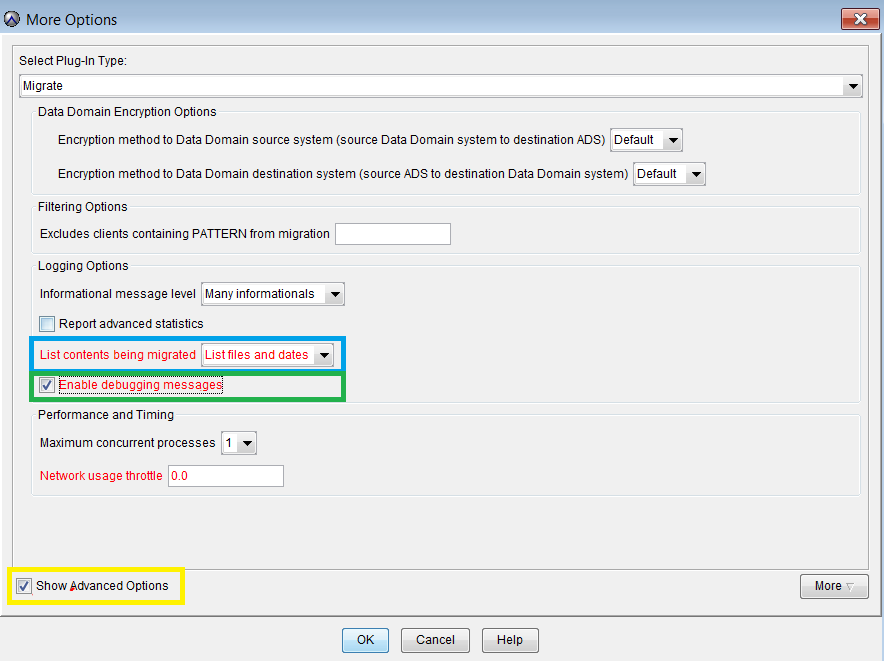
6. '마이그레이션 중인 콘텐츠 목록'이 '파일 및 날짜 나열'로 설정되어 있는지 확인합니다(위에서 파란색으로 강조 표시됨).
7. "Enable debugging messages"가 선택되어 있는지 확인합니다(위에서 녹색으로 강조 표시됨).
8. "Show Advanced Options"(위에서 노란색으로 강조 표시)를 클릭합니다.
9. "Show Advanced Options"에서 "More"를 클릭합니다.
10. 아래와 같이 "특성" "x13" 및 "특성 값" 4194304 추가합니다.
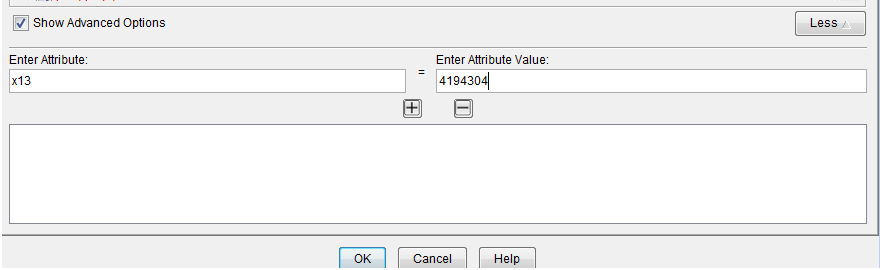
11. OK를 필요에 따라 2-3번 클릭하여 마이그레이션 그룹에 대한 변경 사항을 저장합니다.
Affected Products
AvamarProducts
AvamarArticle Properties
Article Number: 000010268
Article Type: How To
Last Modified: 04 Sept 2026
Version: 7
Find answers to your questions from other Dell users
Support Services
Check if your device is covered by Support Services.