Avamar:如何啟用偵錯模式以故障診斷 Avamar 用戶端移轉問題
Summary: 如何啟用偵錯模式以故障診斷遷移問題。
This article applies to
This article does not apply to
This article is not tied to any specific product.
Not all product versions are identified in this article.
Instructions
在處理 Avamar 用戶端移轉問題時 (例如使用 Avamar 至 Avamar/DataDomain (av2avdd) 遷移公用程式時),啟用偵錯模式會很有用。
若要執行此動作:
1.開啟設定遷移工作的 Avamar 伺服器的 Avamar Administrator UI。
2.前往「Replication/Migration」標籤
3.編輯遷移群組。
4.移至「概觀」
5.按一下「More Options」
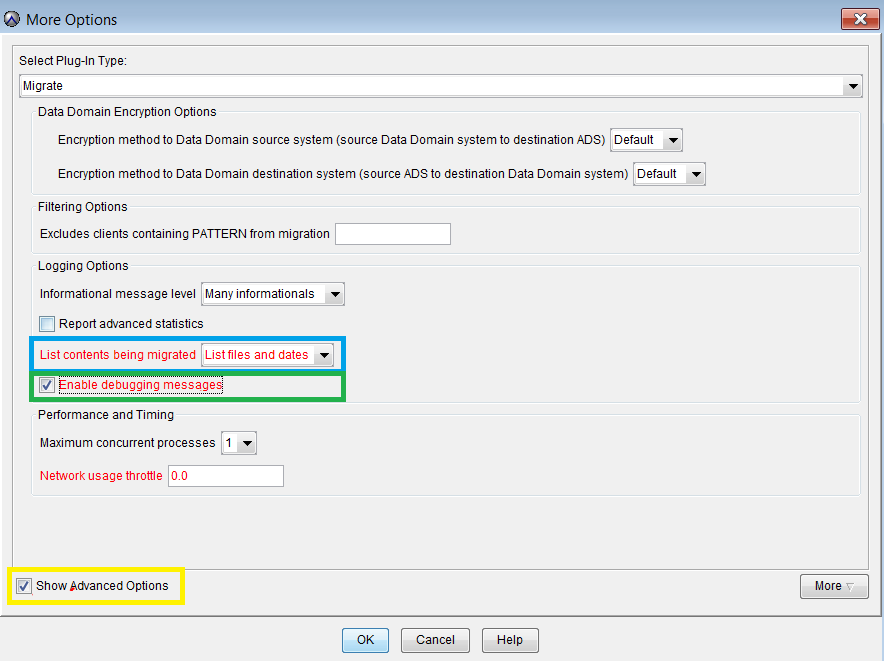
6.請確定「列出要遷移的內容」已設為「列出檔案和日期」(上方以藍色強調顯示)
7.確定已選取「啟用除錯訊息」(上方以綠色強調顯示)
8.按一下「顯示進階選項」(上方以黃色強調顯示)
9.在「顯示進階選項」中,按一下「更多」
10.新增「Attribute」、「x13」和「Attribute value」4194304如下所示:
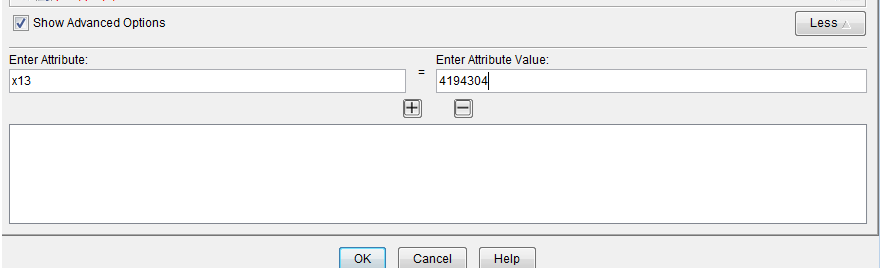
11.視需要按一下確定 2-3 次,以儲存對遷移群組所做的變更。
Affected Products
AvamarProducts
AvamarArticle Properties
Article Number: 000010268
Article Type: How To
Last Modified: 06 Sept 2026
Version: 8
Find answers to your questions from other Dell users
Support Services
Check if your device is covered by Support Services.