Dell Unity OE Matrix
Summary: Dell Unity OE Matrix, release dates, recommended code, and so on.
Instructions
Unity OE Matrix
Our Recommended Code (Target) is shown in bold. This is a highly trusted and recommended release that is evaluated against criteria including runtime time in the field, number of installations, quality metrics, and so on. Recommended Code (Target) and Latest Code released can both be the same revision level if the right criteria have been met.
| Unity OE | Release Date | Recommended Code (Target) | Notes |
| 5.5.4.0.5.037 | 28 May 2026 | 5.5 SP4 | |
| 5.5.3.0.5.057 | 12 Feb 2026 | 5.5 SP3 - Respin to replace 5.5.3.0.5.046 | |
| 5.5.2.0.5.014 | 29 Oct 2025 | 26 Jan 2026 -> present | 5.5 SP2 (Version shipping from manufacturing)
|
| 5.5.1.0.5.025 | 31 Jul 2025 | 5.5 SP1 | |
| 5.5.0.0.5.259 | 26 Mar 2025 | Minor Release - See Note 3. | |
| 5.4.1.0.5.006 | 12 Dec 2024 | 9 Jun 2025 -> 26 Jan 2026 | 5.4 SP1 |
| 5.4.0.0.5.094 | 8 Feb 2024 | 28 May 2024 -> 9 Jun 2025 | Minor Release |
| 5.3.1.0.5.008 | 12 Oct 2023 | 11 Dec 2023 -> 28 May 2024 | 5.3 SP1 |
| 5.3.0.0.5.120 | 5 May 2023 | 17 Jul 2023 -> 11 Dec 2023 | Minor Release |
| 5.2.2.0.5.004 | 27 Jan 2023 | 3 Apr 2023 -> 17 Jul 2023 | 5.2 SP2 |
| 5.2.1.0.5.013 | 28 Jul 2022 | 12 Sep 2022 -> 3 Apr 2023 | 5.2 SP1 |
| 5.2.0.0.5.173 | 29 Apr 2022 | Minor Release | |
| 5.1.3.0.5.003 | 1 Mar 2022 | 23 Mar 2022 -> 12 Sep 2022 | 5.1 SP3 |
| 5.1.2.0.5.007 | 29 Dec 2021 | 5.1 SP2 - Respin to address the Apache Log4j Remote Code Execution Vulnerability. | |
| 5.1.2.0.5.004 | 10 Dec 2021 | 5.1 SP2 - Replaced with 5.1.2.0.5.007 | |
| 5.1.1.0.5.005 | 1 Oct 2021 | 5.1 SP1 - Only contains the fix for the issue that is described in article 191642. | |
| 5.1.0.0.5.394 | 21 Jun 2021 | Minor Release | |
| 5.0.8.0.5.007 | 24 Jan 2022 | 5.0 SP8 | |
| 5.0.7.0.5.008 | 15 Apr 2021 | 16 Jun 2021 -> 23 Mar 2022 | 5.0 SP7 |
| 5.0.6.0.5.008 | 8 Jan 2021 | 8 Feb 2021 -> 16 Jun 2021 | 5.0 SP6 |
| 5.0.5.0.5.002 | 3 Dec 2020 | 5.0 SP5 - See articles 79128 and 181505. | |
| 5.0.4.0.5.012 | 10 Nov 2020 | 5.0 SP4 | |
| 5.0.3.0.5.014 | 18 May 2020 | 22 Jul 2020 -> 8 Feb 2021 | 5.0 SP3 |
| 5.0.2.0.5.009 | 16 Jan 2020 | 2 Mar 2020 -> 22 Jul 2020 | 5.0 SP2 |
| 5.0.1.0.5.011 | 23 Oct 2019 | 17 Dec 2019 -> 2 Mar 2020 | 5.0 SP1 - See article 55676 before upgrading. |
| 5.0.0.0.5.116 | 27 Jun 2019 | Major Release - Replaced with 5.0.1.0.5.011. See Note 2. | |
| 4.5.1.0.5.001 | 15 Mar 2019 | 18 Apr 2019 -> 17 Dec 2019 | 4.5 SP1 - See DTA 531208. |
| 4.5.0.0.5.096 | 31 Jan 2019 | Minor Release - Replaced with 4.5.1.0.5.001. See DTA 531208. | |
| 4.4.1.1539309879 | 30 Oct 2018 | 4.4 SP1 | |
| 4.4.0.1534750794 | 31 Aug 2018 | 6 Dec 2018 -> 18 Apr 2019 | Minor Release |
| 4.3.1.1525703027 | 16 May 2018 | 19 Sep 2018 -> 6 Dec 2018 | 4.3 SP1 |
| 4.3.0.1522077968 | 30 Mar 2018 | Minor Release | |
| 4.2.3.9670635 | 16 Mar 2018 | 20 Mar 2018 -> 19 Sep 2018 | 4.2 SP3 (not for VSA) - Includes the fix for DTA 518863. |
| 4.2.2.9632250 | 26 Jan 2018 | 4.2 SP2 | |
| 4.2.1.9535982 | 18 Oct 2017 | 20 Nov 2017 -> 20 Mar 2018 | 4.2 SP1 |
| 4.2.0.9476662 | 29 Aug 2017 | 11 Oct 2017 -> 20 Nov 2017 | 4.2.0 Respin 2 |
| 4.2.0.9433914 | 3 Aug 2017 | 4.2.0 Respin 1 - Replaced with Unity OE 4.2.0.9476662 | |
| 4.2.0.9392909 | 12 Jul 2017 | Minor Release - Replaced with 4.2.0.9433914. | |
| 4.1.2.9257522 | 17 Apr 2017 | 10 May 2017 -> 11 Oct 2017 | 4.1 SP2 |
| 4.1.1.9138882 | 14 Feb 2017 | 9 Mar 2017 -> 10 May 2017 | 4.1 SP1 |
| 4.1.0.9058043 | 12 Jan 2017 | 4.1.0 Respin - Replaced with 4.1.1.9138882 | |
| 4.1.0.8959731 | 19 Dec 2016 | Minor Release - Replaced with 4.1.0.9058043. | |
| 4.1.0.8940590 | - - | Minor Release - Factory shipping version of 4.1.0. See Note 1. | |
| 4.0.2.8627717 | 2 Nov 2016 | 4.0 SP2 - Contains fix for DTA 491210. | |
| 4.0.1.8404134 | 22 Sep 2016 | 4.0 SP1 | |
| 4.0.1.8320161 | 7 Sep 2016 | 4.0 SP1 - Replaced with 4.0.1.8404134 | |
| 4.0.1.8194551 | 16 Aug 2016 | 4.0 SP1 - Replaced with 4.0.1.8320161 | |
| 4.0.0.7329527 | 2 May 2016 | Dell Unity Release OE Version |
Table 1: Unity OE Releases
Only registered Dell users can access some of the links above.
Version schema detail
The code revision format has changed with Unity OE 4.5 as detailed here:
| Up to Unity OE 4.4.x | From Unity OE 4.5 |
| Example:
a.b.c.dddddddddd a - Major release b - Minor release c - Service Pack d - Build number |
Example:
a.b.c.d.e.fff a - Major release b - Minor release c - Service Pack d - Internal Identifier (always zero for GA versions) e - Distribution Type:
[0-3] Internal
f - Build number[4] Early Access or Beta [5] Release to manufacturing (RTM) / Ready to Ship (RTS) [6] HotFix |
Unity OE supported upgrade paths
Some Unity OE upgrades cannot be done directly and require intermediate upgrade steps. This table describes the valid upgrade paths.
Unity systems running versions older than 5.1 must upgrade to 5.4.1 before upgrading to version 5.5.
This is due to changes in support for TLS, KMIP, and encryption keys between the pre 5.1 versions and 5.5. See the New Features section of the Unity OE 5.4.1 release notes for more details.
| To 5.4.1.x | To 5.5.x | |
| From 4.x | 4.x → 5.4.1.x | 4.x → 5.4.1.x → 5.5.x |
| From 5.0.x | 5.0.x → 5.4.1.x | 5.0.x → 5.4.1.x → 5.5.x |
| From 5.1.x | 5.1.x → 5.4.1.x | 5.1.x → 5.4.1.x → 5.5.x |
| From 5.2.x | 5.2.x → 5.4.1.x | 5.2.x → 5.4.1.x → 5.5.x |
| From 5.3.x | 5.3.x → 5.4.1.x | 5.3.x → 5.4.1.x → 5.5.x |
| From 5.4.0.x | 5.4.0.x → 5.4.1.x | 5.4.0.x → 5.4.1.x → 5.5.x |
| From 5.4.1.x | 5.4.1.x → 5.4.1.x | 5.4.1.x → 5.5.x |
| From 5.5.x | unsupported | 5.5.x → 5.5.x |
Table 2: Unity OE supported upgrade paths.
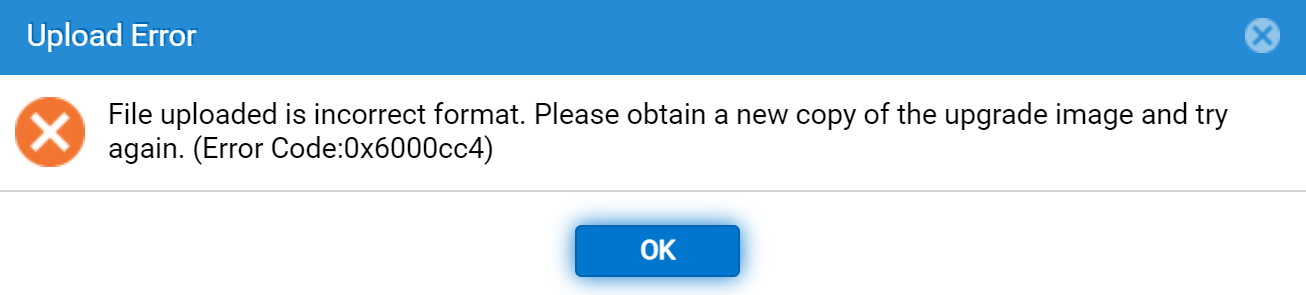
Note: If you attempt to perform an unsupported upgrade when a double-hop upgrade is required, an error message is shows as the encryption keys are not available to decrypt the upgrade package:
Additional Information
For guidance on how to identify the minimum Unity OE that is eligible for Root Cause Analysis (RCA), see:
Dell Unity - Minimum Unity OE code release eligible for Root Cause Analysis (User Correctable)
Notes
Note 1 - Unity systems shipped with OE version 4.1.0.8940590 (Factory-only version) come with this note: Due to an issue found in Unity OE (Operating Environment) 4.1.0.8940590 (currently loaded on this Unity system) we recommend upgrading to the latest Unity OE version upon install of your new system.
Note 2 - Unity XT (x80/F models) was released in the same day as Unity OE 5.0.0.0.5.116. Unity OE 5.0 and later releases are compatible with the existing Unity models x00/F and x50/F, as well as the new x80/F models (Unity XT). Note however, that the new x80/F models require a minimum of Unity OE 5.0.
Note 3 - There is a requirement to disable TLS 1.0/1.1 and enable TLS 1.2 before performing an upgrade to Unity OE 5.5. See Dell Unity: Alert 14:b20080 TLSv1.0 and TLSv1.1 are not secure. It is recommended that you use TLSv1.2 and Dell Unity: How to Disable TLS 1.0 and 1.1 on Unity Array for details.