No Stereo Mix Function on Vostro or Inspiron Desktops
Summary: This article provides information about no Stereo Mix function on Vostro or Inspiron desktop with a Cmedia Audio solution.
This article applies to
This article does not apply to
This article is not tied to any specific product.
Not all product versions are identified in this article.
Symptoms
There may be no Stereo Mix function to record.
Affected Platforms:
- Inspiron 3891
- Vostro 3681
- Vostro 3690
- Vostro 3881
- Vostro 3888
- Vostro 3890
Cause
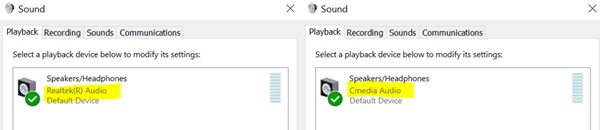
See Device Manger or Settings to see if the computer has a Cmedia Audio solution:
- Open Device Manager and see if Cmedia Audio is listed under Sound, video and game controllers.

- Go to Settings > Sound. Scroll down to Advanced and select More sound settings. See if Cmedia Audio is listed under the Playback tab.
Resolution
If Cmedia Audio is listed in Device Manager or Settings, it is an expected behavior with the Cmedia codec.
Affected Products
Inspiron 3891, Vostro 3681, Vostro 3690, Vostro 3881, Vostro 3888, Vostro 3890Article Properties
Article Number: 000184322
Article Type: Solution
Last Modified: 08 May 2026
Version: 10
Find answers to your questions from other Dell users
Support Services
Check if your device is covered by Support Services.