RecoverPoint for VMs: How to collect RPC (Plugin Server) logs
Summary: How to collect RPC logs from VC or RPC CLI
This article applies to
This article does not apply to
This article is not tied to any specific product.
Not all product versions are identified in this article.
Instructions
In the Plugin Server (RPC) you can click on system on the left, then actions up top. Then choose Collect Plugin Server logs
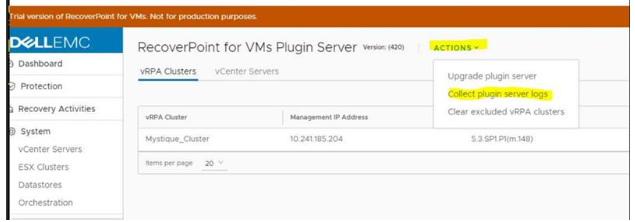
If you are having issues trying to collect RPC logs via vCenter you can run the following via console to the plugin server (if /sbin/SuSEfirewall2 off has already been performed via console then you can SSH:
- SSH (console if first time doing this) to the plugin server
- Enter this command:
/sbin/SuSEfirewall2 off
- Then we will need to run the following script to collect the needed info for a failed deployment:
/opt/rpcenter/log_collection/log_collection.sh
- The output can be found at
/opt/rpcenter/log_collection/collected_logs
- We can collect them using WinSCP or Fillzila.
Additional Information
Refer to this video:
Products
RecoverPoint for Virtual MachinesArticle Properties
Article Number: 000187621
Article Type: How To
Last Modified: 10 May 2026
Version: 9
Find answers to your questions from other Dell users
Support Services
Check if your device is covered by Support Services.