SRDF SRA: SRM UIでアレイ ペアの追加中にエラーが発生しました: SRAコマンド'discoverDevices'が失敗しました。デバイスが見つかりません。
Summary: SRDFレプリケーション アダプター(SRA)コマンド'discoverDevices'が失敗しました。デバイスが見つかりません。エラーの詳細については、EmcSrdfSraログを確認してください。
This article applies to
This article does not apply to
This article is not tied to any specific product.
Not all product versions are identified in this article.
Symptoms
Site Recovery Manager (SRM)ユーザー インターフェイス(UI)でSRAを使用してアレイ ペアを追加すると、次のエラーが表示されます。
SRA Command ‘discoverDevices’ failed. No devices found. Please check the EmcSrdfSra logs for more information on the error.
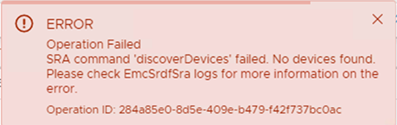
この問題は、新しいアレイ セットアップで発生します。
この問題が発生した構成に関する追加情報:
- vCenterバージョン: 6.7
- SRMバージョン: 8.1の使用方法
- SRAバージョン: 9.2.0
- Solutions Enabler (SE)バージョン: SRMにインストールされた9.2.1クライアント
- SYMAPI Server: SE 9.2.1を使用した組み込みマネージド アレイ
Cause
これらのエラーは、ローカル アレイとリモート アレイの間にSRDFペアが確立されていないために発生しました。デバイス ペアなしで構成されたSRDFグループが1つだけありました。これが、アレイの検出が失敗した理由です。
ローカル アレイとリモート アレイが応答していたのは symrdf pingの詳細を確認してください。
The 'symrdf list' command returned, "There are no RDF devices that are configured in this symmetrix."Resolution
ローカル アレイとリモート アレイの間にSRDFペアを作成し、SRDFセッションを確立します。SRM UIから追加されたペアを再試行します。その後、デバイスの検出が成功します。
Affected Products
SRDF Adapter for VMware Site Recovery ManagerArticle Properties
Article Number: 000190100
Article Type: Solution
Last Modified: 26 Aug 2025
Version: 3
Find answers to your questions from other Dell users
Support Services
Check if your device is covered by Support Services.