SRDF SRA:在 SRM UI 中新增陣列配對時發生錯誤:SRA 命令「discoverDevices」失敗。找不到任何裝置。
Summary: SRDF 複寫配接卡 (SRA) 命令「discoverDevices」失敗。找不到任何裝置。請檢查 EmcSrdfSra 記錄,以取得錯誤的詳細資訊。
This article applies to
This article does not apply to
This article is not tied to any specific product.
Not all product versions are identified in this article.
Symptoms
在 Site Recovery Manager (SRM) 使用者介面 (UI) 中使用 SRA 新增陣列配對時,會顯示下列錯誤:
SRA Command ‘discoverDevices’ failed. No devices found. Please check the EmcSrdfSra logs for more information on the error.
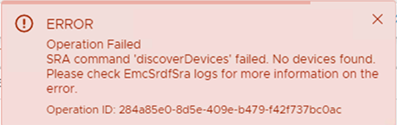
在新的陣列設定中會出現此問題。
出現此問題的組態的其他資訊:
- vCenter 版本:6.7
- SRM 版本:8.1
- SRA 版本:9.2.0
- Solutions Enabler (SE) 版本:安裝在 SRM 上的 9.2.1 用戶端
- SYMAPI 伺服器:具備 SE 9.2.1 的嵌入式管理陣列
Cause
出現這些錯誤是因為未在本機和遠端陣列之間建立 SRDF 配對。只有一個 SRDF 群組未設定任何裝置配對。這就是陣列探索失敗的原因。
本機和遠端陣列正在回應 symrdf ping。
The 'symrdf list' command returned, "There are no RDF devices that are configured in this symmetrix."Resolution
在本機和遠端陣列之間建立 SRDF 配對,並建立 SRDF 工作階段。從 SRM UI 重試新增的配對。裝置探索便會成功。
Affected Products
SRDF Adapter for VMware Site Recovery ManagerArticle Properties
Article Number: 000190100
Article Type: Solution
Last Modified: 26 Aug 2025
Version: 3
Find answers to your questions from other Dell users
Support Services
Check if your device is covered by Support Services.