PowerEdge: Cabling the Switch Stack FN410
Summary: Cabling the Switch Stack FN410.
This article applies to
This article does not apply to
This article is not tied to any specific product.
Not all product versions are identified in this article.
Instructions
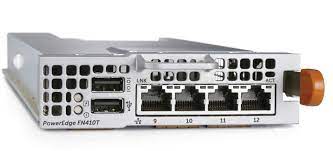
Dell PowerEdge FN I/O Aggregators are connected to operate as a single stack in a ring topology using the SFP+ or Base-T ports on the frontend ports 9 and 10. To create a stack in either a ring or daisy-chain topology, use two units on the same chassis or up to six units across multiple chassis.
Prerequisite: Before attaching the stacking cables, all Aggregators in the stack must be powered up with the default or reconfigured settings.
To connect stacking ports, use only SFP+ transceivers, SFP+ cables, and BaseT and its supported cables (separately purchased). For example:
- Insert a cable in port 9 on the first aggregator.
- Connect the cable to port 10 on the next aggregator.
- Continue this pattern on up to six aggregators.
- Connect a cable from port 9 on the last aggregator to port 10 on the first aggregator. This creates a ring topology.
Affected Products
PowerEdge FX2/FX2sArticle Properties
Article Number: 000191995
Article Type: How To
Last Modified: 22 Apr 2025
Version: 4
Find answers to your questions from other Dell users
Support Services
Check if your device is covered by Support Services.