Volume Fades in and out When Playing Music from a Cell Phone on Collaboration Displays C2422HE, C2722DE, and C3422WE
Summary: This article provides information about audio lowering when playing music from an external device that is connected to a Dell C2422HE, C2722DE, or C3422WE monitor.
Symptoms
Audio Behavior
When playing music from an external device (example: Cell phone), the music may fade away for the audience or recipients.
Both Teams and ZOOM have a "Noise Suppression" function to reduce background noise during a conference call.
In a conference call, the music from a phone may be considered as background noise, and when a person talks, the music fades in and out.
Cause
No cause information is available.
Resolution
If you want the other party to hear the music clearer, you may adjust the wanted level of noise suppression on ZOOM or Teams.
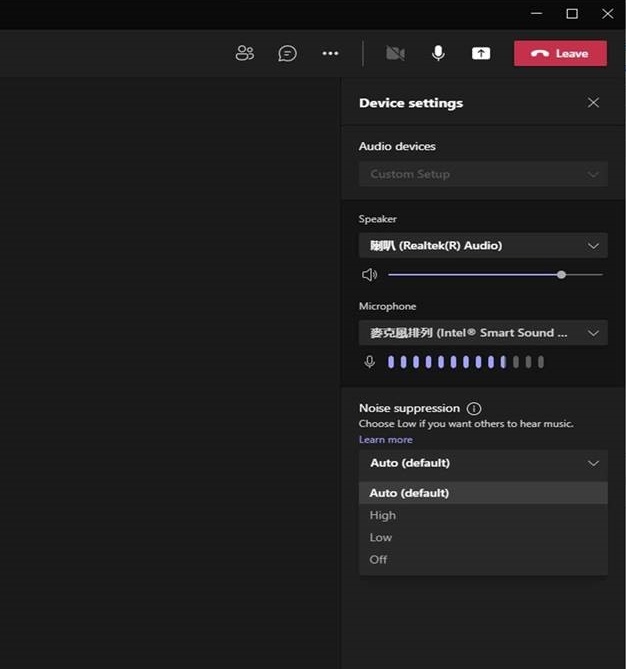
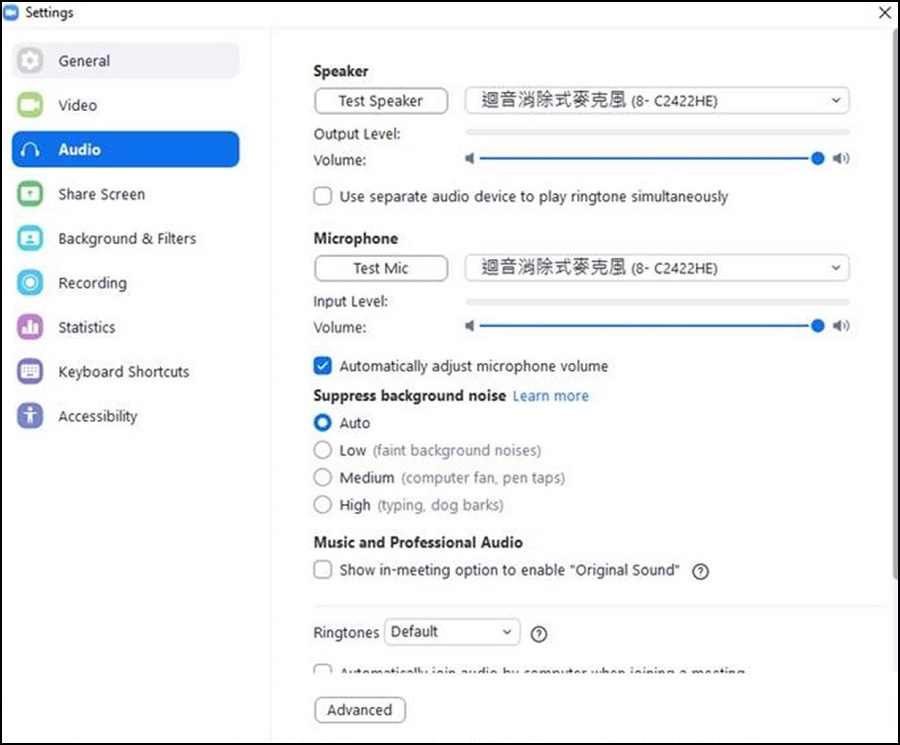
For the highest fidelity when playing music, consider using the "Enable Original Sound" option in Zoom. For Teams, there is the option to turn off "Noise Suppression."
ZOOM:
Setting → Audio → Suppress background noise, select the wanted noise suppression level.
Teams:
Device settings → Noise suppression