VCF on VxRail: Failed to load cluster details: Failed to fetch response
Summary: Adding a new VxRail cluster into the MGMT domain fails on the cluster discovery steps. "Failed to load cluster details: Failed to fetch response due to some internal error, check logs." ...
This article applies to
This article does not apply to
This article is not tied to any specific product.
Not all product versions are identified in this article.
Symptoms
VCF on VxRail 4.2.0.0 or 4.3.1.0.
Adding a new VxRail cluster into the MGMT domain fails on the cluster discovery steps.
Error:
Failed to load cluster details: Failed to fetch the response due to some internal error, check logs for more details.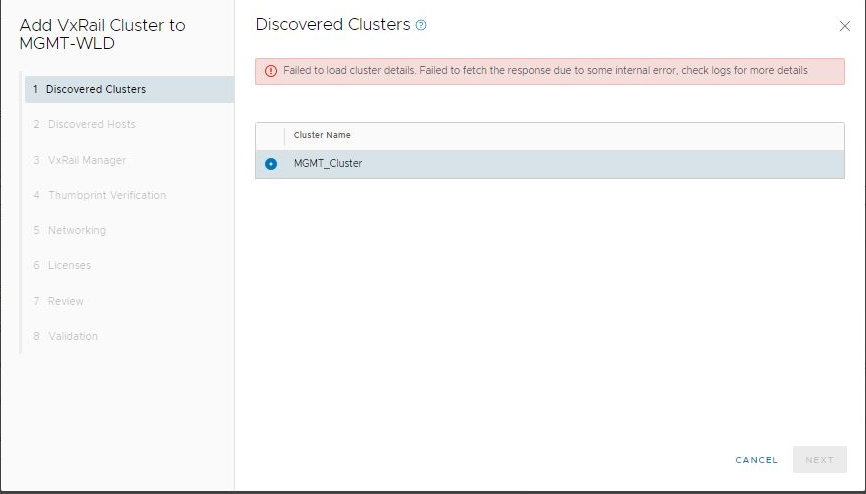
Domain manager log:
2022-01-05T03:36:54.966+0000 ERROR [vcf_dm,14bdd126c1a4dd0d,69a9] [c.v.v.v.c.s.VxRailClusterService,dm-exec-12] Error fetching clusters java.lang.NullPointerException: null at com.vmware.vxrail.vcf.clustermanager.services.VxRailClusterService.lambda$populatePortGroupMapFromNicInfo$16(VxRailClusterService.java:702)
at java.util.stream.ReferencePipeline$2$1.accept(ReferencePipeline.java:174)
at java.util.ArrayList$ArrayListSpliterator.forEachRemaining(ArrayList.java:1384)
at java.util.stream.AbstractPipeline.copyInto(AbstractPipeline.java:482)
at java.util.stream.AbstractPipeline.wrapAndCopyInto(AbstractPipeline.java:472)
at java.util.stream.ReduceOps$ReduceOp.evaluateSequential(ReduceOps.java:708)
at java.util.stream.AbstractPipeline.evaluate(AbstractPipeline.java:234)
at java.util.stream.ReferencePipeline.collect(ReferencePipeline.java:566)
Once the above discovery issue is resolved, the error below occurs. This occurs while running the multiple VDS python script to ingest the VxRail.
2022-01-19T03:49:56.275+0000 INFO [vcf_dm,d98f9b7369eef9d1,7832] [c.v.v.secure.http.HttpClientService,dm-exec-18] Response Body: {"message": "The provided vCenter credentials are not valid."}
xxx@vsphere.local account credentials was tested and able to login to vcenter and it has been also updated in lockbox for vxrail manager.
Cause
VCF port group prefixes should use the standard naming convention and should not be customized.
The above error indicates that there is a port group customization operation for cluster nodes to be injected into the management domain of SDDC Manager.
The second error indicates that there is an SSO management account issue and VxRail cluster vCenter management credential issue.
The above error indicates that there is a port group customization operation for cluster nodes to be injected into the management domain of SDDC Manager.
The second error indicates that there is an SSO management account issue and VxRail cluster vCenter management credential issue.
Resolution
To resolve the first error, modify the Network port group prefixes back to default.
Network Type Prefix
=================
Management Network
VxRail Management
vSphere vMotion
vSAN Virtual SAN
vCenter Server Network
Retry the operation to discover the cluster nodes.
To resolve the second error, ensure the VxRail manager responsible for the VxRail cluster is healthy.
- The VxRail plug-in should be working.
- The certificate CA chain should all be working.
- The host management vCenter manager account credential should be known to SDDC Manager and ensure that the user can log in using it.
See KB: 000157662(Login with support account required) - Check the vCenter SSO passwords from SDDC using:
lookup_passwordscommand - In SDDC Manager, ensure that the SSO administrator user credential was is set to capture the VxRail cluster information.
- Run the following command with root credentials to check:
curl -X GET https://vxrail manager FQDN:443/rest/vxm/v1/system/cluster-hosts -k -u "administrator@vsphere.local:<SSO Password>"
Affected Products
VxRail, VxRail Appliance Series, VxRail E560 VCF, VxRail E560F VCF, VxRail E560N VCF, VxRail G560 VCF, VxRail G560F VCF, VxRail P570 VCF, VxRail P570F VCF, VxRail P580N VCF, VxRail S570 VCF, VxRail V570 VCF, VxRail V570F VCFArticle Properties
Article Number: 000195556
Article Type: Solution
Last Modified: 09 May 2025
Version: 2
Find answers to your questions from other Dell users
Support Services
Check if your device is covered by Support Services.