網域控制站上的 SYSVOL 複寫失敗,發生 DFSR 錯誤 4612、5002 和 5008
Summary: 解決網域控制站 (DC) 上的 SYSVOL 複寫問題,以及分散式檔案系統複寫 (DFSR) 錯誤 4612、5002 和 5008。修正複寫失敗與為 SYSVOL 資料同步重新設定 DC 的指南。適用於 Windows Server 2016、2019、2022 等
This article applies to
This article does not apply to
This article is not tied to any specific product.
Not all product versions are identified in this article.
Symptoms
受影響的 DC 在 net share 命令的輸出結果中可能沒有列出 SYSVOL 或 NETLOGON 共用。
受影響 DC 的 DFSR 事件記錄包含 DFSR 錯誤 4612:
The DFS Replication service initialized SYSVOL at local path [path] and is waiting to perform initial replication. The replicated folder will remain in the initial synchronization state until it has replicated with its partner [partner].
If the server was in the process of being promoted to a domain controller, the domain controller will not advertise and function as a domain controller until this issue is resolved. This can occur if the specified partner is also in the initial synchronization state, or if sharing violations are encountered on this server or the sync partner.
If this event occurred during the migration of SYSVOL from File Replication service (FRS) to DFS Replication, changes will not replicate out until this issue is resolved. This can cause the SYSVOL folder on this server to become out of sync with other domain controllers.
它還可能包含錯誤 5002 和 5008。
Error 5002:
The DFS Replication service encountered an error communicating with partner [partner] for replication group Domain System Volume.

Partner DNS Address: [partner FQDN]

Optional data if available:
Partner WINS Address: [partner hostname]
Partner IP Address: [partner address]

The service will retry the connection periodically.
Error 5008:
The DFS Replication service failed to communicate with partner [partner] for replication group Domain System Volume. This error can occur if the host is unreachable, or if the DFS Replication service is not running on the server.

Partner DNS Address: [partner FQDN]

Optional data if available:
Partner WINS Address: [partner hostname]
Partner IP Address: [partner address]

The service will retry the connection periodically.
錯誤中指出的合作夥伴伺服器為已無法使用的 DC。
Cause
受影響的 DC 無法連線到其 SYSVOL 複寫合作夥伴。合作夥伴可能暫時或永久處於離線狀態。如果合作夥伴 DC 已降級,受影響的 DC 可能仍會在其註冊表中引用它。
Resolution
案例 1:受影響的 DC 是網域中唯一的 DC。
在這種情況下,沒有其他 DC 可從中複製 SYSVOL 資料。因此,您必須先判斷 DC 上是否存在 SYSVOL 資料。若要這麼做,請在檔案總管中瀏覽至 %windir%\SYSVOL\domain\Policies 。此資料夾應至少包含兩個具有長十六進位名稱的子資料夾。這些子資料夾中的每一個都應依次包含名為 “計算機 ”和 “使用者”的子資料夾,以及一個名為 “GPT.ini”的檔。如需有效 SYSVOL 資料的範例,請參閱以下螢幕擷取畫面:
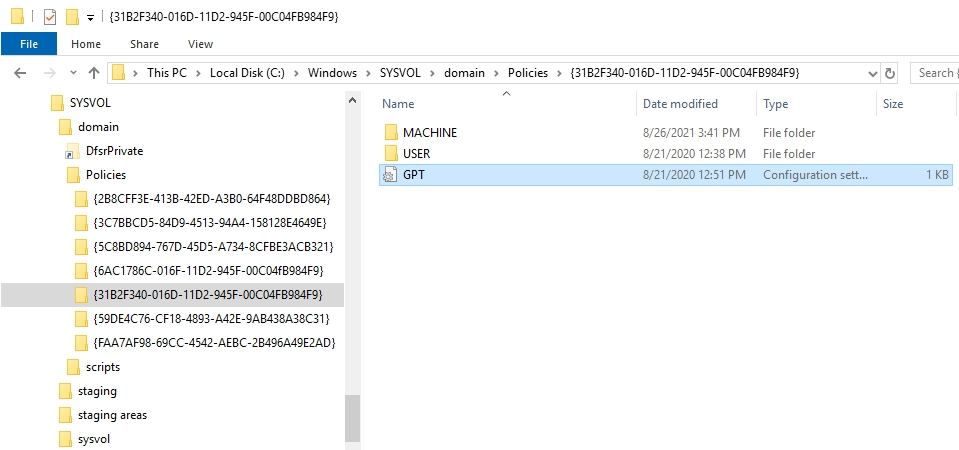
圖 1:網域控制站上的 SYSVOL 資料
如果有 SYSVOL 資料,則可使用 ADSIEdit 主控台執行授權資料同步。有關所需的步驟,請參閱如何使用分散式文件系統複製 (DFSR) 執行 SYSVOL 數據的授權同步。由於網域中只有一個 DC,因此可以略過某些步驟。
如果 SYSVOL 資料不存在,則必須從另一個 DC 的備份 (如果有備份) 取得。如果可以找到這樣的備份 請還原 SYSVOL 資料 並執行授權同步
如果 SYSVOL 資料沒有備份,則必須使用 dcgpofix 命令重新建立預設的群組原則物件。
案例 2:網域中還有其他具有有效 SYSVOL 資料的 DC。
注意:如果網域中有其他 DC,但其中任何一個 DC 上都不存在有效的 SYSVOL 資料,則適用案例 1。
在這種情況下,另一個 DC 可作為 SYSVOL 資料來源。若要啟用此功能,請在受影響的 DC 上執行下列步驟:
- 停止 DFSR 服務。
- 啟動 Registry Editor 並瀏覽至:
HKEY_LOCAL_MACHINE\SYSTEM\CurrentControlSet\Services\DFSR\Parameters\SysVols\Seeding SysVols\[Domain name].
- 找到鍵值內的上層電腦項目。這可能設定為無法使用的 DC 名稱。修改此項目,並將其值設為線上且具有最新 SYSVOL 資料複本的 DC DNS 名稱。
- 關閉 Registry Editor。
- 啟動 DFSR 服務。
- 啟動「事件檢視器」,然後重新整理 DFS 複寫事件記錄,直到事件 4604 出現,表示初始複寫已完成,且 SYSVOL 已初始化。
- 執行
net share命令,以確認 SYSVOL 和 NETLOGON 共用是否存在。
Additional Information
常見問題:
- 什麼是 SYSVOL 複寫?
SYSVOL 複製是在網域中的網域控制站 (DC) 之間複製和散佈一致的檔案和資料夾集的程序。這些檔案和資料夾稱為 SYSVOL,包含群組原則物件 (GPO)、啟動和關閉指令檔,以及登入和登出指令檔。
SYSVOL 複寫程序可確保所有 DC 具有相同的網域相關原則複本。這一點很重要,因為客戶端必須在 DC 之間訪問和同步這些檔和資料夾,GPO 和登錄腳本才能正常運行。
SYSVOL 複寫程序可確保所有 DC 具有相同的網域相關原則複本。這一點很重要,因為客戶端必須在 DC 之間訪問和同步這些檔和資料夾,GPO 和登錄腳本才能正常運行。
- 如何檢查我的 Active Directory (AD) SYSVOL 複寫狀態?
若要檢查您的 Active Directory SYSVOL 複寫狀態,請在網域控制站上開啟提升權限的命令提示字元,然後執行命令
如需完整詳細資料Microsoft請參閱 Active Directory 樹系復原 - 驗證複寫 一文。
repadmin /replsum。這可提供複製狀態摘要,包括所有潛在的錯誤或網域中的 SYSVOL 複寫問題。
如需完整詳細資料Microsoft請參閱 Active Directory 樹系復原 - 驗證複寫 一文。
Affected Products
Microsoft Windows Server 2016, Microsoft Windows Server 2019, Microsoft Windows Server 2022, Microsoft Windows 2008 Server R2, Microsoft Windows 2008 Server Service Pack 2, Microsoft Windows 2012 Server, Microsoft Windows 2012 Server R2Article Properties
Article Number: 000202712
Article Type: Solution
Last Modified: 15 May 2026
Version: 12
Find answers to your questions from other Dell users
Support Services
Check if your device is covered by Support Services.