Dell Management Server Virtual Core Server가 없음 알림
Summary: 이메일 수신자는 Dell Management Server Virtual을 v11.4로 배포 또는 업그레이드하고 이메일 알림을 활성화할 때 매시간 오류 알림을 받습니다.
This article applies to
This article does not apply to
This article is not tied to any specific product.
Not all product versions are identified in this article.
Symptoms
영향을 받는 제품:
- Dell 관리 서버 가상
영향을 받는 버전:
- v11.4
영향을 받는 운영 체제:
- Linux
수신된 이메일의 예:
Automatically generated alert from Dell Security Management Server Virtual – Service: Dell Core Server - HTTP / Event: Does not exist
Action: restart
Host: Server Hostname
Description: process is not running
Service: Dell Core Server - HTTP
Event: Does not exist
Cause
Dell Management Server Virtual 구성 요소의 상태를 확인하는 서비스가 다음과 같은 이유로 코어 서버를 수신 대기 중인 것으로 감지하지 못합니다. netstatnet-tools 패키지의 일부인 가 설치되어 있지 않습니다.
Resolution
- Dell Management Server Virtual 관리 콘솔에 로그인합니다.
참고:
- Dell Security Management Server Virtual의 기본 자격 증명은 다음과 같습니다.
- 사용자 이름:
delluser - 비밀번호:
delluser
- 사용자 이름:
- 관리자는 제품의 가상 어플라이언스 메뉴에서 기본 비밀번호를 변경할 수 있습니다.
- Main Menu에서 Launch Shell을 선택하고 키를 누릅니다.
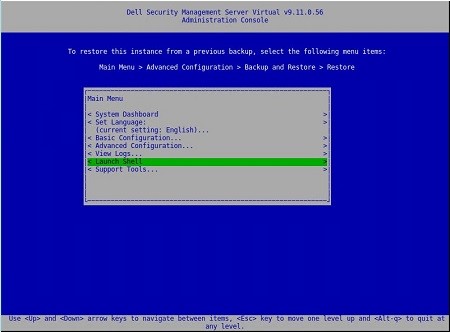
- 사용자를 다음으로 변경
dellsupport명령으로su dellsupport
 참고:
참고:- Dell Security Management Server Virtual의 기본 자격 증명은 다음과 같습니다.
- 사용자 이름:
dellsupport - 비밀번호:
dellsupport
- 사용자 이름:
- 관리자는 제품의 가상 어플라이언스 메뉴에서 기본 비밀번호를 변경할 수 있습니다.
- Dell Security Management Server Virtual의 기본 자격 증명은 다음과 같습니다.
- 의 암호를 확인합니다.
dellsupport사용자로 합니다.

- 상태 확인
netstat명령으로netstat --version. - 만약
netstat가 설치되지 않은 경우 다음 오류가 표시됩니다.

- 다음 명령을 실행합니다.
sudo apt install net-toolsNet Tools를 설치합니다. - 실행
netstat --version다시 확인하여 확인합니다.netstat이제 설치되었습니다.

- 유형
exitEnter 키를 눌러 로그아웃합니다.dellsupport.

- 유형
exitEnter 키를 눌러 셸에서 Main Menu로 로그아웃합니다.

Affected Products
Dell EncryptionArticle Properties
Article Number: 000202891
Article Type: Solution
Last Modified: 14 Sept 2026
Version: 3
Find answers to your questions from other Dell users
Support Services
Check if your device is covered by Support Services.