Dell 管理伺服器虛擬核心伺服器不存在通知
Summary: 將 Dell Management Server Virtual 部署或升級至 v11.4,並啟用電子郵件通知時,電子郵件通知的收件者會每小時收到錯誤通知。
This article applies to
This article does not apply to
This article is not tied to any specific product.
Not all product versions are identified in this article.
Symptoms
受影響的產品:
- Dell 管理伺服器虛擬
受影響的版本:
- v11.4
受影響的作業系統:
- Linux
收到的電子郵件範例:
Automatically generated alert from Dell Security Management Server Virtual – Service: Dell Core Server - HTTP / Event: Does not exist
Action: restart
Host: Server Hostname
Description: process is not running
Service: Dell Core Server - HTTP
Event: Does not exist
Cause
檢查 Dell Management Server Virtual 元件狀態的服務無法偵測到核心伺服器是否在接聽,因為 netstat,是 Net-Tool 包的一部分,未安裝。
Resolution
- 登入 Dell Management Server Virtual 管理主控台。
註:
- Dell Security Management Server Virtual 的預設登入資料為:
- 使用者名稱:
delluser - 密碼:
delluser
- 使用者名稱:
- 系統管理員可以變更在產品的虛擬裝置選單中的預設密碼。
- 從主功能表中,選取 啟動 Shell ,然後按下 Enter 鍵。
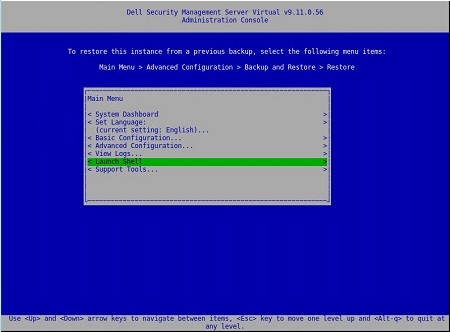
- 將使用者變更為
dellsupport使用命令su dellsupport
 註:
註:- Dell Security Management Server Virtual 的預設登入資料為:
- 使用者名稱:
dellsupport - 密碼:
dellsupport
- 使用者名稱:
- 系統管理員可以變更在產品的虛擬裝置選單中的預設密碼。
- Dell Security Management Server Virtual 的預設登入資料為:
- 確認密碼
dellsupport使用者。

- 檢查
netstat使用命令netstat --version. - 如果
netstat未安裝,您會看到以下錯誤。

- 執行命令
sudo apt install net-tools以安裝網路工具。 - 執行
netstat --version再次驗證netstat現已安裝。

- 類型
exit,然後按下 Enter 鍵以登出dellsupport.

- 類型
exit然後按 Enter 鍵以從外殼中登出主功能表。

Affected Products
Dell EncryptionArticle Properties
Article Number: 000202891
Article Type: Solution
Last Modified: 14 Sept 2026
Version: 3
Find answers to your questions from other Dell users
Support Services
Check if your device is covered by Support Services.