오픈시프트: 노드 재부팅 중에 클러스터 LCM 실패
Summary: CSI 컨트롤러 포드 및 Depot 관리자 포드가 교착 상태에 빠져 노드 재부팅 중에 LCM이 실패했습니다.
This article applies to
This article does not apply to
This article is not tied to any specific product.
Not all product versions are identified in this article.
Symptoms
OCP 업그레이드 또는 노드 재부팅 중에 LCM이 실패하고 업데이트 UI에 액세스할 수 없습니다.
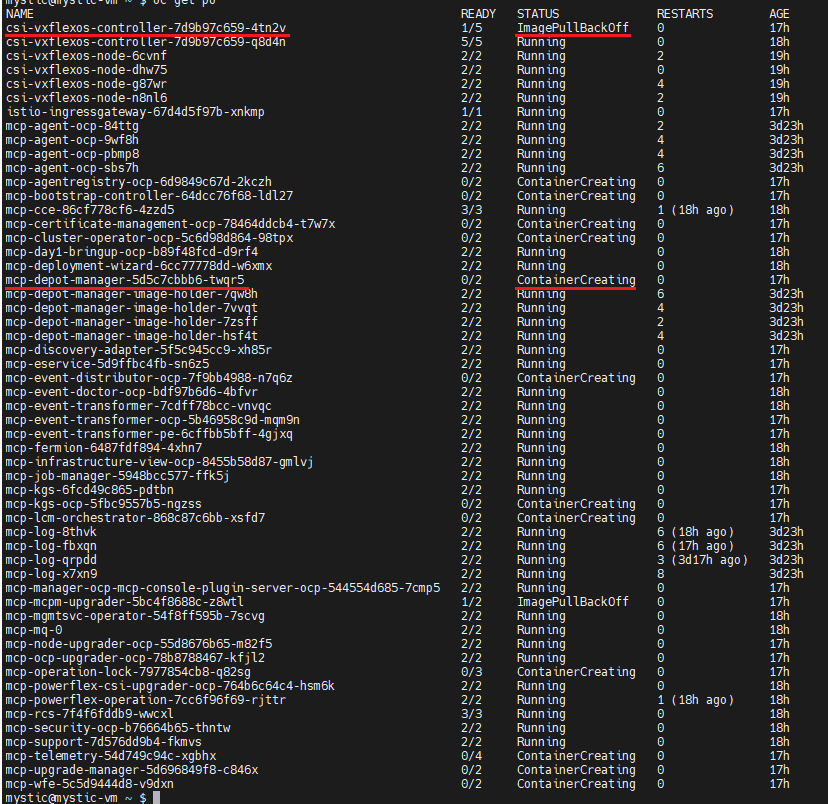
OCP에 로그인하여 "oc get pods -n dell-acp" 명령을 실행하여 포드 상태를 확인합니다. 하나의 csi-vxflexos-controller 포드가 ImagePullBackOff 상태이고 하나의 mcp-depot-manager 포드가 ContainerCreating 상태인지 확인합니다. 예:
"oc logs <pod_name> -n dell-acp -c driver" 명령을 실행하여 Pod 로그를 확인합니다.
"oc describe pod <pod_name> -n dell-acp" 명령을 실행하여 ContainerCreating mcp-depot-manager를 확인합니다(위의 예제 스크린샷에서 포드 이름은 mcp-depot-manager-5d5c7cbbb6-twqr5), 아래
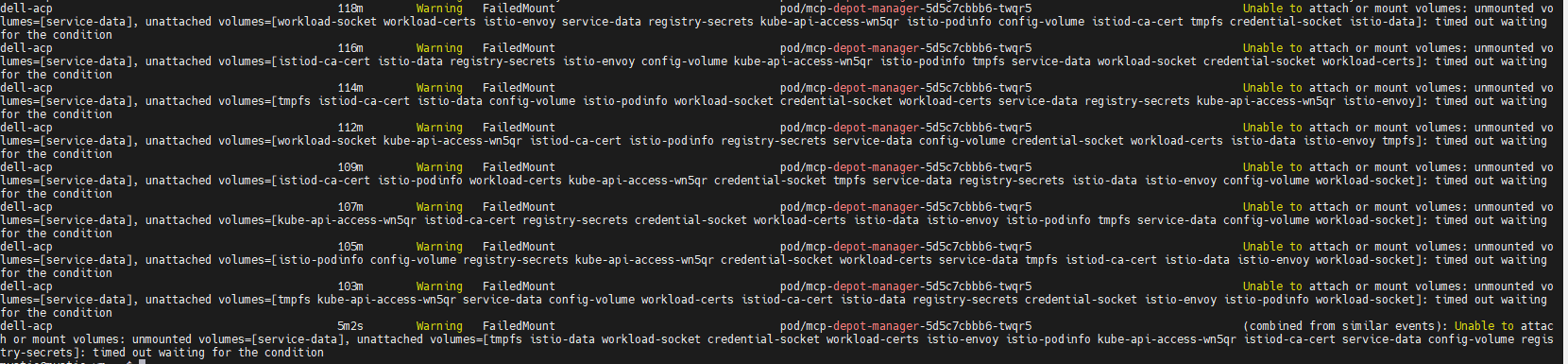
와 같이 FailedMount 경고를 보고합니다."oc get nodes" 명령을 실행하여 노드 상태를 확인합니다. SchedulingDisabled 상태에는 다음과 같은 하나의 노드가 있습니다.

OCP에 로그인하여 "oc get pods -n dell-acp" 명령을 실행하여 포드 상태를 확인합니다. 하나의 csi-vxflexos-controller 포드가 ImagePullBackOff 상태이고 하나의 mcp-depot-manager 포드가 ContainerCreating 상태인지 확인합니다. 예:
"oc logs <pod_name> -n dell-acp -c driver" 명령을 실행하여 Pod 로그를 확인합니다.
- Running csi-vxflexos-controller Pod에서 로그에 리더 리스를 획득하려고 시도하는 것으로 표시됩니다. 예:
mystic@mystic-vm:~$ oc 로그 csi-vxflexos-controller-7d9b97c659-q8d4n -n dell-acp -c driver
I0918 08:33:23.460955 1 leaderelection.go:248] 리더 리스 확보 시도 중 dell-acp/driver-csi-vxflexos-dellemc-com...
I0918 08:33:23.460955 1 leaderelection.go:248] 리더 리스 확보 시도 중 dell-acp/driver-csi-vxflexos-dellemc-com...
- ImagePullBackOff csi-vxflexos-controller Pod의 로그에 리더 리스를 획득했다고 표시됩니다. 예:
mystic@mystic-vm:~$ oc 로그 csi-vxflexos-controller-7d9b97c659-4tn2v -n dell-acp -c driver
I0918 09:07:30.076298 1 leaderelection.go:248] 리더 리스 획득 시도 중 dell-acp/driver-csi-vxflexos-dellemc-com...
I0918 09:07:46.074524 1 leaderelection.go:258] 임대 dell-acp /driver-csi-vxflexos-dellemc-com
time="2023-09-18T09:07:46Z" level=info msg="구성된 69de1f95f50e390f" allSystemNames=endpoint="https://dellpowerflex.h01.com" isDefault=true nasName=0xc000489950 nfsAcls=password="********" skipCertificateValidation=false systemID=69de1f95f50e390f user=admin
time="2023-09-18T09:07:46Z" level=info msg="드라이버 구성 파일" file=/vxflexos-config-params/driver-config-params.yaml
time="2023-09-18T09:07:46Z" level=info msg="로그 구성 파일에서 CSI_LOG_FORMAT 읽기" format=text
time="2023-09-18T09:07:46Z" level=info msg="로그 구성 파일에서 CSI_LOG_LEVEL 읽기" fields.level=debug
time="2023-09-18T09:07:46Z" level=info msg="어레이 구성 파일" 파일=/vxflexos-config/config
time="2023-09-18T09:07:46Z" level=info msg="모든 어레이를 조사합니다. 어레이 수: 1"
time="2023-09-18T09:07:46Z" level=info msg="기본 배열은 배열 ID로 설정됩니다. 69de1f95f50e390f"
time="2023-09-18T09:07:46Z" level=info msg="69de1f95f50e390f는 기본 어레이이며 VolumePrefixToSystems 맵 업데이트를 건너뜁니다. \n"
time="2023-09-18T09:07:46Z" level=info msg="array 69de1f95f50e390f 프로브가 성공적으로 완료됨"
time="2023-09-18T09:07:46Z" level=info msg="구성된 csi-vxflexos.dellemc.com" IsApproveSDCEnabled=false IsHealthMonitorEnabled=false IsQuotaEnabled=false IsSdcRenameEnabled=false MaxVolumesPerNode=0 allowRWOMultiPodAccess=false autoprobe=true externalAccess= mode=controller nfsAcls= privatedir=/dev/disk/csi-vxflexos sdcGUID=sdcPrefix=thickprovision=false
time="2023-09-18T09:07:46Z" level=info msg="ID 서비스 등록됨"
time="2023-09-18T09:07:46Z" level=info msg="컨트롤러 서비스 등록됨"
time="2023-09-18T09:07:46Z" level=info msg="추가 GRPC 서버 등록 중"
time="2023-09-18T09:07:46Z" level=info msg=serving endpoint="unix:///var/run/csi/csi.sock"
I0918 09:07:30.076298 1 leaderelection.go:248] 리더 리스 획득 시도 중 dell-acp/driver-csi-vxflexos-dellemc-com...
I0918 09:07:46.074524 1 leaderelection.go:258] 임대 dell-acp /driver-csi-vxflexos-dellemc-com
time="2023-09-18T09:07:46Z" level=info msg="구성된 69de1f95f50e390f" allSystemNames=endpoint="https://dellpowerflex.h01.com" isDefault=true nasName=0xc000489950 nfsAcls=password="********" skipCertificateValidation=false systemID=69de1f95f50e390f user=admin
time="2023-09-18T09:07:46Z" level=info msg="드라이버 구성 파일" file=/vxflexos-config-params/driver-config-params.yaml
time="2023-09-18T09:07:46Z" level=info msg="로그 구성 파일에서 CSI_LOG_FORMAT 읽기" format=text
time="2023-09-18T09:07:46Z" level=info msg="로그 구성 파일에서 CSI_LOG_LEVEL 읽기" fields.level=debug
time="2023-09-18T09:07:46Z" level=info msg="어레이 구성 파일" 파일=/vxflexos-config/config
time="2023-09-18T09:07:46Z" level=info msg="모든 어레이를 조사합니다. 어레이 수: 1"
time="2023-09-18T09:07:46Z" level=info msg="기본 배열은 배열 ID로 설정됩니다. 69de1f95f50e390f"
time="2023-09-18T09:07:46Z" level=info msg="69de1f95f50e390f는 기본 어레이이며 VolumePrefixToSystems 맵 업데이트를 건너뜁니다. \n"
time="2023-09-18T09:07:46Z" level=info msg="array 69de1f95f50e390f 프로브가 성공적으로 완료됨"
time="2023-09-18T09:07:46Z" level=info msg="구성된 csi-vxflexos.dellemc.com" IsApproveSDCEnabled=false IsHealthMonitorEnabled=false IsQuotaEnabled=false IsSdcRenameEnabled=false MaxVolumesPerNode=0 allowRWOMultiPodAccess=false autoprobe=true externalAccess= mode=controller nfsAcls= privatedir=/dev/disk/csi-vxflexos sdcGUID=sdcPrefix=thickprovision=false
time="2023-09-18T09:07:46Z" level=info msg="ID 서비스 등록됨"
time="2023-09-18T09:07:46Z" level=info msg="컨트롤러 서비스 등록됨"
time="2023-09-18T09:07:46Z" level=info msg="추가 GRPC 서버 등록 중"
time="2023-09-18T09:07:46Z" level=info msg=serving endpoint="unix:///var/run/csi/csi.sock"
"oc describe pod <pod_name> -n dell-acp" 명령을 실행하여 ContainerCreating mcp-depot-manager를 확인합니다(위의 예제 스크린샷에서 포드 이름은 mcp-depot-manager-5d5c7cbbb6-twqr5), 아래
와 같이 FailedMount 경고를 보고합니다."oc get nodes" 명령을 실행하여 노드 상태를 확인합니다. SchedulingDisabled 상태에는 다음과 같은 하나의 노드가 있습니다.
Cause
활성 csi-controller 포드와 mcp-depot-manager가 동일한 노드에 있는 경우 LCM이 노드를 재부팅하면 csi-controller 및 depot-manager가 새 노드로 다시 예약됩니다. 포드를 부팅하는 동안 csi-controller 및 depot-manager가 교착 상태에 빠져 부팅할 수 없습니다.
Resolution
1. "oc get pods -n dell-acp |grep csi" 명령을 실행하여 잘못된 상태의 CSI 컨트롤러 포드의 포드 이름을 식별합니다.
2. "oc delete pod <pod_name> -n dell-acp" 명령을 실행하여 식별된 포드를 삭제합니다.
예:

3. 몇 분 동안 기다린 후 "oc get pods -n dell-acp" 명령을 실행하여 모든 포드가 Running 상태인지 확인합니다. 여전히 csi-controller pod 또는 mcp-depot-manager가 실행되지 않는 경우 위의 단계를 다시 시도하십시오.
4. 모든 포드가 실행 중 상태가 될 때까지 LCM을 다시 시도하여 클러스터 업그레이드를 진행하십시오.
2. "oc delete pod <pod_name> -n dell-acp" 명령을 실행하여 식별된 포드를 삭제합니다.
예:
3. 몇 분 동안 기다린 후 "oc get pods -n dell-acp" 명령을 실행하여 모든 포드가 Running 상태인지 확인합니다. 여전히 csi-controller pod 또는 mcp-depot-manager가 실행되지 않는 경우 위의 단계를 다시 시도하십시오.
4. 모든 포드가 실행 중 상태가 될 때까지 LCM을 다시 시도하여 클러스터 업그레이드를 진행하십시오.
Article Properties
Article Number: 000217992
Article Type: Solution
Last Modified: 18 Sept 2026
Version: 4
Find answers to your questions from other Dell users
Support Services
Check if your device is covered by Support Services.