DELL Networking SONiC Voice VLAN
Summary: This article explains about Voice VLAN and configuration in Dell Networking SONiC. This article uses a Dell SONiC Edge 4.1 POE platform.
Instructions
| Prerequisites
|
Index
Introduction
LLDP-MED VLANs to IP Phone
Configuration Syntax
Configuration of Switch interface to carry Voice and data traffic
Configure LLDP MED
Sample Configuration
Verify
View LLDP-MED information
Introduction
The Voice VLAN feature enables switch ports to carry voice traffic from IP phones with an administrator-defined priority. When multiple devices, such as a personal computer and an IP phone, are connected to the same port, the port can be configured to use one VLAN for voice traffic and another VLAN for data traffic. Voice over IP (VoIP) traffic is inherently time-sensitive: For a network to provide acceptable service, low latency is vital. Voice VLAN enables the separation of voice and data traffic coming onto the port and can provide expedited forwarding of Voice VLAN traffic. A primary benefit of using Voice VLAN is to ensure that the sound quality of an IP phone is safeguarded from interference when the data traffic on the port is high.
| Voice VLAN is supported in Dell Networking Edge Standard SONiC 4.0 and later versions. |
How Voice VLAN works
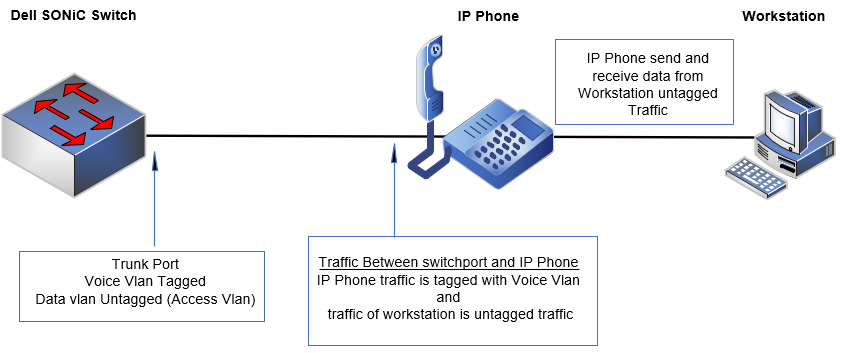
Figure 1: Sample VOIP network
The IP Phones can get the Voice VLAN ID by using many methods. Some are
- Manual Voice VLAN ID and other configurations in IP Phone
- Use a DHCP server to assign Voice VLAN ID to the IP Phone
- Use LLDP-MED in switch to send Voice VLAN to the IP Phone
LLDP-MED VLANs to IP Phone
Link Layer Discovery Protocol-Media Endpoint Discovery (LLDP-MED) is an extension to LLDP to provide interoperability between endpoint devices such as VoIP, and other networking end-devices. LLDP does not automatically apply QoS policies or the VLAN configuration. User must configure appropriate QoS policies to prioritize traffic based on Co-S and DSCP values.
LLDP-MED supports the following TLVs:
- Network policy TLV
- Power management TLV
Network policy TLV
The Network policy TLV allows the device to advertise the voice VLAN information to endpoint devices like VoIP phones. Along with voice VLAN, tagging mode, Dot1p Co-S, and DSCP values can be sent to the endpoint device. The Voice VLAN feature enables switch ports to carry voice traffic with a defined priority to enable separation of voice and data traffic coming onto the port. The separation of voice traffic ensures that the sound quality of an IP phone is safeguarded from deteriorating when the data traffic on the port is high.
We can use tagged or untagged VLAN as Voice VLAN in Dell SONiC. Below is a description about both approaches:
Use Tagged VLAN for Voice VLAN (Most common Deployment).
- We can assign the Voice VLAN manually on the IP phone or by DHCP or by LLDP-MED.
- The phone sends voice packets that are tagged with the voice VLAN; data traffic is sent untagged.
- Data and voice traffic are in two different VLANs hence they can be separated
- We Can apply QoS to Voice VLAN traffic.
Use Untagged traffic for Voice VLAN.
- IP phone sends voice traffic as untagged data.
- Voice VLAN ID must be configured to access VLAN on the Dell SONiC Switch
- Since we are using untagged traffic for voice, QoS cannot be provided
- Voice traffic cannot be differentiated from data traffic if both are untagged. To overcome this, we can use a tagged VLAN for data, but the workstation and Phone must support this.
Power management TLV
This allows the network device and endpoint device to exchange the power information, such as how the device is powered on, power priority, power required by the device, and so on.
LLDP 802.3 Power using MDI TLV
Supports power negotiation between network device and endpoint device using LLDP 802.3 power using the MDI TLV
LLDP Management TLV IP address
By default, LLDP advertises the management IP address that is configured in the system over the management interface. You can override this setting and advertise specific IPv4 and IPv6 addresses by configuring the IP addresses which LLDP advertises on an interface.
Configuration Syntax
Configuration of Switch interface to carry Voice and data traffic
| Configuration | Explanation |
| DELLSONiC# configure | Enter Configuration Mode |
| DELLSONiC(config)# interface Eth <Slot/Port> | Configure Interface |
| DELLSONiC(config)# interface Range Eth <Slot/Port- Slot/Port > | (Optional) Configure a range of interfaces |
| DELLSONiC(conf-if-Ethernet/PoX)# switchport trunk allowed VLAN add <Vlan id> | Allow Voice VLAN as tagged traffic. |
| DELLSONiC(conf-if-Ethernet/PoX)# switchport access Vlan <Vlan id> | Allow data vlan as untagged traffic (Optional). |
Dell SONiC supports untagged Voice VLAN. If Voice VLAN is untagged, use the below configuration:
| Configuration | Explanation |
| DELLSONiC# configure | Enter Configuration Mode |
| DELLSONiC(config)# interface Eth <Slot/Port> | Configure Interface |
| DELLSONiC(config)# interface Range Eth <Slot/Port- Slot/Port > | (Optional) Configure a range of interfaces |
| DELLSONiC(conf-if-Ethernet/PoX)# switchport access Vlan <Vlan id> | Allow Voice VLAN as untagged traffic. |
| DELLSONiC(conf-if-Ethernet/PoX)# switchport trunk allowed VLAN add <Vlan id> | Allow data VLAN as tagged traffic (Optional). |
Configure LLDP MED
To configure LLDP-MED, follow this procedure:Configure the LLDP-MED profile.
| Configuration | Explanation |
|---|---|
| admin@DELLSONiC:~$ sonic-cli | Enter Dell management framework CLI. |
| DELLSONiC # configure | Enter Configuration Mode |
| DELLSONiC (config)# network-policy profile profile-number | Create a network policy profile. |
| DELLSONiC (conf-network-policy)# {voice | voice-signaling} vlan [vlan-id {[cos cos-value | dscp dscp-value] | untagged }| **[dot1p {** cos cos-value | dscp value}]] |
Configure the network policy profile parameters:
|
Configure Interface
| Configuration | Explanation |
|---|---|
| admin@ DELLSONiC:~$ sonic-cli | Enter Dell management framework CLI. |
| DELLSONiC # configure | Enter Configuration Mode |
| DELLSONiC (config)# interface Eth <Slot/Port> | Configure Interface |
| DELLSONiC(config)# interface Range Eth <Slot/Port- Slot/Port > | (Optional) Configure range of interface |
| DELLSONiC (conf-if)# lldp tlv-set { management-address {ipv4|ipv6} ip-address} | (Optional) Configure an IPv4 or IPv6 management address that is used to advertise by LLDP on an interface. |
| DELLSONiC (conf-if)#lldp med-tlv-select [network-policy | power-management] | (Optional) Configure in the interface whether to advertise the LLDP-MED TLVs or not. By default, the LLDP-MED TLVs are advertised.
|
| DELLSONiC (conf-if)# network-policy profile-number | Apply the LLDP-MED network policy to an interface. |
Sample Configuration
Assume that Our Voice VLAN is 30 and Data traffic is 10. We are using Voice VLAN as tagged traffic.
Topology
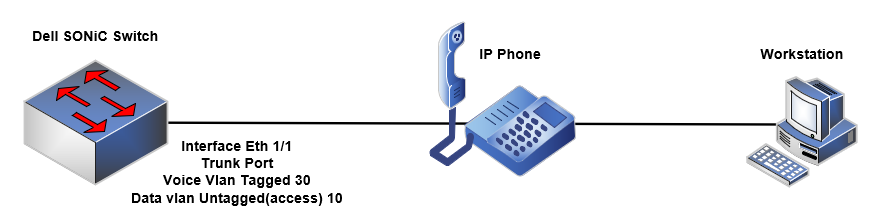
Figure 2: Topology
admin@DELLSONiC:~$ sonic-cli DELLSONiC # configure DELLSONiC (config)# network-policy profile 1 DELLSONiC (conf-network-policy)# voice vlan 30 cos 4 dscp 20 |
Apply Network Policy in interface.
DELLSONiC # configure DELLSONiC (config)# interface Eth 1/1 DELLSONiC (conf-if-Eth1/1)# network-policy 1 DELLSONiC (conf-if-Eth1/1)# end |
Configure the interface as Trunk to allow voice VLAN and data VLA.
admin@DELLSONiC:~$ sonic-cli DELLSONiC # configure DELLSONiC (config)# interface Eth 1/1 DELLSONiC (config-if-Eth1/1)# switchport trunk allowed Vlan add 30 DELLSONiC (config-if-Eth1/1)# switchport access Vlan 10 DELLSONiC (config-if-Eth1/1)# end |
Verify
Use the below command to check interface configuration. DELLSONiC# show running-configuration interface Eth 1/1 ! interface Eth1/1 mtu 9100 speed auto unreliable-los auto no shutdown switchport access Vlan 10 switchport trunk allowed Vlan 30 network-policy 1 poe priority high DELLSONiC# show running-configuration | find network-policy network-policy profile 1 voice vlan 30 cos 4 dscp 20 ! (Output Trimmed for brevity) |
View LLDP-MED information
Use the below commands to show the neighbor, table, or statistics.
DELLSONiC # show lldp neighbor Eth 1/1
-----------------------------------------------------------
LLDP Neighbors
-----------------------------------------------------------
Interface:   Eth1/1,via: LLDP
  Chassis:
    ChassisID:    0.0.0.0
    SysName:      XXXXXXXXXXX
    SysDescr:
    TTL:          120
    MgmtIP:       0.0.0.0
    Capability:   MAC_BRIDGE, ON
  Port
    PortID:       XXXXXXXXXXX
    PortDescr:
  LLDP-MED
    Device Type:  Communication Device Endpoint (Class III)
    Capability:   Capabilities, yes
    Capability:   Ext_mdi_power_pd, yes
    Capability:   Inventory, yes
    Capability:   Network_policy, yes
    LLDP-MED Network Policy for: Voice
      VLAN:       30
      Priority:   4
      DSCP:       20
    Extended Power-over-Ethernet
      Power Type: PD
      Source:     PSE
      Priority:   High
      Value:      0
    Inventory
      Hardware Rev:  XXXXXXXXXXX
      Software Rev:  XXXXXXXXXXX
      Firmware Rev:  XXXXXXXXXXX
      Serial Number: XXXXXXXXXXX
      Manufacturer:  XXXXXXXXXXX
      Model:         XXXXXXXXXXX
----------------------------------------------------------- |
DELLSONiC # show lldp table ------------------------------------------------------------------------------------------------------ LocalPort RemoteDevice RemotePortID Capability RemotePortDescr ------------------------------------------------------------------------------------------------------- Eth1/1 XXXXXXXXXXX XXXXXXXXXXX B |
DELLSONiC # show lldp statistics Eth 1/1
LLDP Statistics
---------------------------------
Interface: Eth1/1
    Transmitted      : 3267
    Received         : 2319
    Discarded        : 0
    Unrecognized TLV : 0
    Ageout           : 0
--------------------------------- |