PowerEdge: How to identify the slot for disk replacement with sdX in linux
Summary: Learn how to identify the slot for a disk replacement with sdX in Linux and a controller in Host Bus Adapter (HBA) mode.
This article applies to
This article does not apply to
This article is not tied to any specific product.
Not all product versions are identified in this article.
Instructions
Here is an example of how to identify the hard disk physical slot for disk replacement based on the /dev/sdX with HBA direct connection mode in Linux.
Example: /dev/sdg is having issue that must be replaced. There are multiple disks in the server. Which slot is the "sdg" located?
First, we can get the serial number and sas_addr from smartctl:
[root@node001 ~]# smartctl -a /dev/sdg | head -n15
smartctl 7.1 2020-04-05 r5049 [x86_64-linux-4.18.0-193.el8.x86_64] (local build)
Copyright (C) 2002-19, Bruce Allen, Christian Franke, www.smartmontools.org

=== START OF INFORMATION SECTION ===
Vendor:               WD
Product:              WD1460BKFG-18P2V
Revision:             D1E4
Compliance:           SPC-4
User Capacity:        146,815,733,760 bytes [146 GB]
Logical block size:   512 bytes
Rotation Rate:        10000 rpm
Form Factor:          2.5 inches
Logical Unit id:      0x50014ee300084694
Serial number:        WXD1EC0WJ490
Device type:          disk
[root@node001 ~]#
If the iDRAC web interface is available, open it and find the disk slot by matching the SAS address or serial number.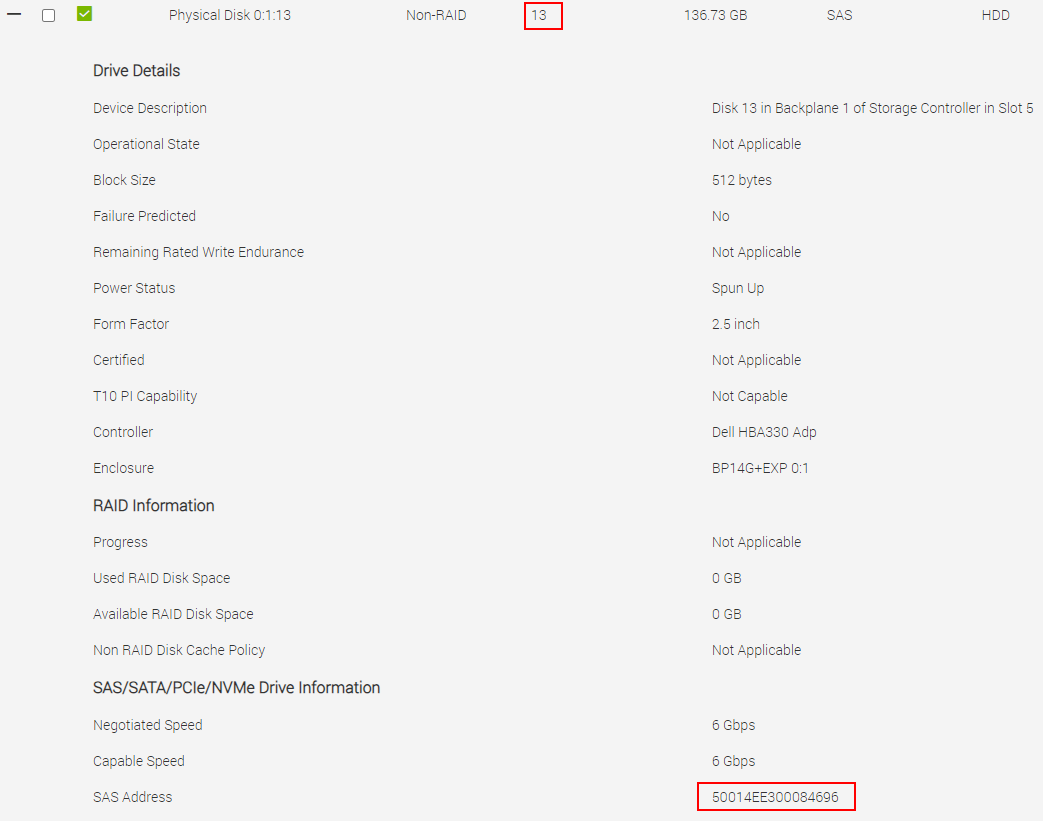
You can match the serial number in the iDRAC UI.
If iDRAC is not available, you can identify the disk ID with:
[root@node001 ~]# lsscsi  | grep 'sdg'
[1:0:6:0]    disk    WD       WD1460BKFG-18P2V D1E4  /dev/sdg
[root@node001 ~]#
Find the slot number using grep for the disk ID. If multiple slot records are returned, the last one is the latest updated slot.
[root@node001 ~]# dmesg | grep '1:0:6:0' | grep slot
[    3.989140] scsi 1:0:6:0: enclosure logical id (0x500056b31234abff), slot(13)
[root@node001 ~]#
Affected Products
SUSE Linux Enterprise Server 11, SUSE Linux Enterprise Server 12, PowerEdge XR2, Poweredge C4140, PowerEdge C6420, PowerEdge C6520, PowerEdge C6525, PowerEdge C6615, PowerEdge C6620, PowerEdge FC640, PowerEdge HS5610, PowerEdge HS5620, PowerEdge M640
, PowerEdge M640 (for PE VRTX), PowerEdge MX740C, PowerEdge MX750c, PowerEdge MX760c, PowerEdge MX840C, PowerEdge R240, PowerEdge R250, PowerEdge R260, PowerEdge R340, PowerEdge R350, PowerEdge R360, PowerEdge R440, PowerEdge R450, PowerEdge R540, PowerEdge R550, PowerEdge R640, PowerEdge R6415, PowerEdge R650, PowerEdge R650xs, PowerEdge R6515, PowerEdge R6525, PowerEdge R660, PowerEdge R660xs, PowerEdge R6615, PowerEdge R6625, PowerEdge R740, PowerEdge R740XD, PowerEdge R740XD2, PowerEdge R7415, PowerEdge R7425, PowerEdge R750, PowerEdge R750XA, PowerEdge R750xs, PowerEdge R7515, PowerEdge R7525, PowerEdge R760, PowerEdge R760XA, PowerEdge R760xd2, PowerEdge R760xs, PowerEdge R7615, PowerEdge R7625, PowerEdge R840, PowerEdge R860, PowerEdge R940, PowerEdge R940xa, PowerEdge R960, PowerEdge T140, PowerEdge T150, PowerEdge T160, PowerEdge T340, PowerEdge T350, PowerEdge T360, PowerEdge T440, PowerEdge T550, PowerEdge T560, PowerEdge T640, PowerEdge XE2420, PowerEdge XE7100, PowerEdge XE7420, PowerEdge XE7440, PowerEdge XE8545, PowerEdge XE8640, PowerEdge XE9640, PowerEdge XE9680, PowerEdge XE9680L, PowerEdge XR11, PowerEdge XR12, Red Hat Enterprise Linux Version 6, Red Hat Enterprise Linux Version 7, Red Hat Enterprise Linux Version 9, Red Hat Enterprise Linux Version 8, SUSE Linux Enterprise Server 15
...
Article Properties
Article Number: 000218961
Article Type: How To
Last Modified: 12 May 2025
Version: 2
Find answers to your questions from other Dell users
Support Services
Check if your device is covered by Support Services.