Dolby Vision HDR is Always on and Color Looks Washed-Out
Summary: This article provides information about Dolby Vision HDR always being on and color looking washed out when connected to an Alienware AW3225QF gaming monitor.
Symptoms
Affected Products:
- Alienware 32 4K QD OLED Gaming Monitor AW3225QF
Affected Operating Systems:
- Windows 11
- Windows 10
Dolby Vision HDR is Always on and Color Looks Washed-Out.
Cause
This is a behavior of Windows 10 and Windows 11. When HDR10 content is displayed, Windows converts the HDR10 content to Dolby Vision HDR content (the color might look washed out). Dolby Vision HDR is always On, and Smart HDR is disabled in the OSD. This happens only when the application is NOT in full screen.
In a full-screen environment, HDR10 is displayed and Smart HDR if available in the OSD Menu.
Resolution
This is the behavior of the operating system (Windows 10 or 11).
Upgrade the monitor firmware (found on the AW3225QF product page) version to M2B103 or later. The firmware has an option in the OSD to disable Dolby Vision.
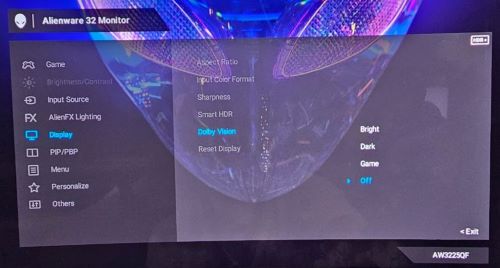
Dolby Vision should be turned on (Bright, Dark, or Game) only if the content is Dolby.