PowerProtect:NTP:时区问题 - ErrorResponse [code=404, reason=指定的时区 ID 无效
Summary: 尝试设置 GMT +1 时,网络时间协议服务器报告 404 无效时区错误
This article applies to
This article does not apply to
This article is not tied to any specific product.
Not all product versions are identified in this article.
Symptoms
错误:
Log: sysmgr.log 路径:/var/log/brs/sysmgr/sysmgr.log
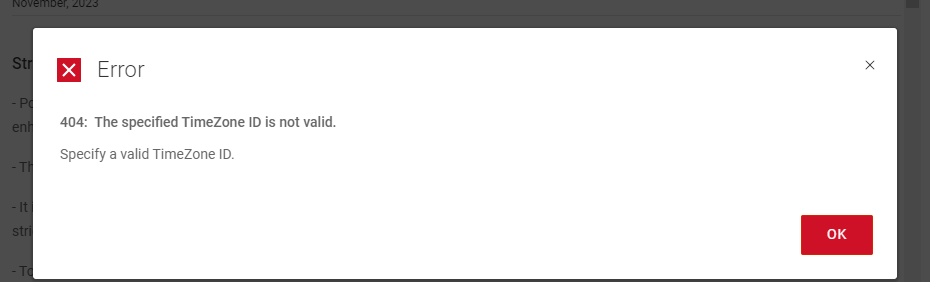
404: The specified Timezone ID is not valid.
Specify a valid Timezone ID
Log: sysmgr.log 路径:/var/log/brs/sysmgr/sysmgr.log
./var/log/brs/sysmgr/sysmgr.log:2024-02-15T16:10:00.069Z ERROR [] [https-jsse-nio-8453-exec-5] [00000000-0000-4000-a000-000000000000][][][TRACE_ID:8b4e########d560][] [c.e.b.s.r.v.AbstractRESTMessageHandler.buildErrorResponse(343)] -  ErrorResponse: ErrorResponse [code=404, reason=The specified TimeZone ID is not valid., remediation=Specify a valid TimeZone ID., timestamp=1708013400069, path=/api/v2/timezones]
./var/log/brs/sysmgr/sysmgr.log:2024-02-15T16:14:01.311Z ERROR [] [https-jsse-nio-8453-exec-1] [00000000-0000-4000-a000-000000000000][][][TRACE_ID:b1dc2e25b3180d91][] [c.e.b.s.r.v.AbstractRESTMessageHandler.buildErrorResponse(343)] -  ErrorResponse: ErrorResponse [code=404, reason=The specified TimeZone ID is not valid., remediation=Specify a valid TimeZone ID., timestamp=1708013641311, path=/api/v2/timezones]
./var/log/brs/sysmgr/sysmgr.log:2024-02-15T18:08:25.154Z ERROR [] [https-jsse-nio-8453-exec-7] [00000000-0000-4000-a000-000000000000][][][TRACE_ID:96cc9d32f169b1a9][] [c.e.b.s.r.v.AbstractRESTMessageHandler.buildErrorResponse(343)] -  ErrorResponse: ErrorResponse [code=404, reason=The specified TimeZone ID is not valid., remediation=Specify a valid TimeZone ID., timestamp=1708020505154, path=/api/v2/timezones]
./var/log/brs/sysmgr/sysmgr.log:2024-02-15T18:08:25.234Z ERROR [] [https-jsse-nio-8453-exec-8] [00000000-0000-4000-a000-000000000000][][][TRACE_ID:a1c2########a87f][] [c.e.b.s.r.v.AbstractRESTMessageHandler.buildErrorResponse(343)] -  ErrorResponse: ErrorResponse [code=404, reason=The specified TimeZone ID is not valid., remediation=Specify a valid TimeZone ID., timestamp=1708020505234, path=/api/v2/timezones]
Cause
时区 ID 无效
Resolution
1.检查时区的状态。
TimeDateCTL 状态
2.检查 NTP 服务器名称或 IP 地址。
chronyc 源码 -v
猫 /etc/chrony.conf
3.运行查询以从列表中查找所需的时区名称。
timedatectl list-timezones | grep -i 多伦多
4.设置时区。
timedatectl set-timezone 美国/多伦多
5.验证时区的状态。
TimeDateCTL 状态
TimeDateCTL 状态
Sample Output:

admin@ppdm196:~> timedatectl status
      Local time: Fri 2024-02-02 09:08:07 PST
  Universal time: Fri 2024-02-02 17:08:07 UTC
        RTC time: Fri 2024-02-02 17:08:07
       Time zone: PST8PDT (PST, -0800)
 Network time on: no
NTP synchronized: yes
 RTC in local TZ: no
2.检查 NTP 服务器名称或 IP 地址。
chronyc 源码 -v
Sample Output:

admin@ppdm:~> chronyc sources -v

  .-- Source mode  '^' = server, '=' = peer, '#' = local clock.
 / .- Source state '*' = current best, '+' = combined, '-' = not combined,
| /             'x' = may be in error, '~' = too variable, '?' = unusable.
||                                                 .- xxxx [ yyyy ] +/- zzzz
||      Reachability register (octal) -.           |  xxxx = adjusted offset,
||      Log2(Polling interval) --.      |          |  yyyy = measured offset,
||                                \     |          |  zzzz = estimated error.
||                                 |    |           \
MS Name/IP address         Stratum Poll Reach LastRx Last sample
===============================================================================
^* DC.amer.lan                   2   6   377    30   -559us[  +64us] +/-   54ms
猫 /etc/chrony.conf
Sample Output:

admin@ppdm:~> cat /etc/chrony.conf
server 192.168.9.100 iburst
3.运行查询以从列表中查找所需的时区名称。
timedatectl list-timezones | grep -i 多伦多
Sample Output:

admin@ppdm:~> timedatectl list-timezones  | grep -i toronto
America/Toronto
4.设置时区。
timedatectl set-timezone 美国/多伦多
Sample Output:

admin@ppdm196:~> timedatectl set-timezone America/Toronto
==== AUTHENTICATING FOR org.freedesktop.timedate1.set-timezone ===
Authentication is required to set the system timezone.
Authenticating as: root
Password:
==== AUTHENTICATION COMPLETE ===
admin@ppdm196:~> timedatectl status
      Local time: Fri 2024-02-02 12:09:06 EST
  Universal time: Fri 2024-02-02 17:09:06 UTC
        RTC time: Fri 2024-02-02 17:09:06
       Time zone: America/Toronto (EST, -0500)
 Network time on: no
NTP synchronized: yes
 RTC in local TZ: no
5.验证时区的状态。
TimeDateCTL 状态
输出示例:

admin@ppdm196:~> timedatectl status
      当地时间:星期五 2024-02-02 09:08:07 PST
  世界时:星期五 2024-02-02 17:08:07 UTC
        RTC 时间:星期五 2024-02-02 17:08:07
       时区:PST8PDT (PST, -0800)
 网络运行时间:否
NTP synchronized: yes
 本地 TZ 中的 RTC:否
Article Properties
Article Number: 000222172
Article Type: Solution
Last Modified: 23 Oct 2024
Version: 3
Find answers to your questions from other Dell users
Support Services
Check if your device is covered by Support Services.