PowerProtect: NTP: 시간대 문제 - ErrorResponse [코드=404, 이유=지정된 시간대 ID가 유효하지 않습니다.
Summary: Network Time Protocol 서버가 GMT +1을 설정하려고 할 때 404 잘못된 시간대 오류를 보고합니다.
This article applies to
This article does not apply to
This article is not tied to any specific product.
Not all product versions are identified in this article.
Symptoms
오류:
로그: sysmgr.log 경로: /var/log/brs/sysmgr/sysmgr.log
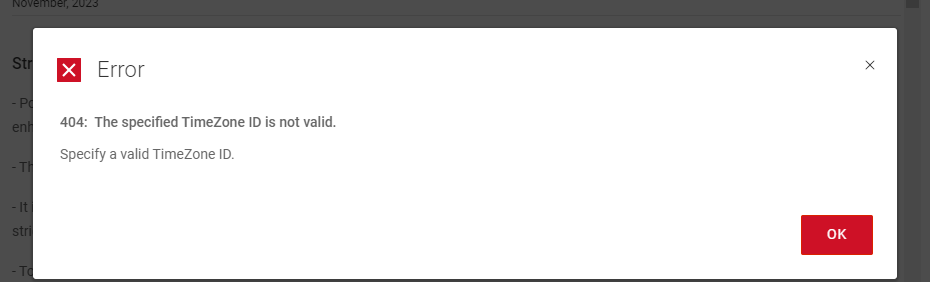
404: The specified Timezone ID is not valid.
Specify a valid Timezone ID
로그: sysmgr.log 경로: /var/log/brs/sysmgr/sysmgr.log
./var/log/brs/sysmgr/sysmgr.log:2024-02-15T16:10:00.069Z ERROR [] [https-jsse-nio-8453-exec-5] [00000000-0000-4000-a000-000000000000][][][TRACE_ID:8b4e########d560][] [c.e.b.s.r.v.AbstractRESTMessageHandler.buildErrorResponse(343)] -  ErrorResponse: ErrorResponse [code=404, reason=The specified TimeZone ID is not valid., remediation=Specify a valid TimeZone ID., timestamp=1708013400069, path=/api/v2/timezones]
./var/log/brs/sysmgr/sysmgr.log:2024-02-15T16:14:01.311Z ERROR [] [https-jsse-nio-8453-exec-1] [00000000-0000-4000-a000-000000000000][][][TRACE_ID:b1dc2e25b3180d91][] [c.e.b.s.r.v.AbstractRESTMessageHandler.buildErrorResponse(343)] -  ErrorResponse: ErrorResponse [code=404, reason=The specified TimeZone ID is not valid., remediation=Specify a valid TimeZone ID., timestamp=1708013641311, path=/api/v2/timezones]
./var/log/brs/sysmgr/sysmgr.log:2024-02-15T18:08:25.154Z ERROR [] [https-jsse-nio-8453-exec-7] [00000000-0000-4000-a000-000000000000][][][TRACE_ID:96cc9d32f169b1a9][] [c.e.b.s.r.v.AbstractRESTMessageHandler.buildErrorResponse(343)] -  ErrorResponse: ErrorResponse [code=404, reason=The specified TimeZone ID is not valid., remediation=Specify a valid TimeZone ID., timestamp=1708020505154, path=/api/v2/timezones]
./var/log/brs/sysmgr/sysmgr.log:2024-02-15T18:08:25.234Z ERROR [] [https-jsse-nio-8453-exec-8] [00000000-0000-4000-a000-000000000000][][][TRACE_ID:a1c2########a87f][] [c.e.b.s.r.v.AbstractRESTMessageHandler.buildErrorResponse(343)] -  ErrorResponse: ErrorResponse [code=404, reason=The specified TimeZone ID is not valid., remediation=Specify a valid TimeZone ID., timestamp=1708020505234, path=/api/v2/timezones]
Cause
시간대 ID가 잘못되었습니다.
Resolution
1. 시간대의 상태를 확인합니다.
timedatectl 상태
2. NTP 서버 이름 또는 IP 주소를 확인하십시오.
chronyc 소스 -v
고양이 /etc/chrony.conf
3. 쿼리를 실행하여 목록에서 원하는 시간대 이름을 찾습니다.
timedatectl 목록 시간대 | grep -i 토론토
4. Time Zone을 설정합니다.
timedatectl set-timezone 아메리카 대륙/토론토
5. 표준 시간대의 상태를 확인합니다.
timedatectl 상태
timedatectl 상태
Sample Output:

admin@ppdm196:~> timedatectl status
      Local time: Fri 2024-02-02 09:08:07 PST
  Universal time: Fri 2024-02-02 17:08:07 UTC
        RTC time: Fri 2024-02-02 17:08:07
       Time zone: PST8PDT (PST, -0800)
 Network time on: no
NTP synchronized: yes
 RTC in local TZ: no
2. NTP 서버 이름 또는 IP 주소를 확인하십시오.
chronyc 소스 -v
Sample Output:

admin@ppdm:~> chronyc sources -v

  .-- Source mode  '^' = server, '=' = peer, '#' = local clock.
 / .- Source state '*' = current best, '+' = combined, '-' = not combined,
| /             'x' = may be in error, '~' = too variable, '?' = unusable.
||                                                 .- xxxx [ yyyy ] +/- zzzz
||      Reachability register (octal) -.           |  xxxx = adjusted offset,
||      Log2(Polling interval) --.      |          |  yyyy = measured offset,
||                                \     |          |  zzzz = estimated error.
||                                 |    |           \
MS Name/IP address         Stratum Poll Reach LastRx Last sample
===============================================================================
^* DC.amer.lan                   2   6   377    30   -559us[  +64us] +/-   54ms
고양이 /etc/chrony.conf
Sample Output:

admin@ppdm:~> cat /etc/chrony.conf
server 192.168.9.100 iburst
3. 쿼리를 실행하여 목록에서 원하는 시간대 이름을 찾습니다.
timedatectl 목록 시간대 | grep -i 토론토
Sample Output:

admin@ppdm:~> timedatectl list-timezones  | grep -i toronto
America/Toronto
4. Time Zone을 설정합니다.
timedatectl set-timezone 아메리카 대륙/토론토
Sample Output:

admin@ppdm196:~> timedatectl set-timezone America/Toronto
==== AUTHENTICATING FOR org.freedesktop.timedate1.set-timezone ===
Authentication is required to set the system timezone.
Authenticating as: root
Password:
==== AUTHENTICATION COMPLETE ===
admin@ppdm196:~> timedatectl status
      Local time: Fri 2024-02-02 12:09:06 EST
  Universal time: Fri 2024-02-02 17:09:06 UTC
        RTC time: Fri 2024-02-02 17:09:06
       Time zone: America/Toronto (EST, -0500)
 Network time on: no
NTP synchronized: yes
 RTC in local TZ: no
5. 표준 시간대의 상태를 확인합니다.
timedatectl 상태
샘플 출력:

admin@ppdm196:~> timedatectl 상태
      현지 시간: 금 2024-02-02 09:08:07 PST
  세계시: 금 2024-02-02 17:08:07 UTC
        RTC 시간: 금 2024-02-02 17:08:07
       시간대: PST8PDT(PST, -0800)
 네트워크 시간 켜짐: 아니요
NTP 동기화: 예
 로컬 TZ의 RTC: 아니요
Article Properties
Article Number: 000222172
Article Type: Solution
Last Modified: 23 Oct 2024
Version: 3
Find answers to your questions from other Dell users
Support Services
Check if your device is covered by Support Services.