Data Protection Advisor – vakava LAX-virhe yritettäessä asentaa tai päivittää DPA:ta
Summary: Virheen saaminen: "Tämän Java-sovelluksen kutsuminen on aiheuttanut ja InvocationTargetException. Tämä sovellus sulkeutuu nyt (LAX)", kun DPA yritetään päivittää tai asentaa.
Symptoms
Kun DPA-tietosäilö yritetään asentaa tai päivittää, näyttöön tulee seuraava virheilmoitus, eikä päivitys jatku:
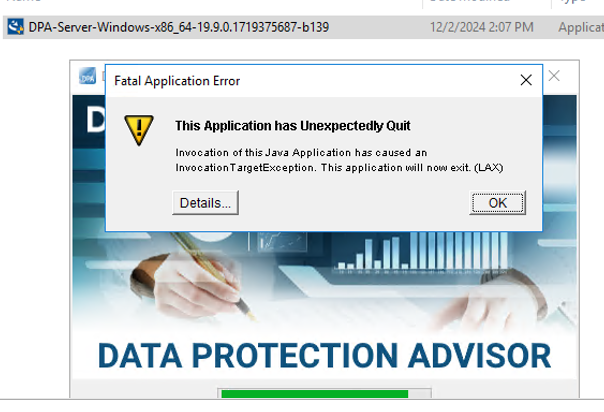
ERROR: "Invocation of this Java Application has caused an InvocationTargetException. This application will now exit. (LAX)"
Complete Error message: Invocation of this Java Application has caused and InvocationTargetException. This application will now exit (LAX)
Tiedot-välilehdessä näkyy Java Lang -virhe:java.lang.NullPointerException at com.zerog.ia.installer.LifeCycleManager.getEnable8dot3(Unknown Source) at com.zerog.ia.installer.LifeCycleManager.a6(Unknown Source) at com.zerog.ia.installer.LifeCycleManager.executeApplication(Unknown Source) at com.zerog.ia.installer.Main.main(Unknown Source) at sun.reflect.NativeMethodAccessorImpl.invoke0(Native Method) at sun.reflect.NativeMethodAccessorImpl.invoke(NativeMethodAccessorImpl.java:62) at sun.reflect.DelegatingMethodAccessorImpl.invoke(DelegatingMethodAccessorImpl.java:43) at java.lang.reflect.Method.invoke(Method.java:498) at com.zerog.lax.LAX.launch(Unknown Source) at com.zerog.lax.LAX.main(Unknown Source)
Cause
Viestin lihavointi virheessä:
getEnable8dot3(Unknown Source)
Tämä ei ole DPA-ongelma, vaan Windowsin rekisterin ongelma, josta puuttuu avain.
Suorita seuraava komento palvelimessa, jossa yrität asentaa tai päivittää, komentokehotteessa:reg query HKEY_LOCAL_MACHINE\SYSTEM\CurrentControlSet\Control\FileSystem\ /v NtfsDisable8dot3NameCreation
Sen pitäisi palata: HKEY_LOCAL_MACHINE\SYSTEM\CurrentControlSet\Control\FileSystem
NtfsDisable8dot3NameCreation REG_DWORD 0x2
Jos kuitenkin seuraavat tiedot palautetaan, ongelma vahvistuu:This command resulted with the same message on both the application and datastore servers:C:\Windows\system32>reg query HKEY_LOCAL_MACHINE\SYSTEM\CurrentControlSet\Control\FileSystem\ /v NtfsDisable8dot3NameCreation
ERROR: The system was unable to find the specified registry key or value
Resolution
REG_DWORD 0x2-avain voidaan lisätä Windowsin rekisteriin.
Tarkista asia asiakkaan käyttöjärjestelmän/Windowsin tietoturvatiimiltä, sillä jokin käytäntö saattaa estää tämän avaimen luonnin.