Data Protection Advisor – kritisk LAX-feil når du prøver å installere eller oppgradere DPA
Summary: Får feilmelding: "Påkalling av denne Java-applikasjonen har forårsaket og InvocationTargetException. Denne applikasjonen avsluttes nå (LAX) når du prøver å oppgradere eller installere DPA. ...
Symptoms
Når du prøver å installere eller oppgradere DPA-datalageret, vises følgende feil på skjermen, og oppgraderingen fortsetter ikke:
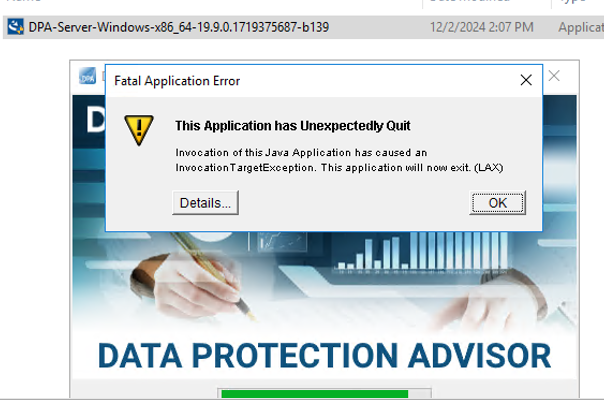
ERROR: "Invocation of this Java Application has caused an InvocationTargetException. This application will now exit. (LAX)"
Complete Error message: Invocation of this Java Application has caused and InvocationTargetException. This application will now exit (LAX)
Kategorien Detaljer gir Java Lang feil:java.lang.NullPointerException at com.zerog.ia.installer.LifeCycleManager.getEnable8dot3(Unknown Source) at com.zerog.ia.installer.LifeCycleManager.a6(Unknown Source) at com.zerog.ia.installer.LifeCycleManager.executeApplication(Unknown Source) at com.zerog.ia.installer.Main.main(Unknown Source) at sun.reflect.NativeMethodAccessorImpl.invoke0(Native Method) at sun.reflect.NativeMethodAccessorImpl.invoke(NativeMethodAccessorImpl.java:62) at sun.reflect.DelegatingMethodAccessorImpl.invoke(DelegatingMethodAccessorImpl.java:43) at java.lang.reflect.Method.invoke(Method.java:498) at com.zerog.lax.LAX.launch(Unknown Source) at com.zerog.lax.LAX.main(Unknown Source)
Cause
Ser på meldingen med fet skrift i feilen:
getEnable8dot3(Unknown Source)
Dette er ikke et DPA-problem, men et problem i Windows-registeret som mangler en nøkkel.
På serveren der du prøver å installere/oppgradere, kjører du følgende kommando i en ledetekst:reg query HKEY_LOCAL_MACHINE\SYSTEM\CurrentControlSet\Control\FileSystem\ /v NtfsDisable8dot3NameCreation
Den skal tilbake: HKEY_LOCAL_MACHINE\SYSTEM\CurrentControlSet\Control\FileSystem
NtfsDisable8dot3NameCreation REG_DWORD 0x2
Hvis følgende returneres, bekrefter dette problemet:This command resulted with the same message on both the application and datastore servers:C:\Windows\system32>reg query HKEY_LOCAL_MACHINE\SYSTEM\CurrentControlSet\Control\FileSystem\ /v NtfsDisable8dot3NameCreation
ERROR: The system was unable to find the specified registry key or value
Resolution
Den REG_DWORD 0x2 nøkkelen kan legges til Windows-registeret.
Kontakt OS/Windows-sikkerhetsteamet for kunden, da det kan finnes retningslinjer som blokkerer opprettelsen av denne nøkkelen.