Data Protection Advisor — krytyczny błąd LAX podczas próby instalacji lub uaktualnienia DPA
Summary: Pojawia się błąd: "Wywołanie tej aplikacji Java spowodowało i InvocationTargetException. Ta aplikacja zostanie teraz zamknięta (LAX)" podczas próby uaktualnienia lub zainstalowania DPA. ...
Symptoms
Podczas próby zainstalowania lub uaktualnienia magazynu danych DPA na ekranie zostanie wyświetlony następujący błąd, a aktualizacja nie będzie kontynuowana:
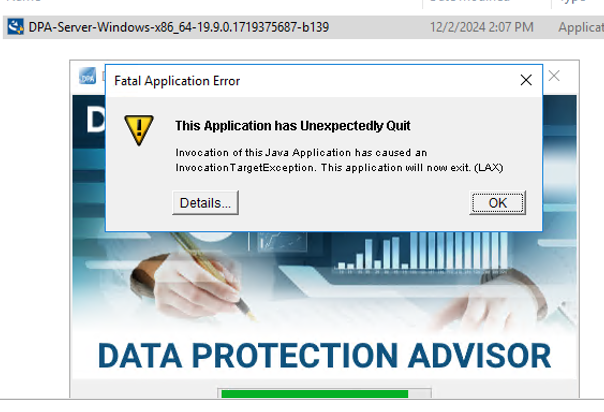
ERROR: "Invocation of this Java Application has caused an InvocationTargetException. This application will now exit. (LAX)"
Complete Error message: Invocation of this Java Application has caused and InvocationTargetException. This application will now exit (LAX)
Zakładka Szczegóły zwraca błąd Java Lang:java.lang.NullPointerException at com.zerog.ia.installer.LifeCycleManager.getEnable8dot3(Unknown Source) at com.zerog.ia.installer.LifeCycleManager.a6(Unknown Source) at com.zerog.ia.installer.LifeCycleManager.executeApplication(Unknown Source) at com.zerog.ia.installer.Main.main(Unknown Source) at sun.reflect.NativeMethodAccessorImpl.invoke0(Native Method) at sun.reflect.NativeMethodAccessorImpl.invoke(NativeMethodAccessorImpl.java:62) at sun.reflect.DelegatingMethodAccessorImpl.invoke(DelegatingMethodAccessorImpl.java:43) at java.lang.reflect.Method.invoke(Method.java:498) at com.zerog.lax.LAX.launch(Unknown Source) at com.zerog.lax.LAX.main(Unknown Source)
Cause
Patrząc na komunikat pogrubiony w polu Błąd:
getEnable8dot3(Unknown Source)
Nie jest to problem DPA, ale problem z rejestrem systemu Windows, w którym brakuje klucza.
Na serwerze, na którym próbujesz przeprowadzić instalację/uaktualnienie, uruchom następujące polecenie w wierszu polecenia:reg query HKEY_LOCAL_MACHINE\SYSTEM\CurrentControlSet\Control\FileSystem\ /v NtfsDisable8dot3NameCreation
Powinien zwrócić: HKEY_LOCAL_MACHINE\SYSTEM\CurrentControlSet\Control\FileSystem
NtfsDisable8dot3NameCreation REG_DWORD 0x2
Jeśli jednak zostanie zwrócony następujący fragment, potwierdzi to problem:This command resulted with the same message on both the application and datastore servers:C:\Windows\system32>reg query HKEY_LOCAL_MACHINE\SYSTEM\CurrentControlSet\Control\FileSystem\ /v NtfsDisable8dot3NameCreation
ERROR: The system was unable to find the specified registry key or value
Resolution
Klucz REG_DWORD 0x2 można dodać do rejestru systemu Windows.
Skontaktuj się z zespołem ds. zabezpieczeń systemu operacyjnego lub Windows, ponieważ mogą istnieć zasady, które blokują utworzenie tego klucza.