Data Protection Advisor — неустранимая ошибка LAX при попытке установить или обновить DPA
Summary: Получение сообщения об ошибке: "Вызов этого Java-приложения вызвал и InvocationTargetException. Теперь это приложение будет закрываться (LAX) при попытке модернизации или установки DPA. ...
Symptoms
При попытке установить или модернизировать хранилище данных DPA на экране отображается следующая ошибка, и обновление не продолжается:
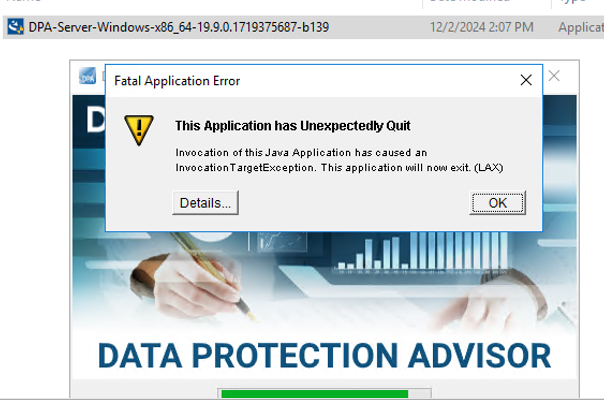
ERROR: "Invocation of this Java Application has caused an InvocationTargetException. This application will now exit. (LAX)"
Complete Error message: Invocation of this Java Application has caused and InvocationTargetException. This application will now exit (LAX)
На вкладке «Details» отображается ошибка Java Lang:java.lang.NullPointerException at com.zerog.ia.installer.LifeCycleManager.getEnable8dot3(Unknown Source) at com.zerog.ia.installer.LifeCycleManager.a6(Unknown Source) at com.zerog.ia.installer.LifeCycleManager.executeApplication(Unknown Source) at com.zerog.ia.installer.Main.main(Unknown Source) at sun.reflect.NativeMethodAccessorImpl.invoke0(Native Method) at sun.reflect.NativeMethodAccessorImpl.invoke(NativeMethodAccessorImpl.java:62) at sun.reflect.DelegatingMethodAccessorImpl.invoke(DelegatingMethodAccessorImpl.java:43) at java.lang.reflect.Method.invoke(Method.java:498) at com.zerog.lax.LAX.launch(Unknown Source) at com.zerog.lax.LAX.main(Unknown Source)
Cause
При просмотре сообщения, выделенного полужирным шрифтом в поле Error:
getEnable8dot3(Unknown Source)
Это проблема не DPA, а проблема реестра Windows, в котором отсутствует раздел.
На сервере, на котором выполняется установка/обновление, выполните в командной строке следующую команду:reg query HKEY_LOCAL_MACHINE\SYSTEM\CurrentControlSet\Control\FileSystem\ /v NtfsDisable8dot3NameCreation
Он должен вернуть: HKEY_LOCAL_MACHINE\SYSTEM\CurrentControlSet\Control\FileSystem
NtfsDisable8dot3NameCreation REG_DWORD 0x2
Однако, если возвращается следующее сообщение, это подтверждает проблему:This command resulted with the same message on both the application and datastore servers:C:\Windows\system32>reg query HKEY_LOCAL_MACHINE\SYSTEM\CurrentControlSet\Control\FileSystem\ /v NtfsDisable8dot3NameCreation
ERROR: The system was unable to find the specified registry key or value
Resolution
Ключ REG_DWORD 0x2 можно добавить в реестр Windows.
Обратитесь в группу безопасности ОС/Windows заказчика, так ли может существовать политика, блокирующая создание этого ключа.