PowerVault ME5: Disk Group Creation errors when using Select All checkbox
Summary: Creating a linear RAID array using the ME5 user interface, selecting all available disks may result in the Sub Groups not being populated correctly. This issue occurs across all RAID levels. ...
This article applies to
This article does not apply to
This article is not tied to any specific product.
Not all product versions are identified in this article.
Symptoms
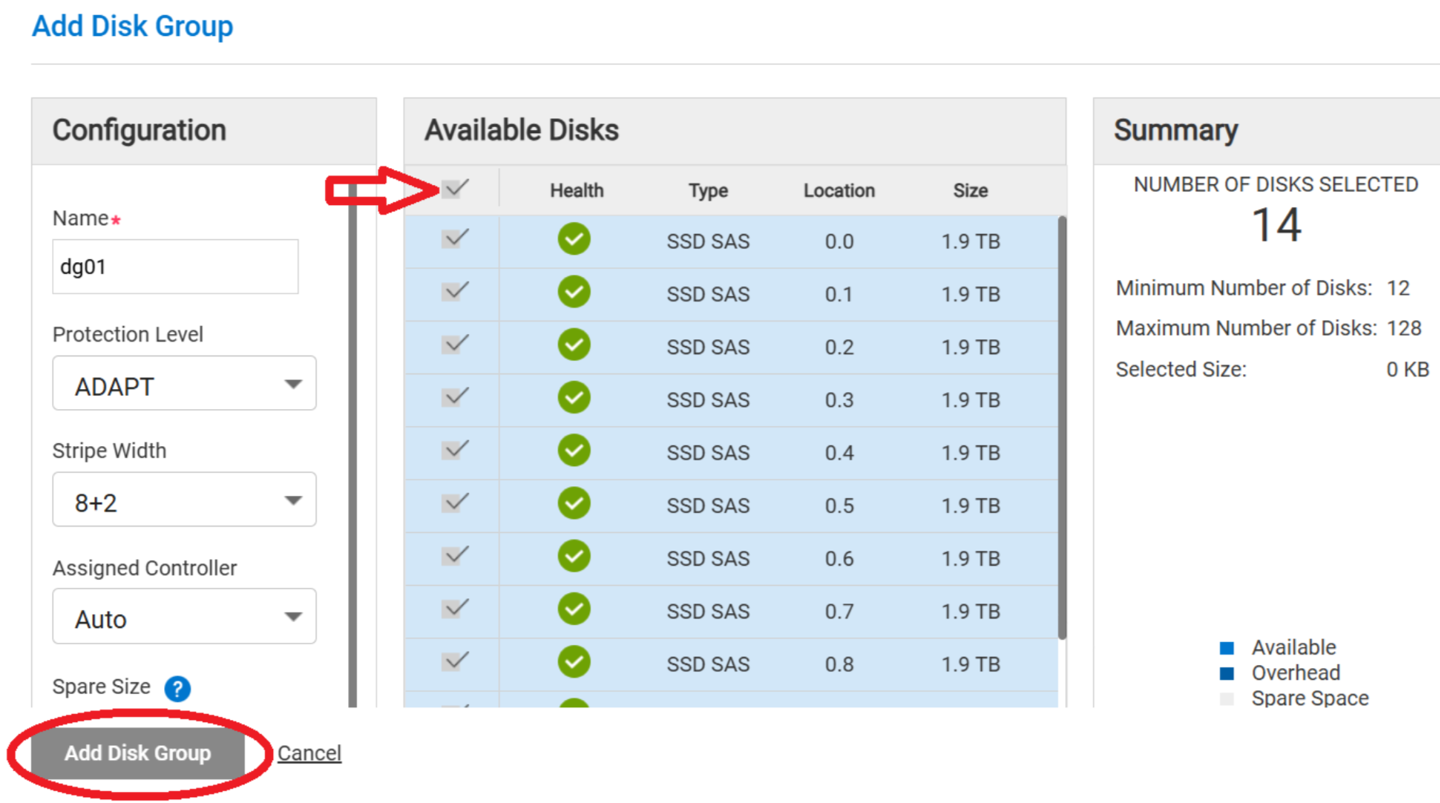
During linear disk group creation, using the select all check box option at the top of Available Disks, does not create the disk group when the Add Disk Group button is selected.
Figure 1:
Cause
Firmware code version 5.1.2.1.1 and earlier
Resolution
Dell Engineering is working on a resolution.
A workaround is available:
- Select all available disks
- Click one disk to clear its selection
- Re-select the disk clicked in step 2
- Proceed with creating the disk group
This issue relates to all disk group types.
A firmware update to address this issue is planned for release in the September to October 2025 timeframe.
Until the fix is available, users can use the workaround described above to successfully create disk groups.
Affected Products
ME Series, PowerVault ME5012, PowerVault ME5024, PowerVault ME5084Article Properties
Article Number: 000280682
Article Type: Solution
Last Modified: 07 Mar 2025
Version: 2
Find answers to your questions from other Dell users
Support Services
Check if your device is covered by Support Services.