NetWorker: Bootstrap back-up- en authc-opdrachten mislukken op geclusterde Linux-server na een upgrade naar 19.7.0.3 of 19.8.0.2 en eerder
Summary: De NetWorker-server wordt geïmplementeerd op een geclusterde Linux NetWorker-server. Na het upgraden van de NetWorker versie naar 19.7.0.3 of 19.8.0.2 en eerder, mislukt de Server Protection bootstrap back-up. Verificatieserviceopdrachten (nsrlogin, authc_config, authc_mgmt) mislukken ook. De geretourneerde fout is dat de authenticatieservice niet beschikbaar is met HTTP-fout 404 (niet gevonden). ...
This article applies to
This article does not apply to
This article is not tied to any specific product.
Not all product versions are identified in this article.
Symptoms
NetWorker server wordt geïmplementeerd op een Red Hat Pacemaker (pc's) cluster met hoge beschikbaarheid.
NetWorker is bijgewerkt naar 19.7.0.4.
Opstarten van de NetWorker-service lukt. Alle clusterbronnen worden weergegeven als 'gestart' op een van de clusterknooppunten:
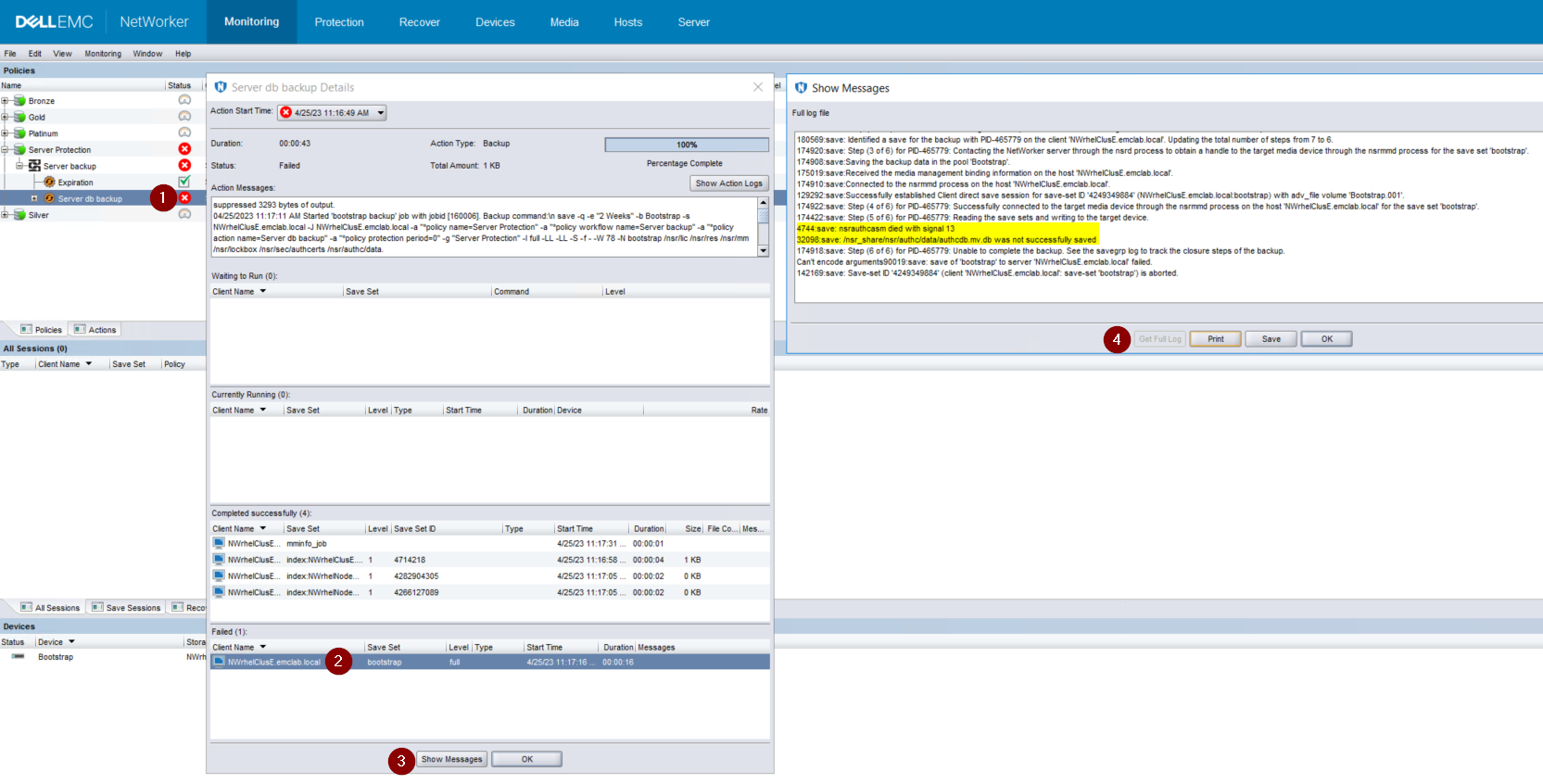
Afbeelding 1: Bootstrap back-up kan geen back-up maken van de authcdb
NetWorker is bijgewerkt naar 19.7.0.4.
Opstarten van de NetWorker-service lukt. Alle clusterbronnen worden weergegeven als 'gestart' op een van de clusterknooppunten:
root@NWrhelNodeG:~# pcs resource * Resource Group: NW_group: * fs (ocf::heartbeat:Filesystem): Started NWrhelNodeG.emclab.local * ip (ocf::heartbeat:IPaddr): Started NWrhelNodeG.emclab.local * nws (ocf::EMC_NetWorker:Server): Started NWrhelNodeG.emclab.localDe opdracht nsrlogin mislukt met HTTP-fout 404 (niet gevonden):
[admin@NWrhelNodeG linux_x86_64]$ nsrlogin -u Administrator 130136:nsrlogin: Please enter password: 117849:nsrlogin: Authentication library error: GET failed with HTTP-ERROR: 404 Server Message : Could not parse server-response from json string Server Message : Make sure that server is runningDe 'Server Protection'-bootstrap back-up kan geen back-up maken van de authcdb:
Afbeelding 1: Bootstrap back-up kan geen back-up maken van de authcdb
Cause
Wijzigingen in authc tijdens de upgrade zijn niet doorgevoerd in cluster shared authcdb. Tijdens het upgradeproces wordt de NWS-bron van pc's uitgeschakeld of wordt de PCS-clusterbron volledig gestopt. Wanneer NWS niet wordt uitgevoerd, wordt de directory /nsr symbolisch gekoppeld (aanwijst) naar /nsr. NetWorker.local in plaats van /nsr_share.
/nsr. NetWorker.local is de map met fysieke knooppunten/nsr en bevat alleen client-gerelateerde mappen. A /nsr. De map NetWorker.local/authc bestaat, maar bevat geen van de bestanden die specifiek zijn voor de authcdb van de NetWorker server. Dit bevindt zich onder /nsr_share/nsr/authc.
Na de NetWorker upgrade verwacht authc "versie B" van de authc-bestanden, maar ziet "versie A" van de bestanden van vóór de upgrade.
/nsr. NetWorker.local is de map met fysieke knooppunten/nsr en bevat alleen client-gerelateerde mappen. A /nsr. De map NetWorker.local/authc bestaat, maar bevat geen van de bestanden die specifiek zijn voor de authcdb van de NetWorker server. Dit bevindt zich onder /nsr_share/nsr/authc.
Na de NetWorker upgrade verwacht authc "versie B" van de authc-bestanden, maar ziet "versie A" van de bestanden van vóór de upgrade.
Resolution
Upgrade NetWorker naar een van de volgende releases (of hoger):
Als u 19.8.0.4 of 19.9.0.2 en hoger gebruikt, voert u het volgende uit:
Nsrlogin-pogingen en bootstrap back-ups moeten slagen.
- 19.8.0.4
- 19.9.0.2
Als u 19.8.0.4 of 19.9.0.2 en hoger gebruikt, voert u het volgende uit:
- Wijzig op elk knooppunt in het cluster de naam /opt/nsr/authc-server/conf/h2_db.properties:
mv /opt/nsr/authc-server/conf/h2_db.properties /opt/nsr/authc-server/conf/h2_db.properties.bak
- Voer op elk knooppunt de /opt/nsr/authc-server/scripts/authc_configure.sh opnieuw uit om authc opnieuw te configureren. Hiermee worden geen instellingen of configuraties verwijderd die eerder in authc zijn uitgevoerd.
Op het actieve knooppunt ziet dit er ongeveer als volgt uit:
Op de passieve knooppunten ziet dit er ongeveer als volgt uit:
root@NWrhelNodeH:~# /opt/nsr/authc-server/scripts/authc_configure.sh

Specify the directory where the Java Standard Edition Runtime Environment (JRE) software is installed [/opt/nre/java/latest]:

The installation process will install an Apache Tomcat instance. For optimum security, EMC NetWorker Authentication Service will use a non-root user (nsrtomcat) to start the Apache Tomcat instance. If your system has special user security requirements, ensure that proper operational permissions are granted to this non-root user (nsrtomcat).
Please refer to NetWorker Installation Guide.

WARNING: Port 9090 is already in use.

Do you wish to specify a different port number [y]? n

The Apache Tomcat will use "NWrhelNodeH.emclab.local" as the host name. The Apache Tomcat will use "9090" as the port number.

The NetWorker Authentication Service requires a keystore file to configure encryption and to provide SSL support.

EMC recommends that you specify a keystore password that has a minimum of six characters.

Do you want to use the existing keystore /nsr/authc/conf/authc.keystore [y]?

Specify password for the existing keystore:
The install will use the existing certificate "emcauthctomcat" for Apache Tomcat.
The install will use the existing certificate "emcauthcsaml" for Authentication Service.

Creating the installation log in /opt/nsr/authc-server/logs/install.log.

Performing initialization. Please wait...

The installation completed successfully.
Op de passieve knooppunten ziet dit er ongeveer als volgt uit:
root@NWrhelNodeG:~# /opt/nsr/authc-server/scripts/authc_configure.sh

Specify the directory where the Java Standard Edition Runtime Environment (JRE) software is installed [/opt/nre/java/latest]:

The installation process will install an Apache Tomcat instance. For optimum security, EMC NetWorker Authentication Service will use a non-root user (nsrtomcat) to start the Apache Tomcat instance. If your system has special user security requirements, ensure that proper operational permissions are granted to this non-root user (nsrtomcat).
Please refer to NetWorker Installation Guide.

The Apache Tomcat will use "NWrhelNodeG.emclab.local" as the host name. The Apache Tomcat will use "9090" as the port number.

The NetWorker Authentication Service requires a keystore file to configure encryption and to provide SSL support.

EMC recommends that you specify a keystore password that has a minimum of six characters.

Do you want to use the existing keystore /nsr/authc/conf/authc.keystore [y]?

Specify password for the existing keystore:
The install will use the existing certificate "emcauthctomcat" for Apache Tomcat.
The install will use the existing certificate "emcauthcsaml" for Authentication Service.

The NetWorker Authentication Service defines automatically an administrator user account named administrator in the NetWorker Authentication Service local database. This account is specific to the administration of the NetWorker Authentication Service, and is not related to other administrator accounts on this system.

*******************************************************************************************
Password criteria: Minimum required characters - 9 and Maximum allowed characters - 126 Minimum [alphabetic - 2, Uppercase - 1, Lowercase - 1, Numeric - 1, Special character - 1]
********************************************************************************************

Specify an initial password for administrator:
Confirm the password:

Creating the installation log in /opt/nsr/authc-server/logs/install.log.

Performing initialization. Please wait...

The installation completed successfully.
OPMERKING: Op het passieve knooppunt wordt u gevraagd om een nieuw wachtwoord te maken voor het NetWorker Administrator-account. Dit betekent niet dat het bestaande wachtwoord verloren gaat. Dit gebeurt omdat de authcdb die door het cluster wordt gebruikt onder /nsr_share/nsr/authc staat die alleen bestaat op het actieve knooppunt. Wanneer een passief knooppunt het nieuwe actieve knooppunt wordt, wordt de gedeelde authcdb gebruikt. Het script authc_configure.sh wordt op elk knooppunt uitgevoerd om de eigenschappen /opt/nsr/authc-server/conf/h2_db.properties die lokaal is voor elk knooppunt opnieuw te maken.
- Start de NWS-resource opnieuw op:
pcs resource restart nws
- Controleer of de NWS-resource is gestart:
pcs resource

root@NWrhelNodeH:~# pcs resource
   * Resource Group: NW_group:
      * fs (ocf::heartbeat:Filesystem): Started
NWrhelNodeH.emclab.local
      * ip (ocf::heartbeat:IPaddr): Started
NWrhelNodeH.emclab.local
      * nws (ocf::EMC_NetWorker:Server): Started
NWrhelNodeH.emclab.local
Nsrlogin-pogingen en bootstrap back-ups moeten slagen.
Affected Products
NetWorkerProducts
NetWorker Family, NetWorker SeriesArticle Properties
Article Number: 000212755
Article Type: Solution
Last Modified: 12 Apr 2024
Version: 6
Find answers to your questions from other Dell users
Support Services
Check if your device is covered by Support Services.